

This article demonstrates how to create and use an insert, update, and delete recored using Web APi in MVC with C# technology. Explain all HTTP methods like GET, PUT, DELETE and POST in this article.
What is web api?
ASP.NET Web API is a framework that makes it easy to build HTTP services that reach a broad range of clients, including browsers and mobile devices. ASP.NET Web API is an ideal platform for building RESTful applications on the .NET Framework
What is CRUD ?
C-Create-POST
If your clients need data in multiple formats (json,xml,csv) the Wep Api needs minimal configuration compared to mvc. Wep Api returns data to the client according to content negotiation (if client needs xml it returns xml, if json, it returns json according to request header ) but in mvc you need more code to satisfy that. You have to explicitly specify data format when writing action methods.(JsonResult,ActionResult,XmlResult)
Wep Api gives you a more meaningful idea about what you are doing when you look at the code later. Comparing method signatures; public List<Student> Get() has more meaning than public JsonResult Index().
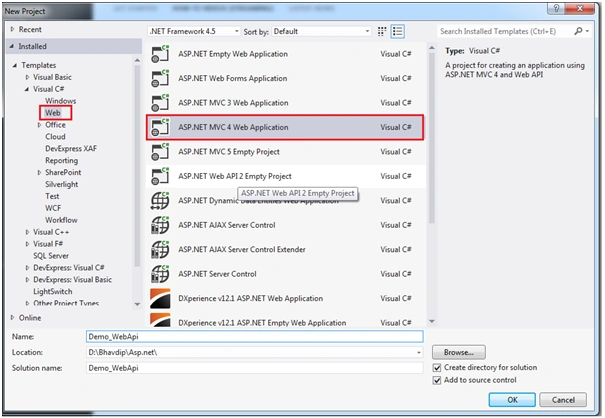
Then select the Web api from project template
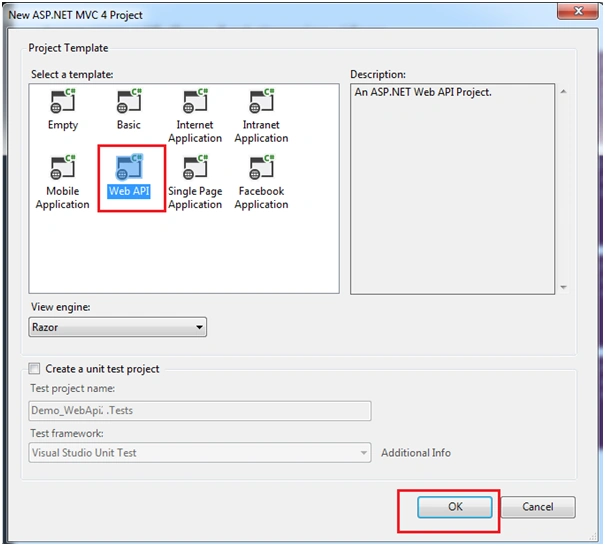
Step 2
Create the new Database and table in SQL server. The database name is "PMS" and table name is "mst_Product"
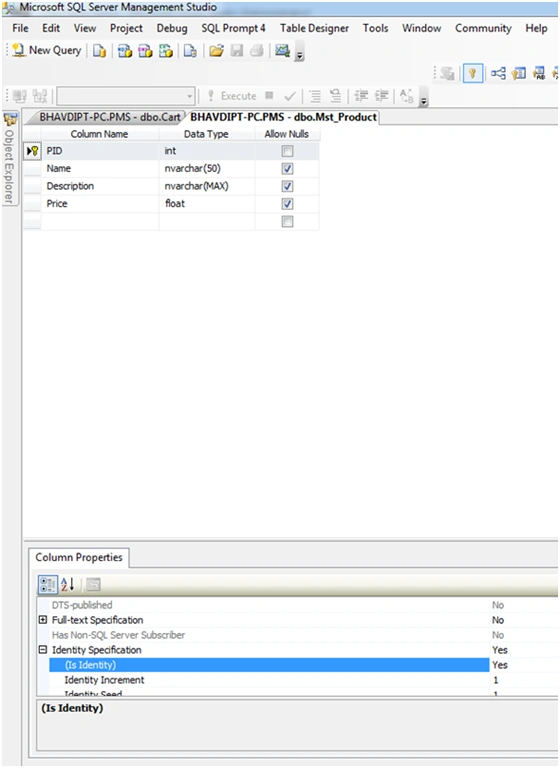
Make sure product table ID is auto increment file (identity = true).
Now delete the areas folder and also the values controller in this created project
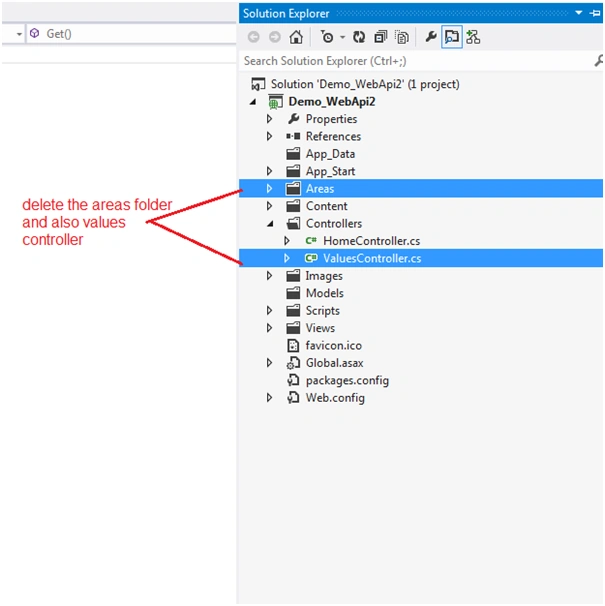
Step 3 - Add the model in this created project
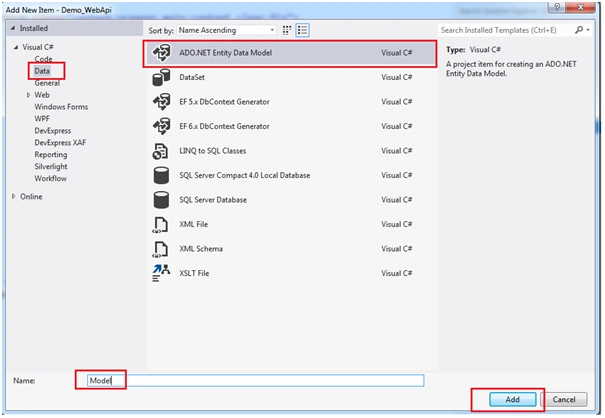
Add the model in this project: right click on this model, add new items, then select data and choose the ado.net entity data model and assign the name of this model and click on ok button
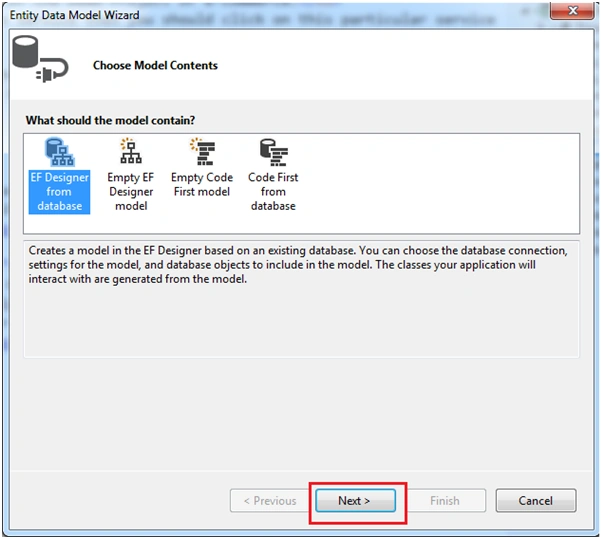
Then choose the Eo designer from the database like this
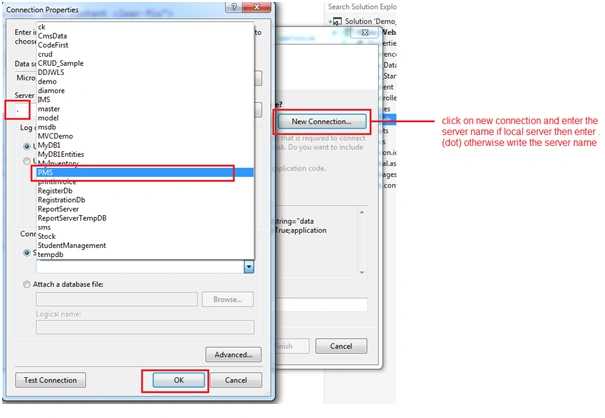
Click on the next button, click on new connection and enter the server name; if local server then enter (Dot) otherwise write the server name
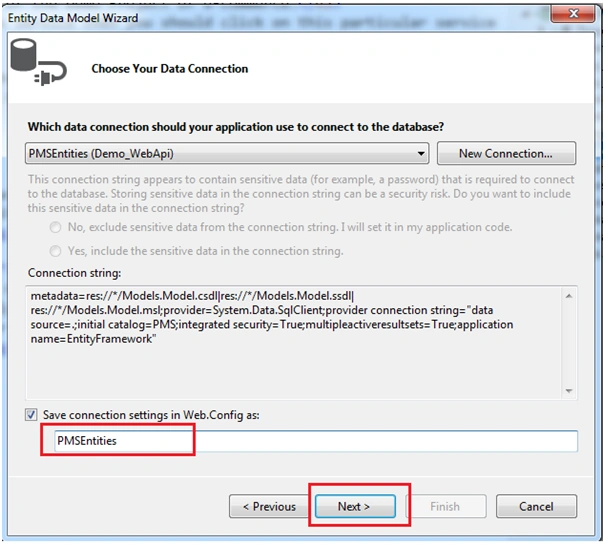
Click on ok button then enter the name of entity and click on next button
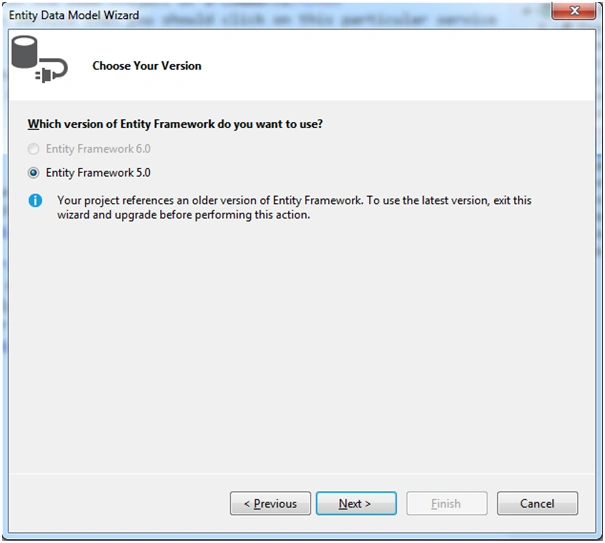
Then chooses Entity Famework 5.0 and also click on next button.
Expand the database and table and click on the check box for selecting this particular table
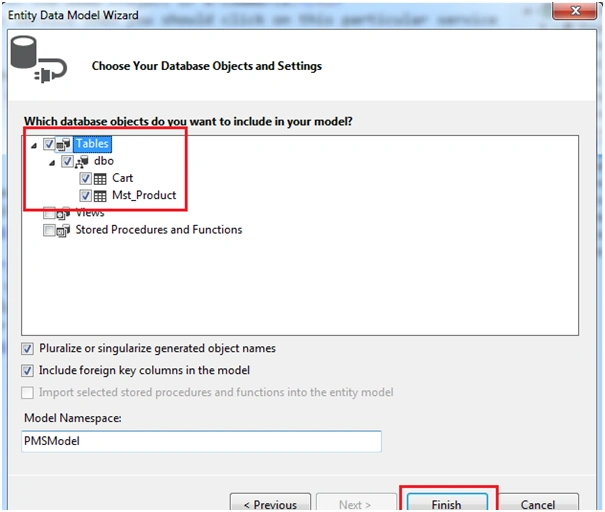
Then you should build the solution.
The right click on the controller and add new controller like this
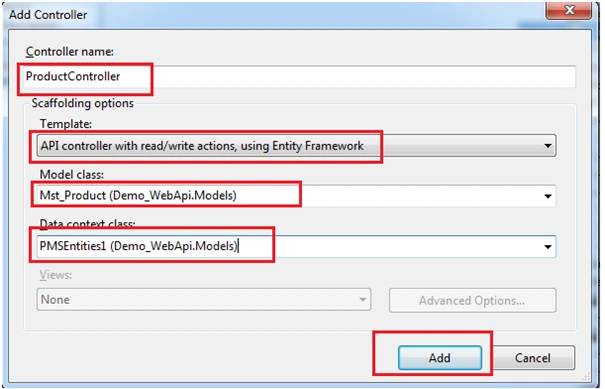
Add your controller name and also select the api controller with read/write actions, using entity framework
Then choose the model class which is based on your controller then choose the data context class (your model) then click on add button.
- using System;
- using System.Collections.Generic;
- using System.Data;
- using System.Data.Entity;
- using System.Data.Entity.Infrastructure;
- using System.Linq;
- using System.Net;
- using System.Net.Http;
- using System.Web;
- using System.Web.Http;
- using Demo_WebApi.Models;
- namespace Demo_WebApi.Controllers {
- public class ProductController: ApiController {
- private PMSEntities1 db = new PMSEntities1();
- // GET api/Product
- public IEnumerable < Mst_Product > GetMst_Product() {
- return db.Mst_Product.AsEnumerable();
- }
- // GET api/Product/5
- public Mst_Product GetMst_Product(int id) {
- Mst_Product mst_product = db.Mst_Product.Find(id);
- if (mst_product == null) {
- throw new HttpResponseException(Request.CreateResponse(HttpStatusCode.NotFound));
- }
- return mst_product;
- }
- // PUT api/Product/5
- //PUT thant means Update the recored.
- public HttpResponseMessage PutMst_Product(int id, Mst_Product mst_product) {
- if (!ModelState.IsValid) {
- return Request.CreateErrorResponse(HttpStatusCode.BadRequest, ModelState);
- }
- if (id != mst_product.PID) {
- return Request.CreateResponse(HttpStatusCode.BadRequest);
- }
- db.Entry(mst_product).State = EntityState.Modified;
- try {
- db.SaveChanges();
- } catch (DbUpdateConcurrencyException ex) {
- return Request.CreateErrorResponse(HttpStatusCode.NotFound, ex);
- }
- return Request.CreateResponse(HttpStatusCode.OK);
- }
- // POST api/Product
- //Post thant means Inset recored.
- public HttpResponseMessage PostMst_Product(Mst_Product mst_product) {
- if (ModelState.IsValid) {
- db.Mst_Product.Add(mst_product);
- db.SaveChanges();
- HttpResponseMessage response = Request.CreateResponse(HttpStatusCode.Created, mst_product);
- response.Headers.Location = new Uri(Url.Link("DefaultApi", new {
- id = mst_product.PID
- }));
- return response;
- } else {
- return Request.CreateErrorResponse(HttpStatusCode.BadRequest, ModelState);
- }
- }
- // DELETE api/Product/5
- public HttpResponseMessage DeleteMst_Product(int id) {
- Mst_Product mst_product = db.Mst_Product.Find(id);
- if (mst_product == null) {
- return Request.CreateResponse(HttpStatusCode.NotFound);
- }
- db.Mst_Product.Remove(mst_product);
- try {
- db.SaveChanges();
- } catch (DbUpdateConcurrencyException ex) {
- return Request.CreateErrorResponse(HttpStatusCode.NotFound, ex);
- }
- return Request.CreateResponse(HttpStatusCode.OK, mst_product);
- }
- protected override void Dispose(bool disposing) {
- db.Dispose();
- base.Dispose(disposing);
- }
- }
- }
Now go to the index page of home controller and paste this link for the jquery and also bootstrap js and css
- <!-- Latest compiled and minified CSS -->
- <link rel="stylesheet" href="https://maxcdn.bootstrapcdn.com/bootstrap/3.3.7/css/bootstrap.min.css">
- <!-- jQuery library -->
- <script src="//code.jquery.com/jquery-1.12.4.js"></script>
- <!-- Latest compiled JavaScript -->
- <script src="https://maxcdn.bootstrapcdn.com/bootstrap/3.3.7/js/bootstrap.min.js"></script>
- <!-- add thids links for the error message-->
- <link rel="stylesheet" href="https://cdnjs.cloudflare.com/ajax/libs/toastr.js/1.3.1/css/toastr.css" />
- <script src="http://cdnjs.cloudflare.com/ajax/libs/toastr.js/1.3.1/js/toastr.js"></script>
- <!--add this link for the datatable-->
- <link href="//maxcdn.bootstrapcdn.com/bootstrap/3.3.7/css/bootstrap.min.css" rel="stylesheet" />
Now add the loader and style for the display loader and make a validation
- <style>
- .red_border {
- border: 1px solid #e46262;
- }
- .LoadingDiv {
- top: 0;
- left: 0;
- position: fixed;
- opacity: 0.97;
- z-index: 10000000;
- background: Black;
- height: 100%;
- width: 100%;
- margin: auto;
- }
- .dataTables_filter {
- float: right;
- }
- </style>
- <div id="dvLoader" class="LoadingDiv" style="display: none;">
- <table style="height: 100%; margin: auto;">
- <tr>
- <td style="vertical-align: middle;">
- <center> <img src="http://www.girlsgotit.org/images/ajax-loader.gif" alt="Loading" /> </center>
- </td>
- </tr>
- </table>
- </div>
- <div id="body">
- <section class="content-wrapper main-content clear-fix">
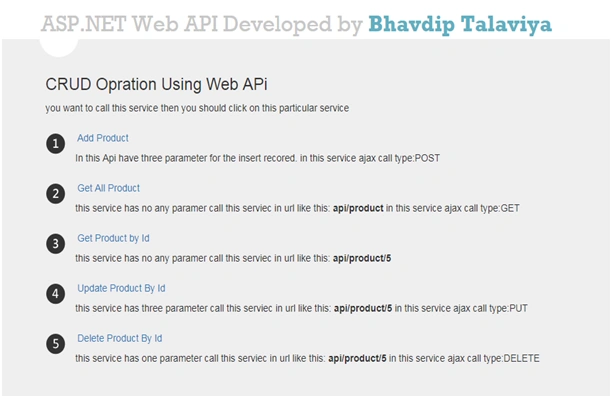
- <h3>CRUD Opration Using Web APi</h3> you want to call this service then you should click on this particular service
- <ol class="round">
- <li class="one">
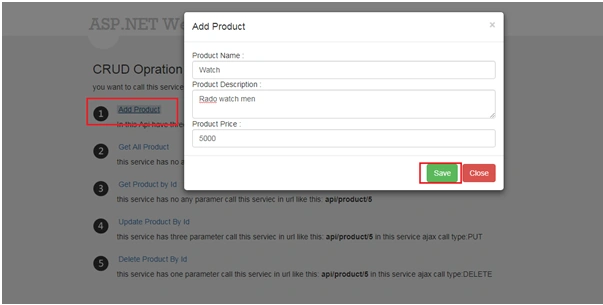
- <h5><a style="cursor: pointer" data-toggle="modal" data-target="#AddProduct_Model">Add Product</a></h5> In this Api have three parameter for the insert recored. in this service ajax call type:POST </li>
- <li class="two">
- <h5><a id="GetAllProduct" style="cursor: pointer">Get All Product</a></h5> this service has no any paramer call this serviec in url like this:<b> api/product</b> in this service ajax call type:GET </li>
- <li class="three">
- <h5><a id="GetAllProductbyid" style="cursor: pointer">Get Product by Id</a></h5> this service has no any paramer call this serviec in url like this:<b> api/product/5</b> </li>
- <li class="four">
- <h5><a data-toggle="modal" data-target="#UpdateProduct_Model" style="cursor: pointer">Update Product By Id</a></h5> this service has three parameter call this serviec in url like this:<b> api/product/5</b> in this service ajax call type:PUT </li>
- <li class="five">
- <h5><a id="DeleteProduct" style="cursor: pointer">Delete Product By Id</a></h5> this service has one parameter call this serviec in url like this:<b> api/product/5</b> in this service ajax call type:DELETE </li>
- </ol>
- </section>
- </div>
Now create the model for the insert recorded using POST method
- <!-- Modal add product -->
- <div id="AddProduct_Model" class="modal fade" role="dialog">
- <div class="modal-dialog">
- <!-- Modal content-->
- <div class="modal-content">
- <div class="modal-header"> <button type="button" class="close" data-dismiss="modal">×</button>
- <h4 class="modal-title">Add Product</h4>
- </div>
- <div class="modal-body"> Product Name :<input type="text" id="txtName" class="form-control required" /> Product Description :<textarea id="txtDesc" class="form-control required"></textarea> Product Price :<input type="text" id="txtPrice" onkeypress="return isNumberKey(event)" class="form-control required" /> </div>
- <div class="modal-footer"> <button type="button" class="btn btn-success" id="btnSave">Save</button> <button type="button" class="btn btn-danger" onclick="clear();" data-dismiss="modal">Close</button> </div>
- </div>
- </div>
- </div>
- $("#btnSave").click(function() {
- debugger
- var PID = 0;
- var Name = $("#txtName").val();
- var Desc = $("#txtDesc").val();
- var Price = parseFloat($("#txtPrice").val()).toFixed(2);
- if (CheckRequiredFields()) {
- $('#dvLoader').show();
- $.ajax({
- url: '@Url.Action("Product", "Api")',
- type: 'POST',
- data: JSON.stringify({
- "PID": parseInt(PID),
- "Name": Name,
- "Description": Desc,
- "price": Price
- }),
- dataType: "json",
- contentType: "application/json; charset=utf-8",
- success: function(result) {
- $('#dvLoader').hide();
- jQuery.noConflict();
- $('#AddProduct_Model').modal('hide');
- toastr.success("product insert successfull");
- clear();
- }
- });
- }
- });
Step 7 - GET Method.
Add the model for the display of all inserted product data in json and xml format,
- <!-- Show product Data-->
- <div id="GetData" class="modal fade" role="dialog">
- <div class="modal-dialog">
- <!-- Modal content-->
- <div class="modal-content">
- <div class="modal-header"> <button type="button" class="close" data-dismiss="modal">×</button>
- <h4 class="modal-title">Show Product Data</h4>
- </div>
- <div class="modal-body">
- <p id="idjson"></p>
- </div>
- <div class="modal-footer"> <a style="float: left; color: #3791cc" href="api/product">click hear to show xml response.</a> <button type="button" class="btn btn-danger" data-dismiss="modal">Close</button> </div>
- </div>
- </div>
- </div>
- $("#GetAllProduct").click(function() {
- $.ajax({
- url: '@Url.Action("Product", "Api")',
- type: 'GET',
- // data: JSON.stringify({ }),
- dataType: "json",
- contentType: "application/json; charset=utf-8",
- success: function(result) {
- jQuery.noConflict();
- $("#idjson").text(JSON.stringify(result));
- $('#GetData').modal('show');
- }
- });
- });
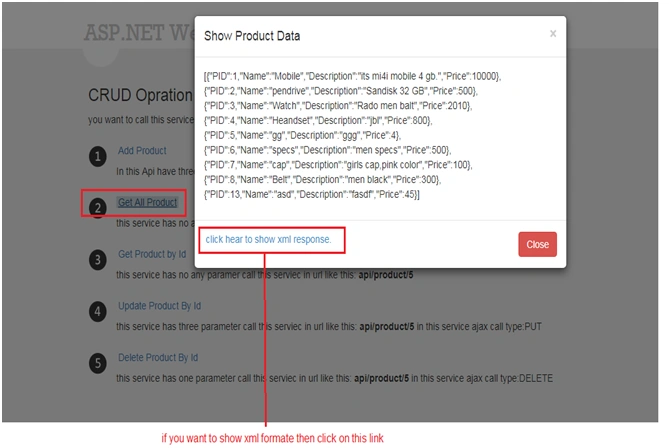
Now add the model for displaying json and xml data for the particular product Id
- <!-- Show product Data by Id-->
- <div id="GetDatabyid" class="modal fade" role="dialog">
- <div class="modal-dialog">
- <!-- Modal content-->
- <div class="modal-content">
- <div class="modal-header"> <button type="button" class="close" data-dismiss="modal">×</button>
- <h4 class="modal-title">Show Product Data by ID</h4>
- </div>
- <div class="modal-body">
- <p id="idjsonbyid"></p>
- </div>
- <div class="modal-footer"> <a style="float: left; color: #3791cc" href="api/product/5">click hear to show xml response by id.</a> <button type="button" class="btn btn-danger" data-dismiss="modal">Close</button> </div>
- </div>
- </div>
- </div>
- $("#GetAllProductbyid").click(function() {
- $.ajax({
- url: 'api/product/5',
- type: 'GET',
- dataType: "json",
- contentType: "application/json; charset=utf-8",
- success: function(result) {
- jQuery.noConflict();
- $("#idjsonbyid").text(JSON.stringify(result));
- $('#GetDatabyid').modal('show');
- }
- });
- });
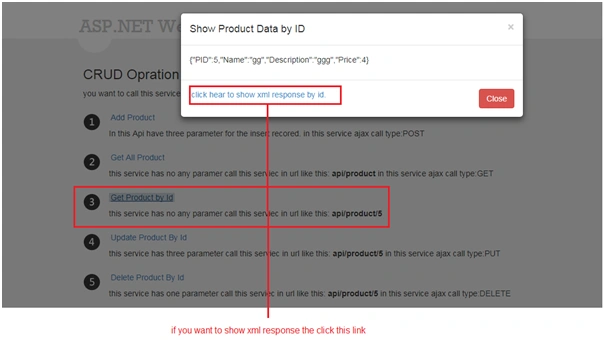
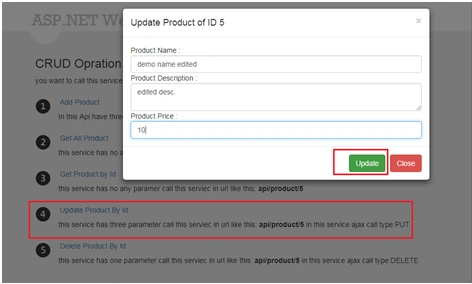
Now add the model for the updated product
- <!-- Modal Update product -->
- <div id="UpdateProduct_Model" class="modal fade" role="dialog">
- <div class="modal-dialog">
- <!-- Modal content-->
- <div class="modal-content">
- <div class="modal-header"> <button type="button" class="close" data-dismiss="modal">×</button>
- <h4 class="modal-title">Update Product of ID 5</h4>
- </div>
- <div class="modal-body"> Product Name :<input type="text" id="txtName2" class="form-control " /> Product Description :<textarea id="txtDesc2" class="form-control "></textarea> Product Price :<input type="text" id="txtPrice2" onkeypress="return isNumberKey(event)" class="form-control " /> </div>
- <div class="modal-footer"> <button type="button" class="btn btn-success" id="btnUpdate">Update</button> <button type="button" class="btn btn-danger" onclick="clear();" data-dismiss="modal">Close</button> </div>
- </div>
- </div>
- </div>
- $("#btnUpdate").click(function() {
- var PID = 5;
- var Name = $("#txtName2").val();
- var Desc = $("#txtDesc2").val();
- var Price = parseFloat($("#txtPrice2").val()).toFixed(2);
- $('#dvLoader').show();
- $.ajax({
- url: 'api/product/5',
- type: 'PUT',
- data: JSON.stringify({
- "PID": parseInt(PID),
- "Name": Name,
- "Description": Desc,
- "price": Price
- }),
- dataType: "json",
- contentType: "application/json; charset=utf-8",
- success: function(result) {
- $('#dvLoader').hide();
- $('#UpdateProduct_Model').modal('hide');
- toastr.success("product updated successfully.");
- clear2();
- }
- });
Now see the updated product output of product of ID 5
Step 9 - DELETE Method.
Now add the method for the deleted product by the particular product Id.
- $("#DeleteProduct").click(function() {
- $.ajax({
- url: 'api/product/5',
- method: 'DELETE',
- contentType: 'application/json',
- success: function(result) {
- toastr.success("product Deleted successfull");
- },
- error: function(request, msg, error) {
- // handle failure
- }
- });
- function CheckRequiredFields() {
- var isValid = true;
- $('.required').each(function() {
- if ($.trim($(this).val()) == '') {
- isValid = false;
- $(this).addClass('red_border');
- } else {
- $(this).removeClass('red_border');
- }
- });
- return isValid;
- }
- function clear() {
- $("#txtName").val("");
- $("#txtDesc").val("");
- $("#txtPrice").val("");
- }
- function clear2() {
- $("#txtName2").val("");
- $("#txtDesc2").val("");
- $("#txtPrice2").val("");
- }
- function isNumberKey(evt) {
- var charcode = (evt.which) ? evt.which : evt.keycode
- if (charcode > 31 && (charcode < 48 || charcode > 58) && evt.keyCode != 35 && evt.keyCode != 36 && evt.keyCode != 37 && evt.keyCode != 38 && evt.keyCode != 39 && evt.keyCode != 40 && evt.keyCode != 46) {
- return false;
- } else {
- return true;
- }
- }
Kaushik DudhatPosted Sep 28, 2017, 12:53 AM
It's very helpful for me , thanks.