

Consume web api in AngularJS
In development, sometimes we consume data from different sources, for example, webservices. Today in this article we are going to learn,
- How to consume webapi using angularjs.
- ng-repete directive in angularjs
What is WEBAPI
As we all know, API stands for Application programming interface. The main purpose of webapi is to create restful services. Web API is consumed by a broad range of clients like
- IOT (Internet of Things)
- Mobile Apps
- Web based Apps
- Desktop Apps
So we are going to learn consuming services through angularjs. So let's take a look.
Step 1- Open Visual Studio
Step 2- File>>New>> Project
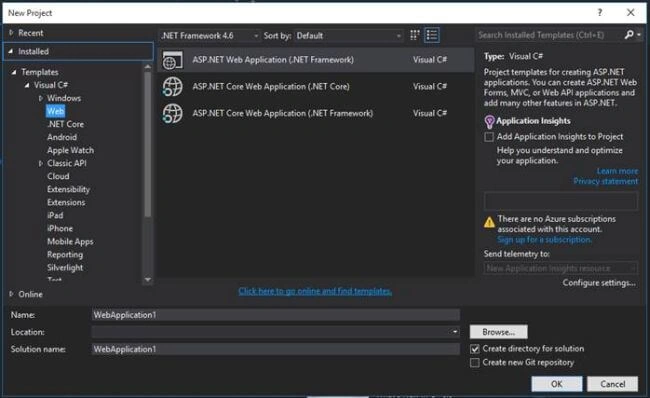
Choose Asp.Net WebApplication
Step 3- Select WebAPI
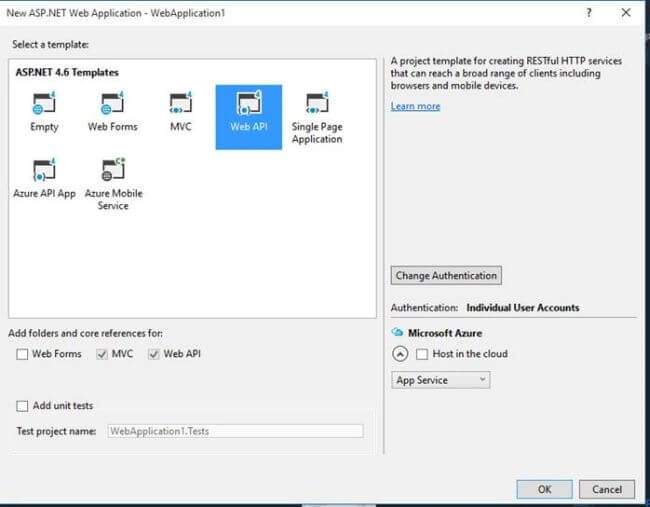
Click on OK Button.
Check the Solution Explorer.
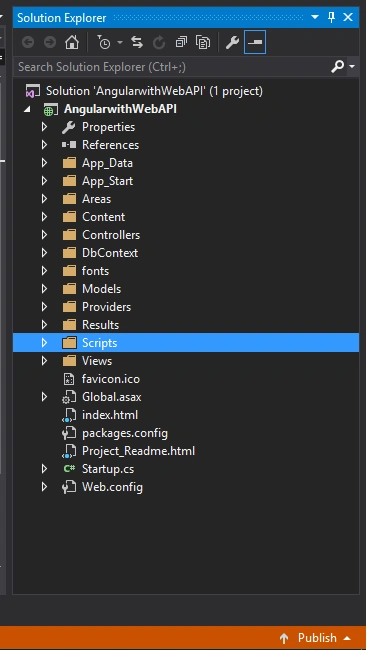
Here you can see, it looks like an MVC Application, where we have Models, View and Controller. But my friend, here we will create webapis.
Now the question arises: What is the diffrence between WebAPI Controller and MVC Controller?
- If , talking about MVC Controller, mvc controller will be inherited by Controller and WebAPI Controller will be inherited by ApiController. This is the biggest diffrence between these two.
- And webAPI is designed for returning data in the form of JSON and XML.
So in this example we have one StudentDB database, where we have studentsinformations. So first create StudentDB and one table StudentMaster.
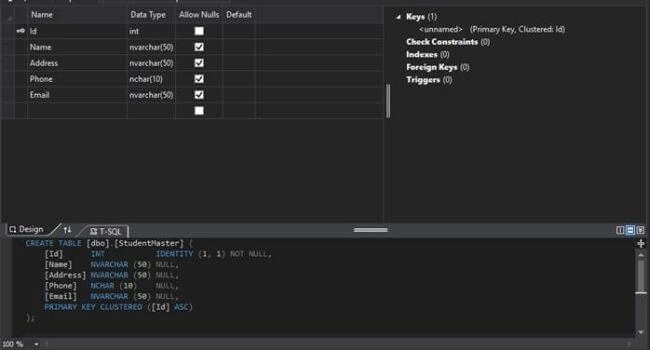
Below is the data into StudentMaster table.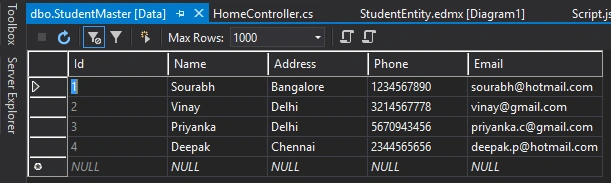
- Now create an edmx file, and connect StudentDB with your Entity. In this example my entity name is StudentEntity.
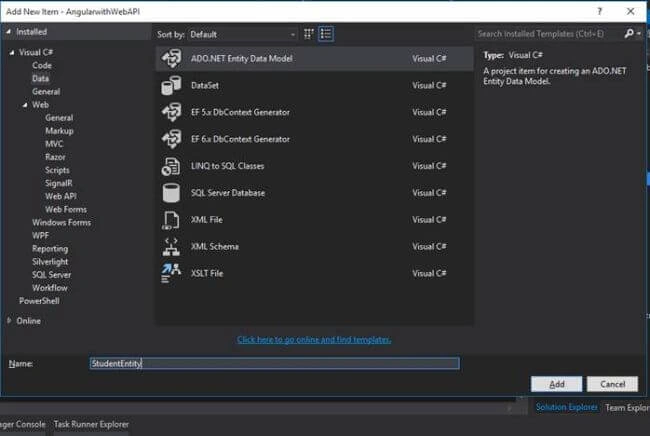
Click on Add Button, now the basis of wizard, create an edmx file.
- Once you click on the finish button your screen looks like
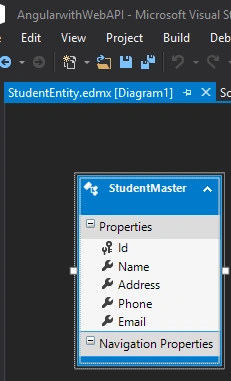
Now open HomeController, by default HomeController will be inherited by Controller like this HomeController:Controller, change this to HomeController:ApiController, and copy below code.
- usingAngularwithWebAPI.DbContext;
- using System;
- usingSystem.Collections.Generic;
- usingSystem.Linq;
- usingSystem.Web;
- usingSystem.Web.Http; // This namespace is responsible for IHttpActionResult
- usingSystem.Web.Mvc;
- namespaceAngularwithWebAPI.Controllers {
- publicclassHomeController: ApiController {
- DbContext.StudentEntitiesstudentEntities = newDbContext.StudentEntities();
- publicIHttpActionResultGetStudents() {
- var query = studentEntities.StudentMasters.ToList();
- return Ok(query);
- }
- }
- }
- Now let's understand the above code line by line. You can see in the above code we have HomeController:ApiController, because we want to work on WebAPI
- I create Object of StudentEntities, so we can get all the table SPs from StudentDB very easily.
- After that we have Public IHttpActionResult, IHttpAtionResult is introduced in WebAPI 2, this needs a namesapceSystem.web.http. IHttpActionResult use for building HttpResponseMessages.
- Now run your service.
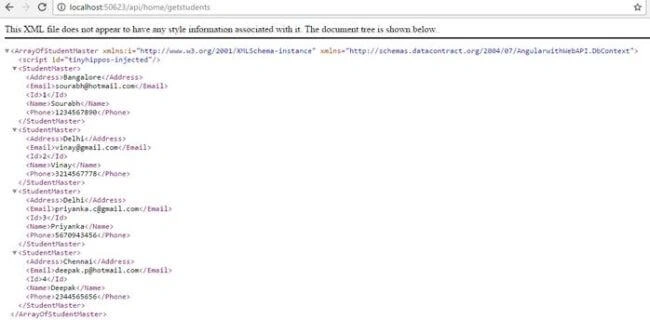
- After that we are getting a list of student data into query, and then returning OK(query), that means this will convert this into Array XML of StudentMaster, with the use of it we can easily console this into our angularcode.
Let's come to our Angular code.
Script.js
- vartestApp = angular
- .module("testModule", [])
- .controller("testController", function($scope, $http) {
- $http.get('http://localhost:50623/api/home/getstudents').then(function(response) {
- $scope.students = response.data;
- });
- });
$http.get('url')- here we have to call our url, so please first, call your webapi and check your port number, and then use your url into $http.get.
Now, call $scope variable into your pge.
index.html
- <!DOCTYPEhtml>
- <htmlng-apphtmlng-app="testModule">
- <head>
- <scriptsrcscriptsrc="Scripts/angular.min.js">
- </script>
- <scriptsrcscriptsrc="Scripts/js/Script.js">
- </script>
- <title></title>
- <metacharsetmetacharset="utf-8" />
- </head>
- <body>
- <divng-controllerdivng-controller="testController">
- <tablebordertableborder="1">
- <thead>
- <tr>
- <th>
- Student Id
- </th>
- <th>
- Name
- </th>
- <th>
- Address
- </th>
- <th>
- </th>
- <th>
- Phone
- </th>
- </tr>
- </thead>
- <trng-repeattrng-repeat="sinstudents">
- <td>
- {{s.Id}}
- </td>
- <td>
- {{s.Name}}
- </td>
- <td>
- {{s.Address}}
- </td>
- <td>
- {{s.Email}}
- </td>
- <td>
- {{s.Phone}}
- </td>
- </tr>
- </table>
- </div>
- </body>
- </html>
Now it's time to check the output.
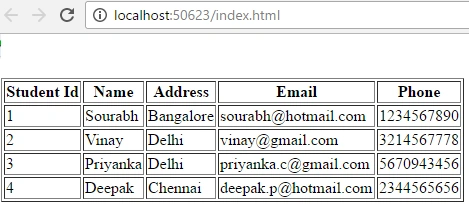
You can see, finally our data is consumed by webapi. We can see all student data row by row through ng-repete.
If you have any query regarding this article or suggesions, please send your valuable comments.
Mukund ThakkarPosted Oct 1, 2018, 8:46 AM
How to use post method to call service method?
Raymond MonderoPosted Jan 6, 2018, 9:37 AM
Hi, may i know what is the content of 'Script.js' which you include. i'm trying the same way to consume the webapi from local but not getting a success, . i think the problem is the recovery from webapi but i dont know what exactly and how to resolve it. do you have any idea? <script> angular .module("myApp", []) .controller("myController", function ($scope, $http) { $http .get('http://localhost:30028/api/products/1') .then(function (response) { $scope.product = response.data; }); }); </script>
Jay KPosted Jul 14, 2017, 11:46 AM
Thank you for this posting. This is really helpful !!!
JAGANNADH RAOPosted Jun 16, 2017, 11:23 AM
Good one bro.. keep posting
Shamim UddinPosted Oct 5, 2016, 11:11 AM
Nice