

Microsoft .NET has been around for 20 years and one thing that is very critical for every to know is exactly how memory management works in the runtime. If you don’t, you will cause performance issues but more serious is causing virtual memory leaks. The way that .NET was designed back in the late ’90s is that it does not have memory leaks in the true sense, but it can create virtual memory leaks.
In a nutshell, if your app has a virtual memory leak, the memory is not destroyed correctly properly, and the leak just keeps building up until the app or service crashes. I have even seen it bring down servers on the backend (I have written about this many times before, so I won’t re-tell them here) and in client apps.
The reason I decided to write a comprehensive set of articles about reference types that implement IDisposable and where you might need to in your types is because of a recent solution I worked on. Unfortunately, this solution has the most issues of any of the millions of lines of code I have analyzed in the past 20 years. I had hoped that after all this time, developers would know how to do this correctly, but sadly it is obvious to me far too many do not, so I hope these articles will help this critical issue.
This solution has a little over a million lines of code. First, I found over 600 places in the code where Dispose() is not being called on Disposable types. Also, I found over 90 types that either did not implement IDisposable correctly or did not implement it when it needed to. For the classes that did implement IDisposable, not even one did it correctly. These changes will cause over 2,000 touchpoints in the code that will need to be changed, code reviewed, tested, and deployed.
The reason I’m sharing these real-world numbers is that if developers do not deal with these types when the code is first written, it will be very, very expensive and time-consuming to fix later down the road (if they even get fixed). Far too many teams do not understand why they must restart servers or services on a regular basis… this is the reason! Please use these articles as a warning for your team and management!
New Code Rules
I feel so strongly about this I made it the topic of a recent New Code Rules segment on my show Rockin’ the Code World with dotNetDave on C# Corner Live. I rant in this video but also give ideas for Microsoft to once and for all solve this issue so developers do not need to worry about it and so apps and services stop failing.
To watch, go to: https://vimeo.com/619336696/9f38a26dfa
Two Types of Memory Management in .NET
Microsoft .NET handles memory in two very different ways that every developer needs to fully understand. The first is the memory stack where all value types are created. The second is the memory heap where all reference types are created and managed by the garbage collector, and this will be the focus of this article. How do you know if a type is a value or reference type? It’s fairly easy… all types such as DateTime, integer, Boolean, or any of the framework types that are number-based, plus user-defined types (structures), are value types and live on the memory stack. Everything else, including the classes you create, are reference types and live on the memory heap. Essentially if you create a type by using ‘new’, it’s a reference type, including the string type. Reference types are what needs attention, especially if they implement IDisposable or contain any disposable fields.
The Memory Heap
People have been writing about how the memory heap works in .NET since it was released, so I won’t rehash that here since that would be an article (or an eBook) in itself. If you are new to .NET or don’t fully understand how the memory heap and the Garbage Collector works, go here for more detailed information from Microsoft.
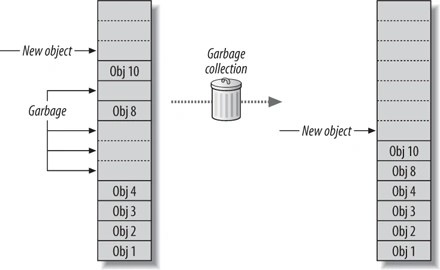
I will quickly mention that the reason .NET is very performant is that when objects are created on the heap, they are always created at the top of the heap. When an object is no longer is used, it is marked to be removed from memory by the Garbage Collector (GC). They do not go away at the end of the code block! Then the heap is compacted by the GC. When are they are removed from memory?
Whenever the Garbage Collector wants to!
Well, it’s a lot more complicated than that, but just remember, developers have no real direct control over the GC. All we can do is allocate cautiously, release objects as soon as possible, and most importantly call Dispose on any disposable objects or implement IDisposable for the types we create that contain a field that is a disposable type. In the early days of .NET, I spent a lot of time watching and learning how the GC works, so I understand it well. Also, twice I had one of the engineers who created the GC speak at the user group I ran for 20 years. Listening to him and speaking with him taught me even more about how memory works in .NET and the pitfalls of the GC.
Disposing Disposable Types
First, let us get into what I teach my beginner students when I taught at a university.
It is critically important to call Dispose() on any type that implements IDisposable!
If a type implements IDisposable it means that it has something it needs to clean up like file handles, memory pointers, other disposable types, and more. So, developers MUST call Dispose as soon as the object is done being used. How do you know if a type implements IDisposable? There are two simple ways.
The first is, just type “.Dispose” at the end of the variable for the type, if it comes up in Intellisense, then you need to call it. The other method is to right mouse click on the type and selects ‘Go to Definition’ and see if IDisposable is in the definition of the class. This is exactly what I tell my beginner students. After you deal with disposable types for a while, you will start to remember which ones are. Here are some helpful tips that I use when I first analyze a codebase.
- If the type name ends in “Stream”, it’s disposable.
- If the type name ends in “Writer” or “Reader”, it’s most likely disposable.
- Any types that deal with graphics are most likely disposable such as the Bitmap type.
- If the type deals with connections, such as databases, sockets, HTTP, it’s disposable. This also includes related types such as DataTable and MailMessage and more.
How we dispose of disposable objects has changed since .NET was created. The safest, recommended way is by using the using pattern and statement.
Here is how to properly use the using statement pattern (the code below is from my OSS called Spargine).
public static TResult Deserialize<TResult>(string xml) where TResult: class
{
    using(var sr = new StringReader(xml))
    {
        var xs = new XmlSerializer(typeof(TResult));
        return (TResult) xs.Deserialize(sr);
    }
}
First, the Disposable object is created in the using statement. When the end of that code block is reached, then Dispose of will be called by the runtime. What happens is that the compiler creates a try/finally block and calls Dispose of in the final as shown in the IL code below.
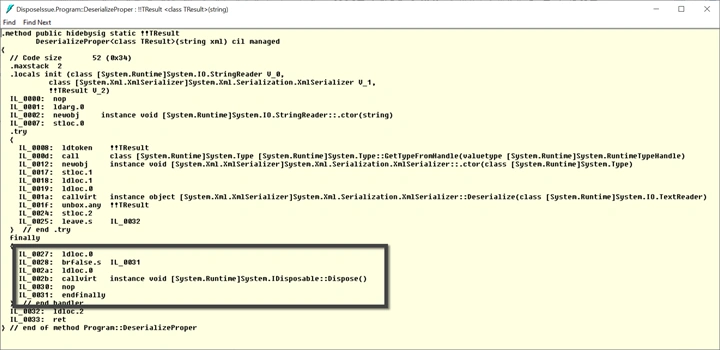
You can also use the simple using statement as shown below,
using var sr = new StringReader(xml);
var xs = new XmlSerializer(typeof(TResult));
return (TResult) xs.Deserialize(sr);
Both using statements do the same thing, but I tend to prefer the original using statement since for me as a code reviewer, it’s easier for me to spot where it’s being used or isn’t being used.
Hidden Disposable Issues
Other “hidden” disposable issues also need to be considered. Some developers who like to put as much code on one line could run into issues. Here is an example.
public static TResult Deserialize<TResult>(string xml) where TResult: class
{
    var xs = new XmlSerializer(typeof(TResult));
    return (TResult) xs.Deserialize(new StringReader(xml));
}
The issue with this is the final line where a new StringReader is created. StringReader is a disposable type and as you can see, there isn’t a call to Dispose in the code or any use of a using statement. Therefore, code like this will cause memory leaks! I can prove that Dispose is not being called by looking at the IL for this method.
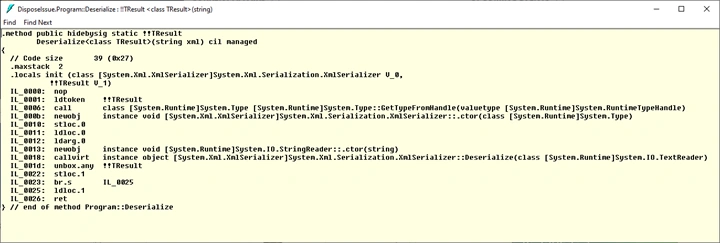
As you can see, there isn’t a call to Dispose in the IL. So, it’s very important to not code Disposable types like this but instead using one of the using statements. I wished that Visual Studio and the compilers would not allow disposable types to be created in this manner.
Summary
The takeaway from this article is that it is critically important to make sure all your code is properly disposing of disposable types. Not only could this improve the performance of your apps, but more importantly your apps will be free of virtual memory leaks.
I challenge everyone reading this article to do a critical scan of your codebase NOW to ensure that all your disposable types are being disposed of. I would love to hear how many of these issues you found. Just comment below.
Part 2 of this article will tackle how to properly implement the IDisposable interface for types that you create that have field variables that hold disposable types. Part 3 of this article will discuss how to use tools to help you find these issues in your code.
Hari LakkakulaPosted Oct 17, 2021, 7:23 PM
What if , we are used for DBContext. once we are dissposed, after we can able to access it again the object?
Nick DonnellyPosted Oct 11, 2021, 8:52 AM
Typo, "intelligence" should be intellisense
Srinivasan RamamoorthiPosted Oct 10, 2021, 9:43 AM
Very good article for developers
Ss InfodPosted Oct 9, 2021, 10:19 PM
Very nice article. Any idea when part 2 will be avaiable ?
Sagar LadPosted Oct 8, 2021, 2:45 PM
Great Article !!! Thank for sharing
Bill KempfPosted Oct 7, 2021, 9:42 PM
"It is critically important to call Dispose() on any type that implements IDisposable!" False. Not all disposable types should be disposed, ironically. As an example it's recommended you don't dispose Task objects, despite them implementing IDisposable. :( Another example is the HttpClient created via the HttpClientFactory which is responsible for the lifetime semantics. For that case, almost everything injected into a class has it's lifetime managed by the container and shouldn't be manually disposed of. Also, any time you pass a disposable object to another object, especially in the constructor, you may be passing "ownership" and should no longer call Dispose yourself. An example, the I/O classes in .NET generally require you to create a Writer with a Stream, etc. When you pass the stream to the constructor of the Writer it takes ownership and will dispose of the stream when it itself is disposed. While it won't hurt to dispose the stream in most situations, it's not needed. As for "virtual" memory leaks these are more about holding onto references than about failing to dispose, as the object will be collected (and finalized) at some point after the last reference is removed. Failing to dispose is more about issues with non-deterministic releasing of resources which can certainly cause runtime issues. So, while disposing is important, it's not quite as cut and dried as this article makes it out to be.
ПаханPosted Oct 6, 2021, 3:14 PM
Some issues with this article: "if you create a type by using ‘new’, it’s a reference type" - false, you can create value types with "new"."memory stack where all value types are created" - false, value types live on heap when it is a field in a reference type. Value types can implement interfaces, including IDisposable, e.g. https://tooslowexception.com/disposable-ref-structs-in-c-8-0/ . "code like this will cause memory leaks" - not really. Finalizers exist to deal with forgotten Dispose calls.
Roberto DalmontePosted Oct 6, 2021, 6:57 AM
David thanks for your article and your Vimeo (very convincing-menacing) video. After your warnings, I started again to use IDisposableAnalyzers nuget package in each and every project and, as you forecasted, I spotted dozens of missed disposed objects. What is your opinion of this tool (IDisposableAnalyzers)?
Hiesh KidechaPosted Oct 5, 2021, 4:09 AM
Great article, very informative, thanks for writing David.
David MccarterPosted Oct 4, 2021, 8:04 PM
Thank you so much!
Tahir AlviPosted Oct 4, 2021, 6:22 PM
David, honestly this is really a priceless article. You explain a complex concept in very easy and understandable language. Really Helpfull.