

Introduction
- Dynamically append the rows to the table with JQuery.
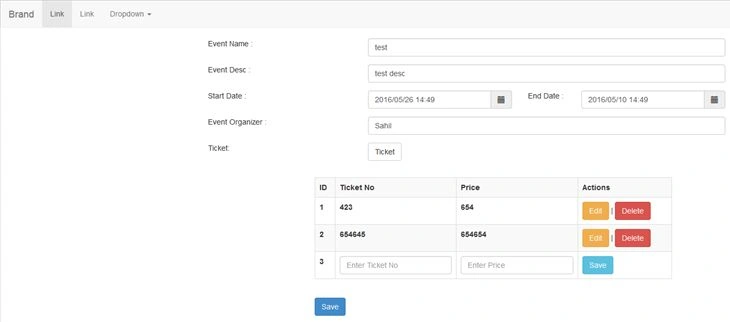
- Here we have an example that show the event details. Against each event there may be a number of tickets generated for an event.
- The tickets generated have to be added in the table as a row, containing Ticket number, price, edit, and save button for save.
- Edit and Delete buttons also given for their respective operations. They also giving dynamic editing and deleting features.
- On click of save data will be posted on server.
Start writing HTML Code
- Create basic layout of the page.
- Add texboxes, button for appending row dynamically and save button for posting the data on the server.
- Add a table with header row only. In this table we have to append rows by clicking on ticket button.
- <html>
- <head>
- <title></title>
- </head>
- <body>
- <div class="container">
- <div class="form-horizontal">
- <div class="form-group">
- <div class="row">
- <div class="col-md-3">
- Event Name :
- </div>
- <div class="col-md-7">
- <input type="text" class="form-control" placeholder="Enter Event Name" name="txtEvent" id="txtEvent" />
- </div>
- </div>
- </div>
- <div class="form-group">
- <div class="row">
- <div class="col-md-3">
- Event Desc :
- </div>
- <div class="col-md-7">
- <input type="text" class="form-control" placeholder="Enter Event Description" name="txtEventDesc" id="txtEventDesc" />
- </div>
- </div>
- </div>
- <div class="form-group">
- <div class="row">
- <div class="col-md-3">
- Start Date :
- </div>
- <div class="col-md-3">
- <div class="input-group input-append date">
- <input type="text" class="form-control" id="datetimepicker1" placeholder="Enter Event Start Date" onblur="restrictDate()" />
- <span class="input-group-addon">
- <span class="glyphicon glyphicon-calendar"></span>
- </span>
- </div>
- </div>
- <div class="col-md-1">
- End Date :
- </div>
- <div class="col-md-3">
- <div class="input-group input-append date">
- <input type="text" class="form-control" id="datetimepicker2" placeholder="Enter Event End Date" />
- <span class="input-group-addon">
- <span class="glyphicon glyphicon-calendar"></span>
- </span>
- </div>
- </div>
- </div>
- </div>
- <div class="form-group">
- <div class="row">
- <div class="col-md-3">
- Event Organizer :
- </div>
- <div class="col-md-7">
- <input type="text" class="form-control" placeholder="Enter Event Organizer" name="txtOrganizer" id="txtOrganizer" />
- </div>
- </div>
- </div>
- <div class="form-group">
- <div class="row">
- <div class="col-md-3">
- Ticket:
- </div>
- <div class="col-md-7">
- <input type="button" class="btn btn-default" onclick="addRow();" name="btnTicket" id="btnTicket" value="Ticket" />
- </div>
- </div>
- </div>
- <div class="form-group">
- <div class="row">
- <div class="col-md-03"></div>
- <div class="col-md-7"></div>
- </div>
- </div>
- <div class="form-group">
- <div class="row">
- <div class="col-md-2"></div>
- <div class="col-md-7">
- <table class="table table-striped table-bordered" id="tbl">
- <tr>
- <th>ID</th>
- <th>Ticket No</th>
- <th>Price</th>
- <th>Actions</th>
- </tr>
- </table>
- </div>
- </div>
- </div>
- <div class="form-group">
- <div class="row">
- <div class="col-md-2">
- </div>
- <div class="col-md-7">
- <input type="button" class="btn btn-primary" name="btnSave" id="btnSave" onclick="SaveEvent();" value="Save" />
- </div>
- </div>
- </div>
- </div>
- </div>
- </body>
- </html>
Start writing script for dynamic crud of row
- addRow function appends the row in the table containing textbox ,label,button for save with seprate id of each row and each control in a row.
- SaveTicket function save the current row in which the click event is fired and adds the edit and delete button in the row inplace of save.
- row id is passed to each function to verify that click event is performed from which row.
- EditTicket function again edit the current row and show textboxes in place of labels with update button to update the data in a row.
- UpdateTicket update the data and show the edit and delete button with all the data in labels.
- DeleteTicket delete the row from the table.
- Include the script in head tag of html page.
- function addRow()
- {
- var table = document.getElementById("tbl"); //get the table
- var rowcount = table.rows.length; //get no. of rows in the table
- //append the controls in the row
- var tblRow = '
- <tr id="row' + rowcount + '">
- <td>
- <label id="lblID' + rowcount + '">' + rowcount + '</label>' +
- '
- </td>
- <td>
- <input type="text" class="form-control" placeholder="Enter Ticket No" id="txtTicketNo' + rowcount + '" />
- </td>' +
- '
- <td>
- <input type="text" class="form-control" placeholder="Enter Price" id="txtPrice' + rowcount + '" />
- </td>' +
- '
- <td>
- <input type="button" class="btn btn-info" id="btnSave' + rowcount + '" onclick="SaveTicket(' + rowcount + ')" value="Save" />
- </td>
- </tr>'
- //append the row to the table.
- $("#tbl").append(tblRow);
- }
- function SaveTicket(id)
- {
- var id = $("#lblID" + id).html();
- var tcktNo = $("#txtTicketNo" + id).val();
- var Price = $("#txtPrice" + id).val();
- //remove current selected row
- $("#row" + id).remove();
- //append new row
- var tblRow = '
- <tr id="row' + id + '">
- <td>
- <label id="lblID' + id + '">' + id + '</label>
- </td>
- <td>
- <label id="lblTicketNo' + id + '">' + tcktNo + '</label>' +
- '
- </td>
- <td>
- <label id="lblPrice' + id + '" >' + Price + '</label>
- </td>
- <td>' +
- '
- <input type="button" class="btn btn-warning" id="btnEdit' + id + '" onclick="EditTicket(' + id + ')" value="Edit" />' +
- ' |
- <input type="button" class="btn btn-danger" id="btnDelete' + id + '" onclick="DeleteTicket(' + id + ')" value="Delete" />
- </td>
- </tr>'
- $("#tbl").append(tblRow);
- }
- function EditTicket(id)
- {
- var id = $("#lblID" + id).html();
- var tcktNo = $("#lblTicketNo" + id).html();
- var Price = $("#lblPrice" + id).html();
- $("#row" + id).remove();
- var tblRow = '
- <tr id="row' + id + '">
- <td>
- <label id="lblID' + id + '">' + id + '</label>
- </td>' +
- '
- <td>
- <input type="text" class="form-control" placeholder="Enter Ticket No" value=' + tcktNo + ' id="txtTicketNo' + id + '" />
- </td>' +
- '
- <td>
- <input type="text" class="form-control" placeholder="Enter Price" value=' + Price + ' id="txtPrice' + id + '" />
- </td>' +
- '
- <td>
- <input type="button" class="btn btn-info" id="btnUpdate' + id + '" onclick="UpdateTicket(' + id + ')" value="Update" />
- </td>
- </tr>'
- $("#tbl").append(tblRow);
- }
- function UpdateTicket(id)
- {
- var id = $("#lblID" + id).html();
- var tcktNo = $("#txtTicketNo" + id).val();
- var Price = $("#txtPrice" + id).val();
- $("#row" + id).remove();
- var tblRow = '
- <tr id="row' + id + '">
- <td>
- <label id="lblID' + id + '">' + id + '</label>
- </td>
- <td>
- <label id="lblTicketNo' + id + '">' + tcktNo + '</label>
- </td>' +
- '
- <td>
- <label id="lblPrice' + id + '" >' + Price + '</label>
- </td>' +
- '
- <td>
- <input type="button" class="btn btn-warning" id="btnEdit' + id + '" onclick="EditTicket(' + id + ')" value="Edit" /> ' +
- '|
- <input type="button" class="btn btn-danger" id="btnDelete' + id + '" onclick="DeleteTicket(' + id + ')" value="Delete" />
- </td>
- </tr>'
- $("#tbl").append(tblRow);
- }
- function DeleteTicket(id)
- {
- $("#row" + id).remove();
- }
Reference Articles for AngularJS:
Harish BatchuPosted Oct 1, 2018, 1:05 AM
Can you share the code files.
HARRY PATELPosted Aug 30, 2018, 4:14 AM
Save event Method code Missing share that code also
Elavarasan MPosted May 29, 2018, 7:35 AM
Hi Saveevent Method code Missing share that code also
Thenmozhi ViswanathanPosted May 7, 2018, 1:43 AM
Save to server code is missing. could you please share details for the same
James MojePosted Apr 9, 2018, 10:02 PM
The function to save the table is missing, kindly help me with this one. Thanks in advance
Sonu ChaudharyPosted Jun 6, 2016, 9:56 AM
good one...
Ketak BhalsingPosted Jun 2, 2016, 1:37 AM
Helpful information....
Humayun Kabir MamunPosted Jun 1, 2016, 2:17 AM
Nice...
Thiruppathi RPosted May 31, 2016, 2:56 AM
Nice Share.
Raja TPosted May 31, 2016, 12:19 AM
Good, Thansk for sharing
Vignesh ManiPosted May 30, 2016, 5:02 PM
Nice one
Debasis SahaPosted May 30, 2016, 1:56 PM
Good One..
Bhuvanesh MohankumarPosted May 30, 2016, 1:15 PM
Good one
Ajay MalikPosted May 30, 2016, 11:30 AM
nice..