

Here, I’ve thought to write my thoughts about hands-on Angular. This is the fifth article, which states how can you manage the BookMySeat layout and Angular Services.
- Developing Book My Seat Application In AngularJS And ASP.NET
- Developing Book My Seat Application In AngularJS And ASP.NET - WebAPI Methods - Part Two
- Developing Book My Seat Application In AngularJS And ASP.NET- Part Three managing database
- Developing Book My Seat Application In AngularJS And ASP.NET - Usage Of Routing And RouteParams
This article elaborates about dealing with creating main bookmhtml page as well as Angular Services usage in order to populate values on the page.
Create a booking.html page under Application folder and paste the code segment, mentioned below in it, as depicted in the image, mentioned below.
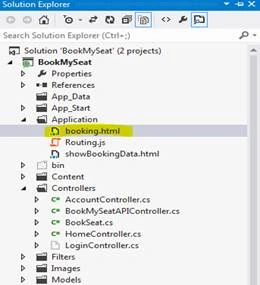
If you notice in the screen, mentioned above, there is another file, routing.js, which keeps the complete logic written in the form of Angular controller as well as Angular Services.
Booking.html code snippet is mentioned below.
- <!DOCTYPE html>
- <html xmlns="http://www.w3.org/1999/xhtml">
- <head>
- <!--<script src="../Scripts/angular.intellisense.js"></script>-->
- <script data-require="ui-bootstrap@*" data-semver="0.10.0" src="http://angular-ui.github.io/bootstrap/ui-bootstrap-tpls-0.10.0.js"></script>
- <link href = "//maxcdn.bootstrapcdn.com/bootstrap/3.3.1/css/bootstrap.min.css" rel = "stylesheet">
- <title></title>
- </head>
- <body ng-app="routingApp" class="container">
- <div ng-controller="BookingController" align="center">
- <input type="text" name="name" value="" ng-model="onclick" />
- <br />
- <div>
- <b>UserName:</b> <input type="text" ng-model="UserName" style="background-color:yellow" ng-blur="ValidateUser(UserName)" ng-click="RemoveTag()"/>
- <span ng-show="checkuser" style="color:green" >
- <br />
- <b>You have already booked your seat in SlotNo: {{SlotDetail}}</b>
- </span>
- </div>
- <!--<div>
- <span ng-show="">
- </span>
- </div>-->
- <br />
- <br />
- <div class = "panel-body" >
- <div ng-init="testfunc()" >
- <span ng-repeat="image in images track by $index">
- <span ng-if="(bookcollscope).indexOf($index)!=-1" >
- <img id="{{$index}}" ng-src="{{imageUrl1}}" ng-mouseover="showOptionDetails($index)"/>
- {{$index+1}}
- </span>
- <span ng-if="(bookcollscope).indexOf($index)==-1">
- <img id="{{$index}}" ng-src="{{imageUrl}}" ng-click="BookMySeat(UserName,$index)" />
- {{$index+1}}
- </span>
- <div ng-if="($index+1)%5==0">
- <br></br>
- </div>
- </span>
- </div>
- </div>
- </div>
- <dotnetpiper-directive></dotnetpiper-directive>
- </body>
- </html>
Dependency injection is shown below in the image.

BookingController plays an important role in this Application and is written in Routing.js file, shown in the image below.
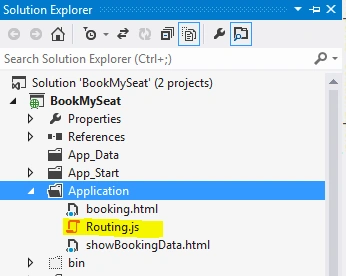
Complete code snippet for BookingController has the complete logic for the data manipulation and Angular Services, as shown below.
- routingApp.controller("BookingController", ['$scope', 'dataService', '$routeParams', '$modal', '$log', function ($scope, dataService, $routeParams, $modal, $log) {
- $scope.GetIndex = function (Index) {
- $scope.lastIndex = Index;
- }
- $scope.onclick = true;
- $scope.RemoveTag = function () {
- // alert("remove");
- $scope.checkuser = false;
- }
- var slotNum = $routeParams.slotNumber.substring(0, 3);
- var totalseat = 30;
- var ApiResult;
- $scope.testfunc = function () {
- dataService.GetEmployeeService(slotNum).success(function (result) {
- $scope.empList = result;
- var imageCollection = new Array(totalseat);
- $scope.images = imageCollection;
- $scope.imageUrl = "../Images/RED.jpg";
- // var bookedcollection = new Array($scope.empList);
- $scope.bookcollscope = $scope.empList;
- console.log($scope.bookcollscope);
- var imageCollection1 = new Array($scope.empList);
- $scope.images1 = imageCollection1;
- $scope.imageUrl1 = "../Images/GREEN.jpg";
- }).error(function (result) {
- $scope.error = true;
- });
- }
- $scope.BookMySeat = function (UserName, SeatNo) {
- $scope.onclick=!$scope.onclick;
- //$scope.$apply();
- console.log(UserName + SeatNo);
- dataService.InsertSeat(UserName, slotNum, SeatNo).success(function (output) {
- //$scope.insertResult = output.data;
- $scope.empList = output;
- var imageCollection = new Array(totalseat);
- $scope.images = imageCollection;
- $scope.imageUrl = "../Images/RED.jpg";
- // var bookedcollection = new Array($scope.empList);
- $scope.bookcollscope = $scope.empList;
- console.log($scope.bookcollscope);
- var imageCollection1 = new Array($scope.empList);
- $scope.images1 = imageCollection1;
- $scope.imageUrl1 = "../Images/GREEN.jpg";
- alert("Seat number " + SeatNo + " has been booked for : " + UserName);
- }).error(function (output) {
- $scope.error = true;
- });
- }
- $scope.ValidateUser = function (UserName) {
- //alert("hello");
- dataService.ValidateUsername(UserName).success(function (output) {
- //alert(output);
- if (output != -1) {
- $scope.checkuser = true;
- $scope.SlotDetail = output;
- }
- console.log(output);
- }).error(function (output) {
- $scope.error = true;
- });
- }
- $scope.DeleteBooking = function (SeatNo) {
- dataService.DeleteSeat(SeatNo, slotNum).success(function (output) {
- console.log(output);
- })
- .error(function (output) {
- $scope.error = true;
- });
- }
- $scope.option = {
- name: 'Name (hover over for more details)',
- longDescription: 'This is my detailed description... lots of text here'
- }
- $scope.showOptionDetails = function (SeatNo) {
- dataService.GetSeatDetail(slotNum, SeatNo).success(function (output) {
- console.log("seat name is " + output);
- $log.info($scope.option);
- $scope.optionModal = $modal.open({
- template: '<div class="modal-header" style=" background-color: red;" ng-mouseleave="close()"><h3 class="modal-title">Seat Details </h3></div><div class="modal-body"style=" background-color: yellow;" ><b>UserName:</b> ' + output + ' <b> SeatNo: </b> {{' + (SeatNo + 1) + '}}</div><div class="modal-footer" ng-click="close()"><input type="button" ng-click="DeleteBooking(' + SeatNo + ')" value="Delete"/>Close</div>',
- controller: 'modalCtrl',
- resolve: {
- option: function () {
- return $scope.option;
- }
- }
- });
- }).error(function (output) {
- $scope.error = true;
- });
- }
- $scope.closeOptionDetails = function () {
- $scope.optionModal.close();
- }
- }]).directive('dotnetpiperDirective', function () {
- var directive = {};
- directive.restrict = 'E'; /* restrict this directive to elements */
- directive.templateUrl = "Application/showBookingData.html";
- return directive;
- });
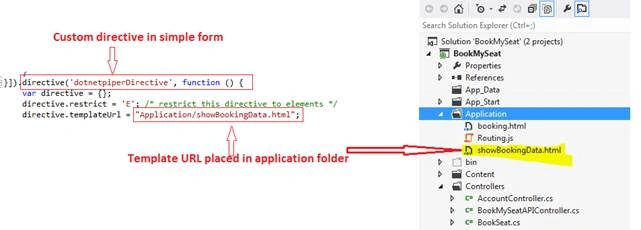
Angular Services
Services are a point, where you can put common functionality to an AngularJS Application. For example, if you would like to share the data with more than one controller then the best way is to promote the data to the Service and then make it available via the Service. Services extend the controllers and make them more globally accessible.
This is the complete code snippet used in in this application, there are six methods to perform different operations. Kindly visit this link to understand Web API methods.
This is how Angular Service is defined, as shown below in the code segment.

Code Segment
- routingApp.service('dataService', ['$http', '$window', function ($http, $window) {
- var result;
- this.GetEmployeeService = function (slotNum) {
- result = $http.get('api/BookMySeatAPI/GetSeatCount?slot=' + slotNum).success(function (data, status) {
- result = data.result;
- }).error(function (error) {
- result = error;
- alert("Something happned wrong");
- });
- console.log(result);
- return result;
- }
- this.GetShowbookingDetailService = function () {
- result = $http.get('api/BookMySeatAPI/ShowBookSeat').success(function (data, status) {
- result = data.result;
- }).error(function (error) {
- result = error;
- alert("Something happned wrong");
- });
- console.log(result);
- return result;
- }
- this.InsertSeat = function (UserName, slotNum, SeatNo) {
- var resultPost;
- var Indata = { 'UserName': UserName, 'TimeSlot': slotNum, 'SeatNo': SeatNo };
- return this.resultPost = $http.post('api/seat/BookMySeatAPI/SeatBook', Indata).success(function (data) {
- this.resultPost = data.result;
- $window.location.reload();
- console.log(resultPost);
- }).error(function (error) {
- this.resultPost = error;
- alert("Value thrown @ iNSERT FUNCTION");
- });
- // return resultPost;
- }
- this.GetSeatDetail = function (slotNum, SeatNo) {
- var resultSeatDetail;
- var Indata = { 'TimeSlot': slotNum, 'SeatNo': SeatNo };
- return this.resultSeatDetail = $http.post('api/seatdetail/BookMySeatAPI/SeatDetail', Indata).success(function (data) {
- console.log(data);
- }).error(function (error) {
- this.resultSeatDetail = error;
- });
- }
- this.ValidateUsername = function (UserName) {
- var resultSeatDetail;
- var Indata = { 'UserName': UserName };
- return this.resultSeatDetail = $http.post('api/ValidateUser/BookMySeatAPI/ValidateUser', Indata).success(function (data) {
- console.log(data);
- }).error(function (error) {
- this.resultSeatDetail = error;
- });
- }
- this.DeleteSeat = function (SeatNo, SlotNo) {
- var resultSeatDetail;
- console.log(SeatNo + '' + SlotNo);
- var Indata = { 'SeatNo': SeatNo, 'TimeSlot': SlotNo };
- return this.resultSeatDetail = $http.post('api/DeleteSeat/BookMySeatAPI/DeleteSeat', Indata).success(function (data) {
- $window.location.reload();
- console.log(data);
- }).error(function (error) {
- this.resultSeatDetail = error;
- });
- }
- this.SaveEmployee = function (employee) {
- var result;
- //alert("service called");
- result = $http.post('/Employee/SaveEmployee', employee).success(function (data, status) {
- alert(data);
- result = data;
- console.log(data);
- //$scope.success = true;
- }).error(function (error) {
- result = error;
- });
- return result;
- }
- }]);
There are certain areas where the code can be improved. Hence, please look into those factors, which will be beneficial for an individual.
Hope it’ll help you some day. Enjoy coding.
First LastPosted Sep 19, 2018, 12:03 PM
The BookingController controllers BookMySeat function in the Routing.js has code in it ( starting with: $scope.empList = output; ) that has no reason to be there and is not needed as the booking.html page is reloaded which in turn executes the DisplayingImages() function which reads the database again to get the current booked seats which now includes the inserted seat.
First LastPosted Sep 19, 2018, 11:53 AM
The DeleteBooking function in the Routing.js is obsolete code. The same named function in the modalCtrl controller is the one that is being executed.
First LastPosted Sep 17, 2018, 12:11 PM
In the testfunc and BookMySeat functions, what is the purpose of these as they do not appear to have any relevance and are confusing. var imageCollection1 = new Array($scope.bookedSeatList); $scope.images1 = imageCollection1;
First LastPosted Sep 17, 2018, 9:08 AM
In the $scope.showOptionsDetails function, the modal window, why do you add 1 to the SeatNo? That shows it 1 greater than the value in the database and is not consistent with the seat in the list of booked seats which is derived from the database. I believe you are increasing it due the the array being zero-based.
First LastPosted Sep 16, 2018, 6:53 PM
In the BookMySeat function, you call the web api service to insert a row. The stored procedure sp_BookMySeat returns a 1 (if successful). You then use that output of 1 to set a green image. That can't be correct as it needs a list of booked seats (which would now include the newly inserted seat). I believe you need to modify sp_BookMySeat to return all the seats for the time slot so the BookMySeat function behaves similar to the testfunc function which processes the list of booked seats returned.
First LastPosted Sep 16, 2018, 5:15 PM
The booked seats in green are not being set correctly. They are offset by 1. So if seat 3 is booked(not available) it should be green but seat 4 is showing as green. I believe the problem is due to the zero-based index. You increased it by 1 to handle that fact and label the seats 1 thru 30. To get it to show correctly, I added '$index + 1' in 4 places that just had '$index'. These do not include the 2 label areas that had '$index + 1' already.
First LastPosted Sep 16, 2018, 2:15 PM
If I do NOT enter a user name and then click a seat image, I get an error. - Procedure or function 'sp_BookMySeat' expects parameter '@UserName', which was not supplied. The The UserName needs to be validated first.
Sachin KaliaPosted Nov 24, 2016, 6:43 AM
naga lakshmi you can download db from link above.Thanks for reading an article.
naga lakshmiPosted Nov 21, 2016, 7:13 AM
Where i sthe database file to run the project
Thiruppathi RPosted Oct 26, 2016, 3:33 AM
Nice Article...