

In Xamarin.Forms, a "wait loader" or a loading indicator is typically used to inform the user that a time-consuming operation is in progress, such as data retrieval, processing, or any operation that may cause the UI to freeze or appear unresponsive.
Functions
1. Visual Feedback
- Purpose: Provide visual feedback to users that a process is in progress.
- Importance: Users often appreciate knowing that their action has been acknowledged and that the application is actively working on their request.
2. User Engagement
- Purpose: Keep users engaged during potentially lengthy operations.
- Importance: A loader prevents users from feeling like the application has frozen or become unresponsive. It assures them that something is happening in the background.
3. Expectation Management
- Purpose: Set clear expectations about the duration of the process.
- Importance: Users are more likely to wait patiently if they have an idea of how long the process might take. A loader manages expectations and reduces perceived waiting time.
4. Prevent User Interaction
- Purpose: Disable or limit user interactions during the process.
- Importance: Preventing user interactions while a process is ongoing helps avoid unexpected behavior or errors that could result from user input during that time.
5. Progress Indication
- Purpose: Communicate progress if the duration of the process is known.
- Importance: For processes with a foreseeable duration, a loader can indicate progress, giving users a sense of how much work has been completed and how much is remaining.
Implement the Nuget package of “Xamarin.Custom.LoaderEase” into Xamarin
Step-by-step process to implement the Nuget package of “Xamarin.Custom.LoaderEase” into the Xamarin application.
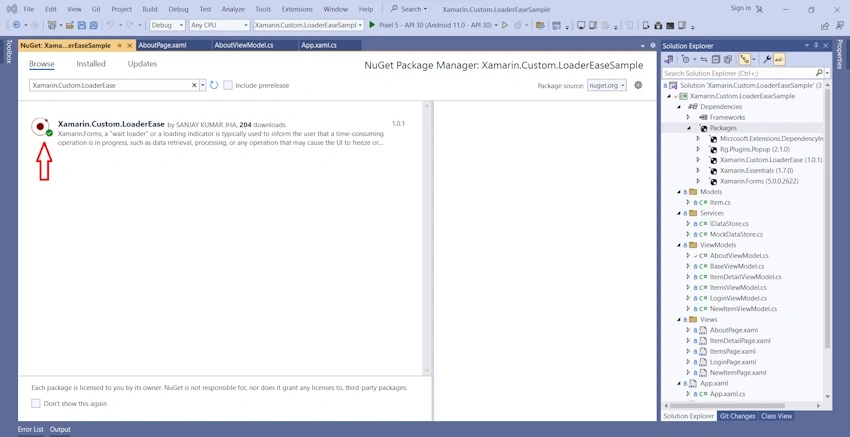
Install Nuget package: " Xamarin.Custom.LoaderEase"
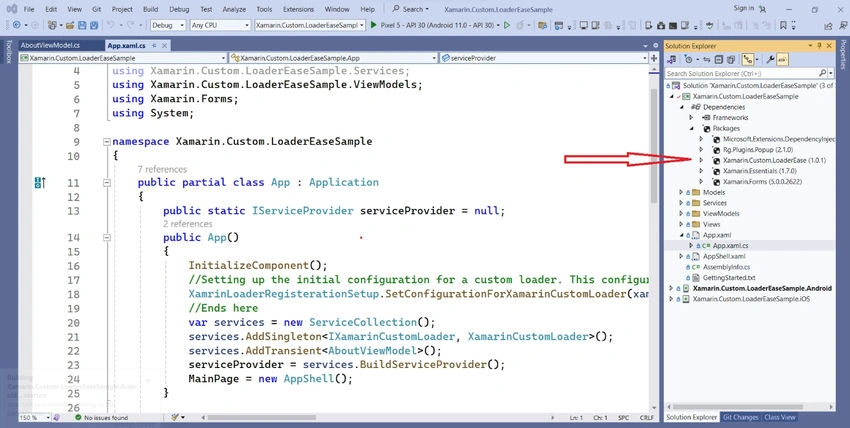
Initial setup in App.xaml.cs file for implementing above mentioned Nuget package
using Microsoft.Extensions.DependencyInjection;
using Xamarin.Custom.LoaderEase.Interfaces;
using Xamarin.Custom.LoaderEase;
using Xamarin.Custom.LoaderEaseSample.Services;
using Xamarin.Custom.LoaderEaseSample.ViewModels;
using Xamarin.Forms;
using System;

namespace Xamarin.Custom.LoaderEaseSample
{
    public partial class App : Application
    {
        public static IServiceProvider serviceProvider = null;

        public App()
        {
            InitializeComponent();

            // Setting up the initial configuration for a custom loader.
            // This configuration can also be applied at the page level.
            XamrinLoaderRegisterationSetup.SetConfigurationForXamarinCustomLoader(
                xamarinWaitLoaderColor: Color.FromHex("#FFFFFF"),
                loaderTextColor: Color.White,
                loaderHeightRequest: 350.0,
                loaderWidthRequest: 350.0,
                loaderFontSize: 12.0);
            // Ends here

            var services = new ServiceCollection();

            services.AddSingleton<IXamarinCustomLoader, XamarinCustomLoader>();
            services.AddTransient<AboutViewModel>();

            serviceProvider = services.BuildServiceProvider();

            MainPage = new AppShell();
        }

        protected override void OnStart()
        {
        }

        protected override void OnSleep()
        {
        }

        protected override void OnResume()
        {
        }
    }
}
View of custom loaders defined in the Nuget package can be defined like below.
<?xml version="1.0" encoding="utf-8" ?>
<ContentPage xmlns="http://xamarin.com/schemas/2014/forms"
             xmlns:x="http://schemas.microsoft.com/winfx/2009/xaml"
             x:Class="Xamarin.Custom.LoaderEaseSample.Views.AboutPage"
             xmlns:vm="clr-namespace:Xamarin.Custom.LoaderEaseSample.ViewModels"
             Title="{Binding Title}">

    <!--<ContentPage.BindingContext>
        <vm:AboutViewModel />
    </ContentPage.BindingContext>-->

    <ContentPage.Resources>
        <ResourceDictionary>
            <Color x:Key="Accent">#96d1ff</Color>
        </ResourceDictionary>
    </ContentPage.Resources>

    <Grid>
        <Grid.RowDefinitions>
            <RowDefinition Height="Auto" />
            <RowDefinition Height="*" />
        </Grid.RowDefinitions>

        <StackLayout BackgroundColor="{StaticResource Accent}" VerticalOptions="FillAndExpand" HorizontalOptions="Fill">
            <StackLayout Orientation="Horizontal" HorizontalOptions="Center" VerticalOptions="Center">
                <ContentView Padding="0,40,0,40" VerticalOptions="FillAndExpand">
                    <Image Source="xamarin_logo.png" VerticalOptions="Center" HeightRequest="64" />
                </ContentView>
            </StackLayout>
        </StackLayout>

        <ScrollView Grid.Row="1">
            <StackLayout Orientation="Vertical" Padding="30,24,30,24" Spacing="10">
                <Label Text="Start developing now" FontSize="Title"/>
                <Label Text="Make changes to your XAML file and save to see your UI update in the running app with XAML Hot Reload. Give it a try!" FontSize="16" Padding="0,0,0,0"/>
                <Label FontSize="16" Padding="0,24,0,0">
                    <Label.FormattedText>
                        <FormattedString>
                            <FormattedString.Spans>
                                <Span Text="Learn more at "/>
                                <Span Text="https://aka.ms/xamarin-quickstart" FontAttributes="Bold"/>
                            </FormattedString.Spans>
                        </FormattedString>
                    </Label.FormattedText>
                </Label>
                <Button Margin="0,10,0,0" Text="Learn more"
                        Command="{Binding RunLoaderCommand}"
                        BackgroundColor="{StaticResource Primary}"
                        TextColor="White"/>
            </StackLayout>
        </ScrollView>
    </Grid>
</ContentPage>
Incorporating code for the MVVM pattern through the view model using dependency injection.
using System;
using System.Windows.Input;
using Xamarin.Custom.LoaderEase.Interfaces;
using Xamarin.Custom.LoaderEase.Utility;
using Xamarin.Essentials;
using Xamarin.Forms;

namespace Xamarin.Custom.LoaderEaseSample.ViewModels
{
    public class AboutViewModel : BaseViewModel
    {
        private readonly IXamarinCustomLoader xamarinCustomLoader = null;

        public AboutViewModel(IXamarinCustomLoader xamarinCustomLoader)
        {
            Title = "About";
            RunLoaderCommand = new Command(() => ShowLoader());
            this.xamarinCustomLoader = xamarinCustomLoader;
            ShowWaitWindow();
            CloseLoader();
        }

        private void ShowLoader()
        {
            // To show loader with Dependency injection service method
            if (xamarinCustomLoader != null)
            {
                xamarinCustomLoader.ShowCustomLoader(message: "Ring..", loaderType: LoaderType.Default);
                CloseLoader();
            }
        }

        private void ShowWaitWindow()
        {
            // Displaying the loader utilizing a method from the Dependency Injection service.
            // if (xamarinCustomLoader != null)
            //    xamarinCustomLoader.ShowCustomLoader(message: "Processing", loaderType: LoaderType.XamarinWaitLoader);

            // Displaying the loader without utilizing the Instance method.
            LoaderHandler.ShowCustomLoader(message: "Preparing", loaderType: LoaderType.BouncingBallLoader);
        }

        private void CloseLoader()
        {
            Device.StartTimer(TimeSpan.FromSeconds(10), () =>
            {
                // Concealing the loader using a method from the Dependency Injection service.
                // if (xamarinCustomLoader != null)
                // {
                //     xamarinCustomLoader.HideCustomLoader();
                // }

                // To conceal the loader without using the Instance method.
                LoaderHandler.HideCustomLoader();
                return false;
            });
        }

        public ICommand RunLoaderCommand { get; }
    }
}
Nuget Package: “Xamarin.Custom.LoaderEase”
NuGet\Install-Package Xamarin.Custom.LoaderEase -Version 1.0.1
Repository path: https://github.com/OmatrixTech/Xamarin.Custom.LoaderEaseSample
Join the conversation! Your thoughts help the community grow.