

Introduction
In this article, we will learn how to Create Form and Form validation in React Application
Steps to follow,
Now we will start by creating a new project for mock web service.
Step 1
Create an Angular project setup using the below commands or however, you create your React app.
npx create-react-app projectname
Example
npx create-react-app sample-form
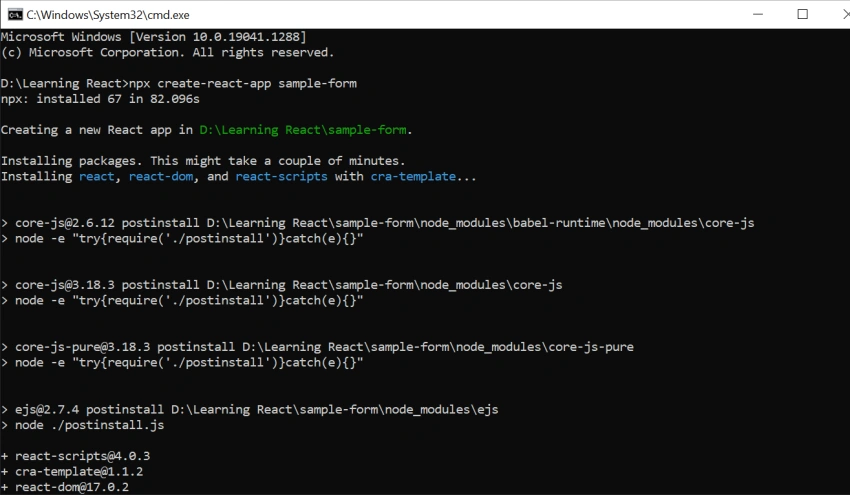
Step 2 - Installing React Bootstrap
Open a new terminal and run the following below commands.
Install Bootstrap as a dependency in your app,
npm install react-bootstrap bootstrap
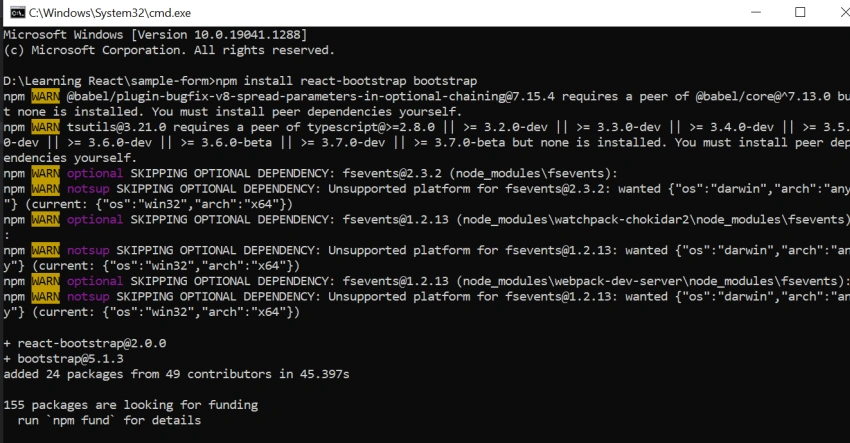
In App.js we will import bootstrap.min.css.
import "bootstrap/dist/css/bootstrap.min.css";
Step 3 - Add Form Field
Now we will add Formvalue field and validation.
constructor() {
    super();
    this.state = {
        form: {
            name: "",
            email: "",
            phone: "",
            password: "",
            gender: null,
            language: [],
        },
        formErrors: {
            name: null,
            email: null,
            phone: null,
            password: null,
            gender: null,
            language: null,
        },
    };
    this.language = [{
        value: "english",
        label: "English"
    }, {
        value: "Tamil",
        label: "Tamil"
    }, {
        value: "hindi",
        label: "Hindi"
    }, ];
}
We have Render Boostrap Card Design in App.js
render() {
    const { form, formErrors } = this.state;
    return (
      <>
        <div class="container-fluid">
          <div class="card mt-4">
            <div class="card-header card-no-bg d-flex align-items-center justify-content-between">
              Register Form
            </div>
            <div class="card-body"></div>
        </div>
    );
}
Step 4
Now we will Implement validation in Fields,
validateField = (name, value, refValue) => {
    let errorMsg = null;
    switch (name) {
        case "name":
            if (!value) errorMsg = "Please enter Name.";
            break;
        case "email":
            if (!value) errorMsg = "Please enter Email.";
            else if (!/^(([^<>()[\]\\.,;:\s@"]+(\.[^<>()[\]\\.,;:\s@"]+)*)|(".+"))@(([[0-9]{1,3}\.[0-9]{1,3}\.[0-9]{1,3}\.[0-9]{1,3}\])|(([a-zA-Z\-0-9]+\.)+[a-zA-Z]{2,}))$/.test(value)) errorMsg = "Please enter valid Email.";
            break;
        case "phone":
            if (!value) errorMsg = "Please enter Phone.";
            break;
        case "gender":
            if (!value) errorMsg = "Please select Gender.";
            break;
        case "password":
            if (!value) errorMsg = "Please enter Password.";
            else if (refValue && value !== refValue) errorMsg = "Password and Confirm Password does not match.";
            break;
        case "language":
            if (value.length === 0) errorMsg = "Please select Language.";
            break;
        default:
            break;
    }
    return errorMsg;
};
Step 5
Now we can handle the Change Event method on Form here.
Now we have changed to the changeValue event method to validate the value after the setState.
changeValue = (e) => {
    const {
        name,
        value,
        checked
    } = e.target;
    const {
        form,
        formErrors
    } = this.state;
    let formObj = {};
    if (name === "language") {
        // handle the change event of language
        if (checked) {
            // push selected value in list
            formObj = {
                ...form
            };
            formObj[name].push(value);
        } else {
            // remove unchecked value from the list
            formObj = {
                ...form,
                [name]: form[name].filter((x) => x !== value),
            };
        }
    } else {
        // handle change event except language field
        formObj = {
            ...form,
            [name]: value,
        };
    }
    this.setState({
        form: formObj
    }, () => {
        if (!Object.keys(formErrors).includes(name)) return;
        let formErrorsObj = {};
        if (name === "password") {
            let refValue = this.state.form[name === "password"];
            const errorMsg = this.validateField(name, value, refValue);
            formErrorsObj = {
                ...formErrors,
                [name]: errorMsg
            };
            if (!errorMsg && refValue) {
                formErrorsObj.confirmPassword = null;
                formErrorsObj.password = null;
            }
        } else {
            const errorMsg = this.validateField(name, name === "language" ? this.state.form["language"] : value);
            formErrorsObj = {
                ...formErrors,
                [name]: errorMsg
            };
        }
        this.setState({
            formErrors: formErrorsObj
        });
    });
};
Step 6
Next, we have to Render the Form Design,
render() {
    const {
        form,
        formErrors
    } = this.state;
  return (
     <>
     <div class="container-fluid">
       <div class="card mt-4">
         <div class="card-header card-no-bg d-flex align-items-center justify-content-between"> Register Form </div>
         <div class="card-body">
           <div className="row mb-2">
             <div className="col-md-6">
               <div className="form-group">
                 <label> Name: <span className="asterisk">*</span>
                 </label>
                 <input className="form-control" type="text" name="name" value={form.name} onChange={this.changeValue} onBlur={this.changeValue} /> {formErrors.name && ( <span className="err">{formErrors.name}</span> )}
               </div>
               <div className="form-group mt-1">
                 <label className="mr-3"> Gender: <span className="asterisk">*</span>
                 </label>
                 <div className="form-control border-0 p-0 pt-1">
                   <label className="mr-2">
                     <input type="radio" name="gender" value="male" checked={form.gender==="male" } onChange={this.changeValue} />{" "} Male </label>
                   <label>
                     <input type="radio" name="gender" value="female" checked={form.gender==="female" } onChange={this.changeValue} />{" "} Female </label>
                 </div> {formErrors.gender && ( <span className="err">{formErrors.gender}</span> )}
               </div>
               <div className="form-group">
                 <label> Password: <span className="asterisk">*</span>
                 </label>
                 <input className="form-control" type="password" name="password" value={form.password} onChange={this.changeValue} onBlur={this.changeValue} /> {formErrors.password && ( <span className="err">{formErrors.password}</span> )}
               </div>
             </div>
             <div className="col-md-6">
               <div className="form-group">
                 <label> Email: <span className="asterisk">*</span>
                 </label>
                 <input className="form-control" type="text" name="email" value={form.email} onChange={this.changeValue} onBlur={this.changeValue} /> {formErrors.email && ( <span className="err">{formErrors.email}</span> )}
               </div>
               <div className="form-group">
                 <label> Phone: <span className="asterisk">*</span>
                 </label>
                 <input className="form-control" type="text" name="phone" value={form.phone} onChange={this.changeValue} onBlur={this.changeValue} onKeyPress={this.validatePhoneNumber} /> {formErrors.phone && ( <span className="err">{formErrors.phone}</span> )}
               </div>
               <div className="form-group mt-2">
                 <label className="mr-3"> Language: <span className="asterisk">*</span>
                 </label>
                 <div className="form-control border-0 p-0 pt-1"> {this.language.map((x, i) => { return ( <label key={i} className="mr-2">
                     <input type="checkbox" name="language" value={x.value} checked={form.language.includes(x.value)} onChange={this.changeValue} />{" "} {x.label} </label> ); })} </div> {formErrors.language && ( <span className="err">{formErrors.language}</span> )}
               </div>
             </div>
           </div>
           <div className="form-group">
             <input type="button" className="btn btn-primary" value="Submit" onClick={this.handleSubmit} />
           </div>
         </div>
       </div>
     </div>undefined
   </>
  );
}
Add Phone number validation method below,
validatePhoneNumber = (evt) => {
    var theEvent = evt || window.event;
    // Handle paste
    if (theEvent.type === "paste") {
        key = theEvent.clipboardData.getData("text/plain");
    } else {
        // Handle key press
        var key = theEvent.keyCode || theEvent.which;
        key = String.fromCharCode(key);
    }
    var regex = /[0-9]|\./;
    if (!regex.test(key)) {
        theEvent.returnValue = false;
        if (theEvent.preventDefault) theEvent.preventDefault();
    }
};
Now finally we need to change the submit Function as below,
validateForm = (form, formErrors, validateFunc) => {
    const errorObj = {};
    Object.keys(formErrors).map((x) => {
        let refValue = null;
        if (x === "password") {
            refValue = form[x === "password"];
        }
        const msg = validateFunc(x, form[x], refValue);
        if (msg) errorObj[x] = msg;
    });
    return errorObj;
};
handleSubmit = () => {
    const {
        form,
        formErrors
    } = this.state;
    const errorObj = this.validateForm(form, formErrors, this.validateField);
    console.log(errorObj, "value ", form);
    if (Object.keys(errorObj).length !== 0) {
        this.setState({
            formErrors: {
                ...formErrors,
                ...errorObj
            }
        });
        return false;
    }
};
Step 7
Now we will run the application,
Npm run start
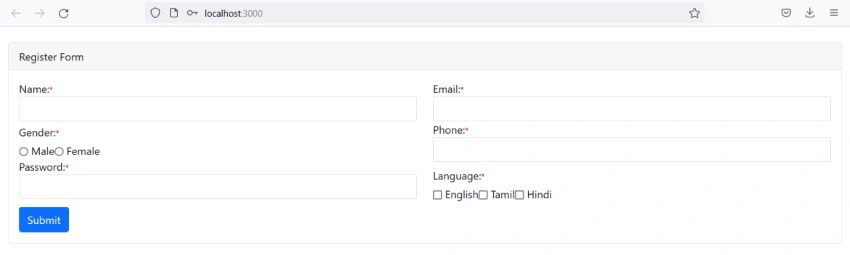
On successful execution of the above command, it will show the browser,
Join the conversation! Your thoughts help the community grow.