

Introduction
Requirements
- Android Studio version 2.3.3
- Little bit XML and JAVA knowledge.
- Android Emulator (or) Android mobile
- Download link (Android Studio)
Steps to be followed
Follow these steps to create a native Email Android application using Android Studio. I have attached the source code too with this article.
Step 1
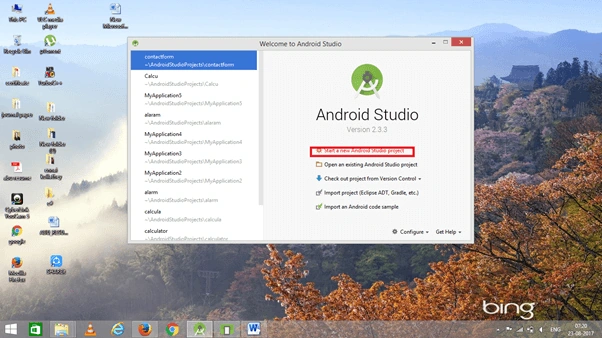
Open Android Studio and start a new Android Studio project.
Step 2
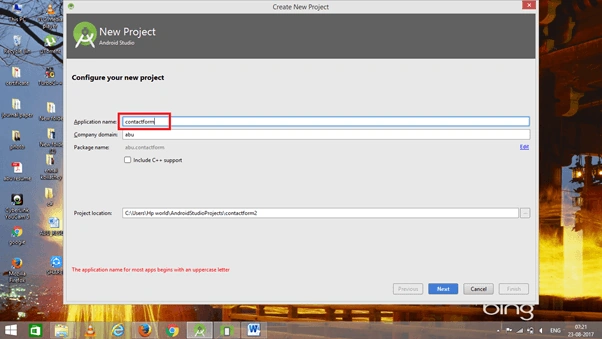
Choose your application name and choose where your project is stored at the location. If you wish to use C++ for coding the project, mark the "Include C++ support" checkbox, and click the "Next" button.
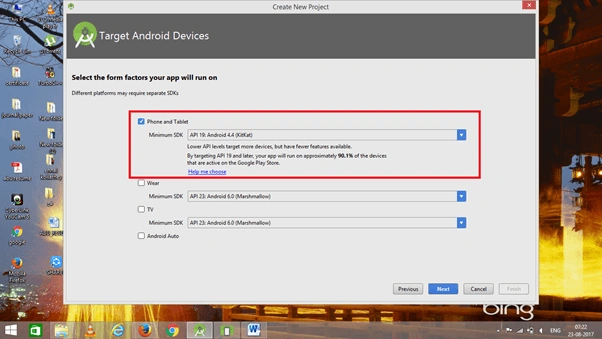
 Now, select the version of Android and select the target Android devices.
Step 3
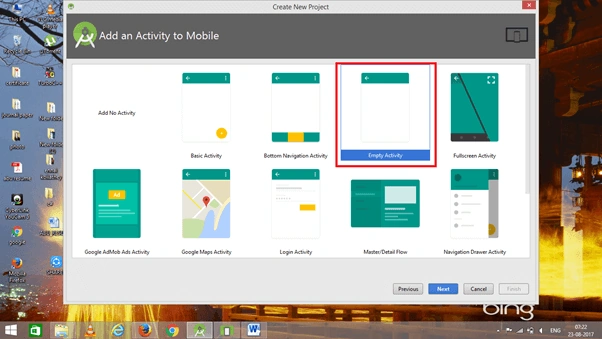
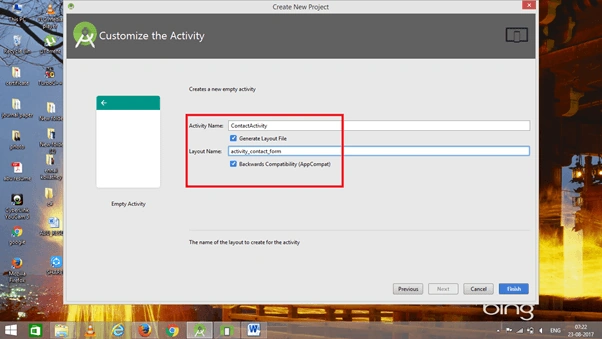
Now, add an Empty Activity and click the "Next" button.
 Add the Activity name and click "Finish".
Step 4
Go to activity_contact_form.xml. This XML file contains the designing code for an Android app.
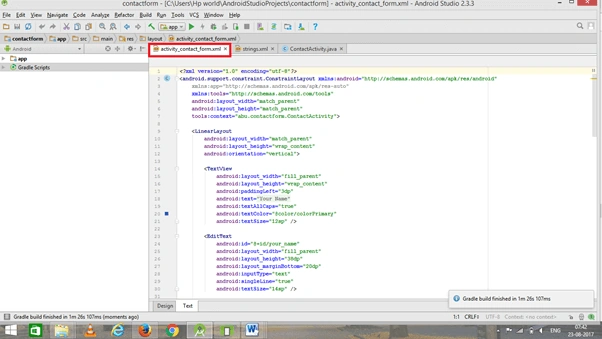 The XML code is given below.
- <?xml version="1.0" encoding="utf-8"?>
- <android.support.constraint.ConstraintLayout xmlns:android="http://schemas.android.com/apk/res/android"
- xmlns:app="http://schemas.android.com/apk/res-auto"
- xmlns:tools="http://schemas.android.com/tools"
- android:layout_width="match_parent"
- android:layout_height="match_parent"
- tools:context="abu.contactform.ContactActivity">
- <LinearLayout
- android:layout_width="match_parent"
- android:layout_height="wrap_content"
- android:orientation="vertical">
- <TextView
- android:layout_width="fill_parent"
- android:layout_height="wrap_content"
- android:paddingLeft="3dp"
- android:text="@string/contact_form_name"
- android:textAllCaps="true"
- android:textColor="@color/colorPrimary"
- android:textSize="12sp" />
- <EditText
- android:id="@+id/your_name"
- android:layout_width="fill_parent"
- android:layout_height="38dp"
- android:layout_marginBottom="20dp"
- android:inputType="text"
- android:singleLine="true"
- android:textSize="14sp" />
- <TextView
- android:layout_width="fill_parent"
- android:layout_height="wrap_content"
- android:paddingLeft="3dp"
- android:text="@string/contact_form_email"
- android:textAllCaps="true"
- android:textColor="@color/colorPrimary"
- android:textSize="12sp" />
- <EditText
- android:id="@+id/your_email"
- android:layout_width="fill_parent"
- android:layout_height="38dp"
- android:layout_marginBottom="20dp"
- android:inputType="textEmailAddress"
- android:singleLine="true"
- android:textSize="14sp" />
- <TextView
- android:layout_width="fill_parent"
- android:layout_height="wrap_content"
- android:paddingLeft="3dp"
- android:text="@string/contact_form_subject"
- android:textAllCaps="true"
- android:textColor="@color/colorPrimary"
- android:textSize="12sp" />
- <EditText
- android:id="@+id/your_subject"
- android:layout_width="fill_parent"
- android:layout_height="38dp"
- android:layout_marginBottom="20dp"
- android:inputType="text"
- android:singleLine="true"
- android:textSize="14sp" />
- <TextView
- android:layout_width="fill_parent"
- android:layout_height="32dp"
- android:paddingLeft="3dp"
- android:text="@string/contact_form_message"
- android:textAllCaps="true"
- android:textColor="@color/colorPrimary"
- android:textSize="12sp" />
- <EditText
- android:id="@+id/your_message"
- android:layout_width="fill_parent"
- android:layout_height="wrap_content"
- android:layout_marginBottom="20dp"
- android:height="180dp"
- android:gravity="top"
- android:inputType="textMultiLine"
- android:textSize="14sp" />
- <Button
- android:id="@+id/post_message"
- android:layout_width="wrap_content"
- android:layout_height="32dp"
- android:layout_gravity="center"
- android:background="@color/colorPrimary"
- android:paddingBottom="1dp"
- android:paddingLeft="15dp"
- android:paddingRight="15dp"
- android:paddingTop="1dp"
- android:text="@string/contact_form_button"
- android:textAllCaps="true"
- android:textColor="@android:color/white"
- android:textSize="13sp" />
- </LinearLayout>
- </android.support.constraint.ConstraintLayout>
Join the conversation! Your thoughts help the community grow.