

Introduction
- In this article, I will explain about checking the temperature and humidity using Arduino Mega 2560.
- It can accurately display the temperature in the serial monitor.
Parts Of Lists
- Arduino Mega 2560
- Temperature sensor
- Hookup Wires
- Bread Board
Temperature Sensor
- Temperature sensor is used to find the temperature of the place.
- It also posses the self low heating and does not cross the 0.1-degree Celsius temperature rise till the air.
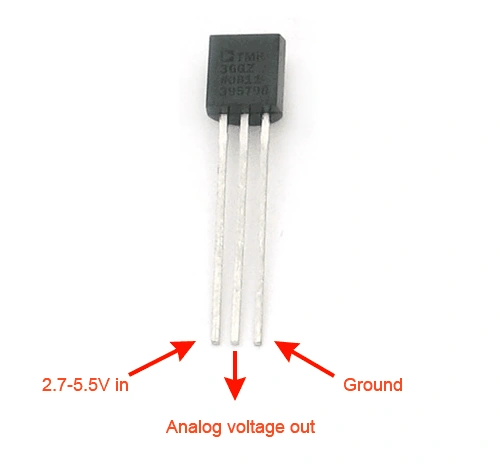
Figure 1: Temperature Sensor
Connection
Step 1: Connection From Temperature Sensor To ArduinoMega2560.
- Connect the 5v of the supply to the 5v of the Arduino mega board.
- Connect the Analog pin of the sensor to the A0 of the Analog of the board.
- Connect the ground pin to the board of the Gnd
Programming
- void getCurrentTemp(int * sign, int * whole, int * fract);
- char temp_string[10];
- void setup()
- {
- Serial.begin(9600);
- // initialize DS18B20 datapin
- digitalWrite(REF_PIN, LOW);
- pinMode(REF_PIN, INPUT); // sets the digital pin as input (logic 1)
- pinMode(A0, INPUT);
- }
- void loop()
- {
- getCurrentTemp(temp_string);
- Serial.println(temp_string);
- delay(1000);
- }
- void OneWireReset(int Pin) // reset. Should improve to act as a presence pulse
- {
- digitalWrite(Pin, LOW);
- pinMode(Pin, OUTPUT); // bring low for 500 us
- delayMicroseconds(500);
- pinMode(Pin, INPUT);
- delayMicroseconds(500);
- }
- void OneWireOutByte(int Pin, byte d) // output byte d (least sig bit first).
- {
- byte n;
- for (n = 8; n != 0; n--)
- {
- if ((d & 0x01) == 1) // test least sig bit
- {
- digitalWrite(Pin, LOW);
- pinMode(Pin, OUTPUT);
- delayMicroseconds(5);
- pinMode(Pin, INPUT);
- delayMicroseconds(60);
- }
- else
- {
- digitalWrite(Pin, LOW);
- pinMode(Pin, OUTPUT);
- delayMicroseconds(60);
- pinMode(Pin, INPUT);
- }
- d = d >> 1; // now the next bit is in the least sig bit position.
- }
- }
- byte OneWireInByte(int Pin) // read byte, least sig byte first
- {
- byte d, n, b;
- for (n = 0; n < 8; n++)
- {
- digitalWrite(Pin, LOW);
- pinMode(Pin, OUTPUT);
- delayMicroseconds(5);
- pinMode(Pin, INPUT);
- delayMicroseconds(5);
- b = digitalRead(Pin);
- delayMicroseconds(50);
- d = (d >> 1) | (b << 7); // shift d to right and insert b in most sig bit position
- }
- return (d);
- }
- void getCurrentTemp(char * temp)
- {
- int HighByte, LowByte, TReading, Tc_100, sign, whole, fract;
- OneWireReset(REF_PIN);
- OneWireOutByte(REF_PIN, 0xcc);
- OneWireOutByte(REF_PIN, 0x44); // perform temperature conversion, strong pullup for one sec
- OneWireReset(REF_PIN);
- OneWireOutByte(REF_PIN, 0xcc);
- OneWireOutByte(REF_PIN, 0xbe);
- LowByte = OneWireInByte(REF_PIN);
- HighByte = OneWireInByte(REF_PIN);
- TReading = (HighByte << 8) + LowByte;
- sign = TReading & 0x8000; // test most sig bit
- if (sign) // negative
- {
- TReading = (TReading ^ 0xffff) + 1; // 2's comp
- }
- Tc_100 = (6 * TReading) + TReading / 4; // multiply by (100 * 0.0625) or 6.25
- whole = Tc_100 / 100; // separate off the whole and fractional portions
- fract = Tc_100 % 100;
- if (sign)
- {
- temp[0] = '-';
- }
- else
- {
- temp[0] = '+';
- }
- if (whole / 100 == 0)
- {
- temp[1] = ' ';
- }
- else
- {
- temp[1] = whole / 100 + '0';
- }
- temp[2] = (whole - (whole / 100) * 100) / 10 + '0';
- temp[3] = whole - (whole / 10) * 10 + '0';
- temp[4] = '.';
- temp[5] = fract / 10 + '0';
- temp[6] = fract - (fract / 10) * 10 + '0';
- temp[7] = '\0';
- }
Explanation
- In this article I explained about the Checking temperature and humidity using Arduinomega2560.
- It can accurately give the temperature of the place in the serial monitor.
Output
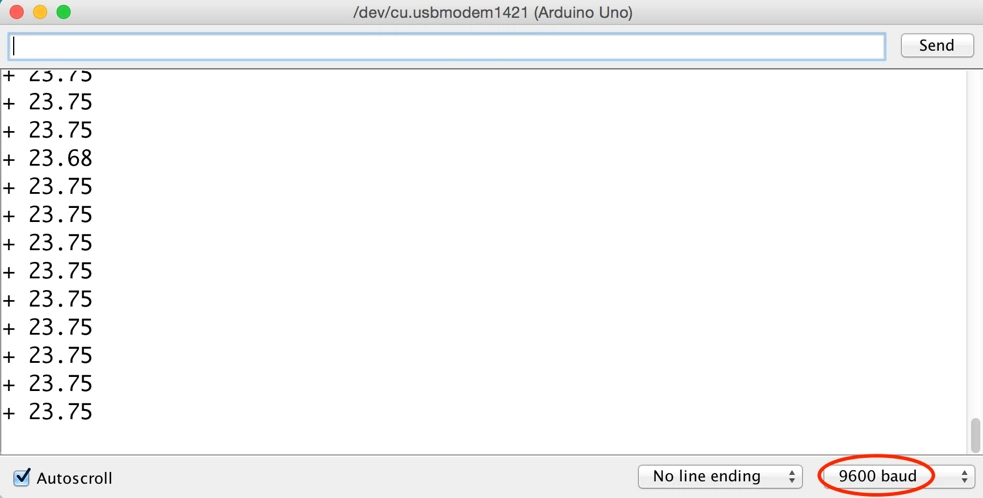
Figure 2: Output
Shobana JPosted Jul 8, 2016, 4:16 AM
Big one n nice share
Shobana JPosted Jul 8, 2016, 4:14 AM
Nice share..good one
Sonu ChaudharyPosted May 26, 2016, 10:18 AM
good one
Ketak BhalsingPosted May 26, 2016, 2:09 AM
Nice Info....
Debasis SahaPosted May 26, 2016, 1:18 AM
Good One..
RajaPosted May 26, 2016, 12:08 AM
Great Work.I was Learned many more things from your articles Thank You!