

In this article, we will discuss how to invoke API, using AJAX in ASP.NET .Core. This article will explain how to create Web API in ASP.NET Core and call that Web API, using jQuery AJAX in Razor.
Milestone
Milestone
- Create a simple ASP.NET Core Web Application project.
- Add a Model.
- Create Web API returning list of the data.
- Create a new Controller and View.
- Write jQuery AJAX code to invoke Web API and parse into HTML.
Create simple ASP.NET Core Web Application.
Creating a Web Application is similar to creating a ASP.NET MVC Web Application.
Step 1
Open Visual Studio.
Creating a Web Application is similar to creating a ASP.NET MVC Web Application.
Step 1
Open Visual Studio.
Step 2
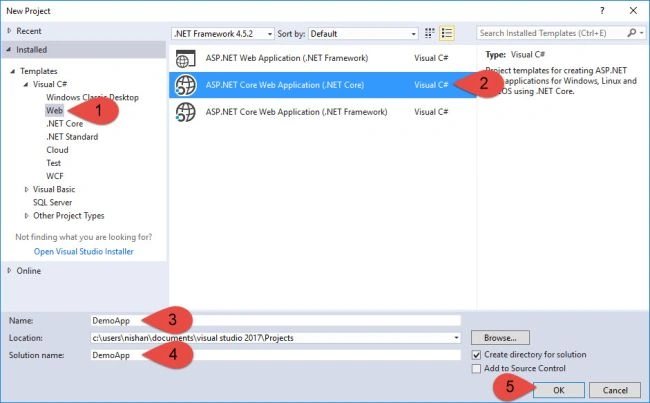
Go to File => New Project.
Go to File => New Project.
- Select Visual C# => .NET Core => ASP.NET Core Web Application(.NET Core).
- Name your Solution (DemoApp), Project (DemoApp) and click OK.
- Select Web Application.
- Change Authentication to Individual Accounts.
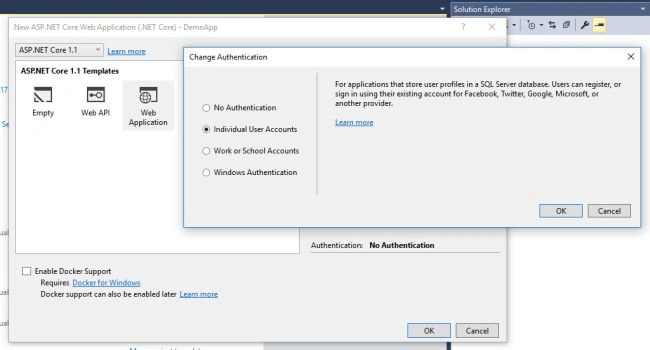
Now, Visual Studio 2017 will create a project for you.
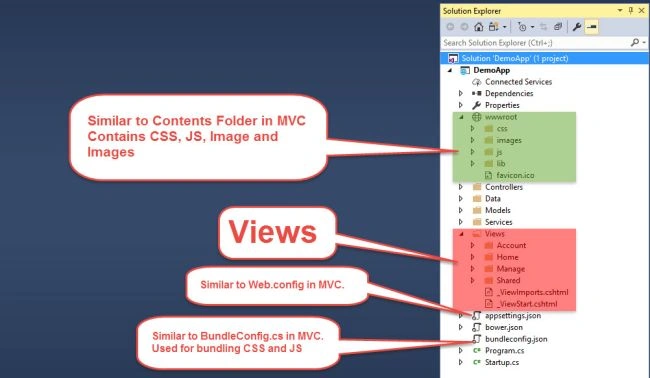
Once the project is created, you will see the screen, as shown below.
Once the project is created, you will see the screen, as shown below.
Add Model
Step 1
Create a new folder under Models folder named Student.
Step 1
Create a new folder under Models folder named Student.
Step 2
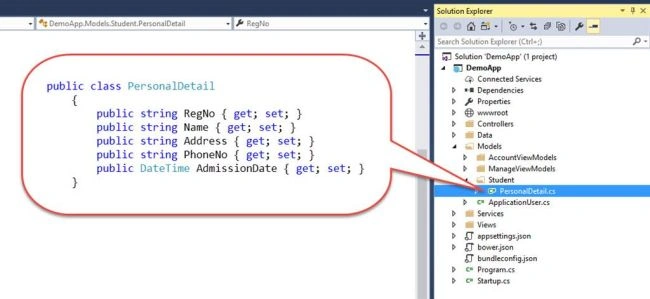
Add New Class named as PersonalDetail.
Step 3
Add the lines of codes given below to PersonalDetail class.
Add New Class named as PersonalDetail.
Step 3
Add the lines of codes given below to PersonalDetail class.
Code sample
- public class PersonalDetail
- {
- public string RegNo { get; set; }
- public string Name { get; set; }
- public string Address { get; set; }
- public string PhoneNo { get; set; }
- public DateTime AdmissionDate { get; set; }
- }
Add Web API
Step 1
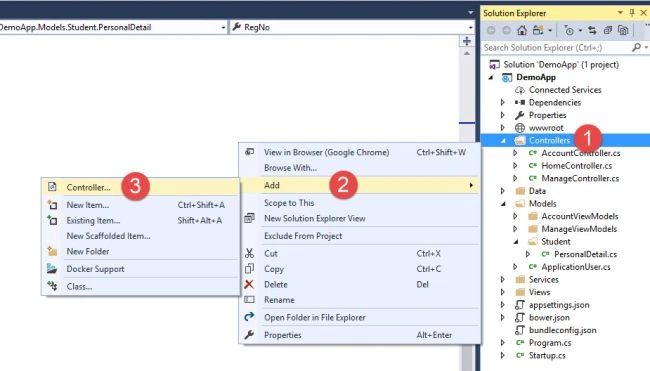
Right click on Controller Folder and Add => Controller.
Step 1
Right click on Controller Folder and Add => Controller.
Step 2
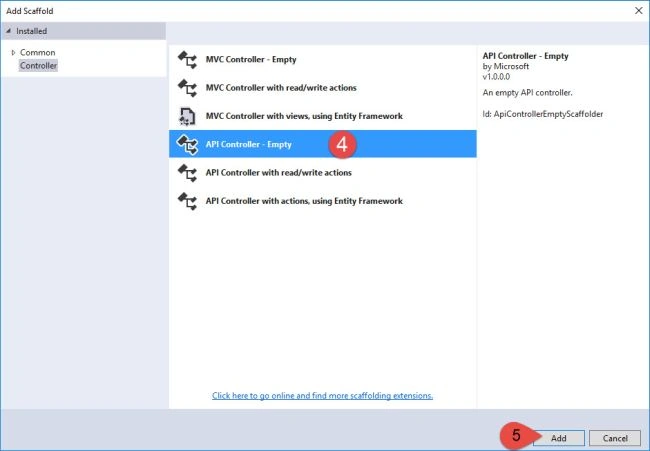
Select API Controller - Empty.
Step 3
Click Add.
Select API Controller - Empty.
Step 3
Click Add.
Step 4
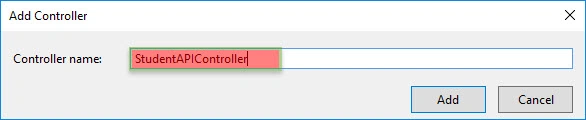
Name the Web API as StudentAPI.
Name the Web API as StudentAPI.
Step 5
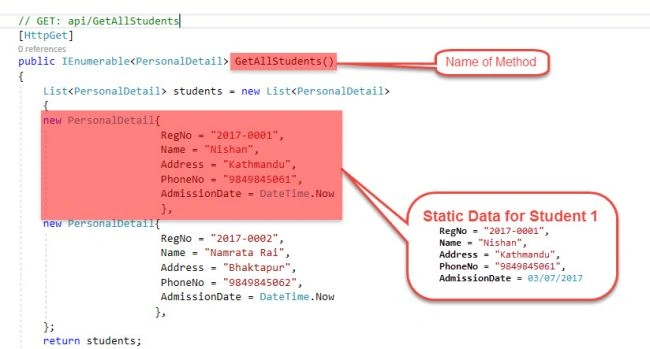
Now, create [HttpGet] type method called GetAllStudents().
Now, create [HttpGet] type method called GetAllStudents().
Your method should look, as shown below.
Code sample
- public class StudentAPIController : Controller
- {
- // GET: api/GetAllStudents
- [HttpGet]
- public IEnumerable<PersonalDetail> GetAllStudents()
- {
- List<PersonalDetail> students = new List<PersonalDetail>
- {
- new PersonalDetail{
- RegNo = "2017-0001",
- Name = "Nishan",
- Address = "Kathmandu",
- PhoneNo = "9849845061",
- AdmissionDate = DateTime.Now
- },
- new PersonalDetail{
- RegNo = "2017-0002",
- Name = "Namrata Rai",
- Address = "Bhaktapur",
- PhoneNo = "9849845062",
- AdmissionDate = DateTime.Now
- },
- };
- return students;
- }
- }
Creating Controller and View
You can create a new controller and view for displaying the data returned by Web API. For Now I used Index Method of Home Controller to call Web API just created.
Step 1
Open Views => Home => Index.cshtml
Step 2
Lets remove unnecessady HTML codes.
Step 3
Add Reference to Jquery.
Step 4
Let's add a simple HTML Table to display data returned from Web API in tablular form.
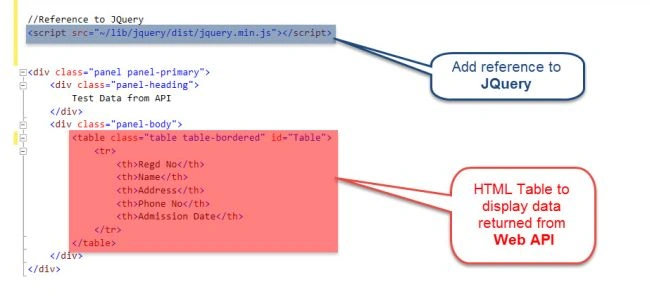
Code sample
- //Reference to JQuery
- <script src="~/lib/jquery/dist/jquery.min.js"></script>
- <div class="panel panel-primary">
- <div class="panel-heading">
- Test Data from API
- </div> <!--en dof panel-heading -->
- <div class="panel-body">
- <table class="table table-bordered" id="Table">
- <tr>
- <th>Regd No</th>
- <th>Name</th>
- <th>Address</th>
- <th>Phone No</th>
- <th>Admission Date</th>
- </tr> <!--end of table-row -->
- </table> <!--end of table -->
- </div> <!--end of Panel-body -->
- </div> <!--end of Panel -->
Step 5
Let's add jQuery scripts to call Web API, which we just created and parse the data sent by API to HTML. AJAX looks, as shown below.
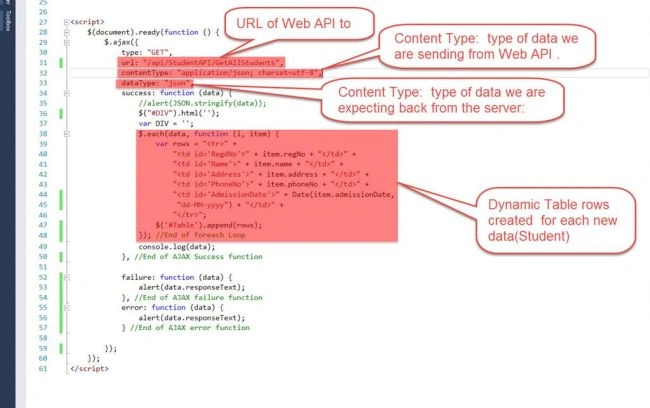
Let's add jQuery scripts to call Web API, which we just created and parse the data sent by API to HTML. AJAX looks, as shown below.
Code sample
- <script>
- $(document).ready(function () {
- $.ajax({
- type: "GET",
- url: "/api/StudentAPI/GetAllStudents",
- contentType: "application/json; charset=utf-8",
- dataType: "json",
- success: function (data) {
- //alert(JSON.stringify(data));
- $("#DIV").html('');
- var DIV = '';
- $.each(data, function (i, item) {
- var rows = "<tr>" +
- "<td id='RegdNo'>" + item.regNo + "</td>" +
- "<td id='Name'>" + item.name + "</td>" +
- "<td id='Address'>" + item.address + "</td>" +
- "<td id='PhoneNo'>" + item.phoneNo + "</td>" +
- "<td id='AdmissionDate'>" + Date(item.admissionDate,
- "dd-MM-yyyy") + "</td>" +
- "</tr>";
- $('#Table').append(rows);
- }); //End of foreach Loop
- console.log(data);
- }, //End of AJAX Success function
- failure: function (data) {
- alert(data.responseText);
- }, //End of AJAX failure function
- error: function (data) {
- alert(data.responseText);
- } //End of AJAX error function
- });
- });
- </script>
AJAX is a developer's dream(Defn from W3Schools), because you can
- Update a Web page without reloading the page.
- Request data from a server - after the page has loaded.
- Receive data from a server - after the page has loaded.
- Send the data to a Server - in the background.
To learn the basics of AJAX, please visit https://www.w3schools.com/xml/ajax_intro.asp
Parts of AJAX
type: GET/POST
url : URL ofWeb API to pull/push data
contentType: application/json
dataType: json
success: function()
failure: function()
error: function()
Application Execution
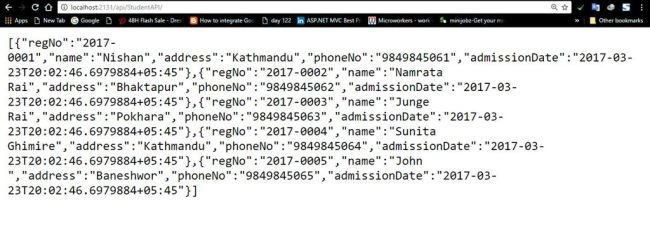
Now, run the Index Mthod of Home Page Controller and you will be able to retrieve all the data passed from Web API. If you navigate to the Web API, which we just created, it looks as shown below.
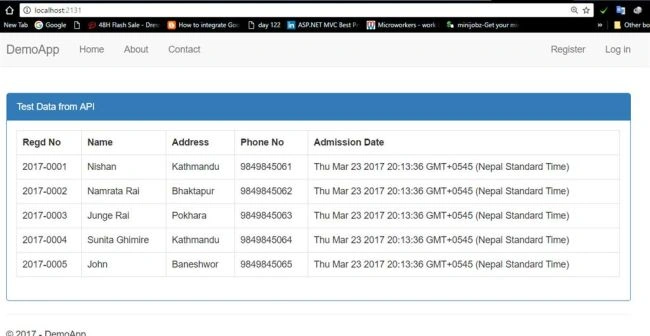
Now, let's navigate to Index Method of Home Contoller (Where we load WebAPI using JQuery AJAX)
JSON data shown above is parsed here.
Now, run the Index Mthod of Home Page Controller and you will be able to retrieve all the data passed from Web API. If you navigate to the Web API, which we just created, it looks as shown below.
Now, let's navigate to Index Method of Home Contoller (Where we load WebAPI using JQuery AJAX)
JSON data shown above is parsed here.
Checking data, using Browser console
Let's check the data shown above, using Browser console too. The data in the console looks as shown below.
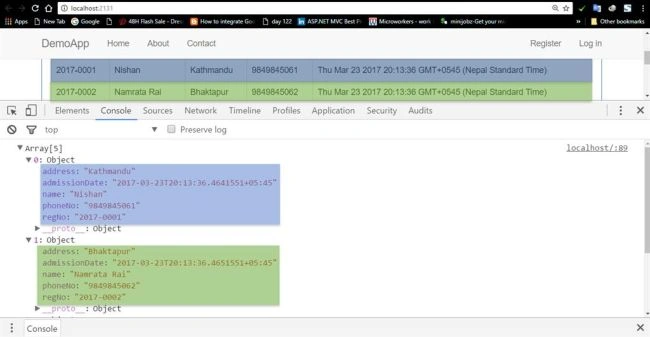
If you like to show the data only after clicking any buttons, you can customize the script section to load the data.
Summary
I hope you learned:
- How to create a simple SP.NET Web Application (.NET Core).
- How to create a simple Web API.
- Pass data from Web API.
- Call Web API, using AJAX and parse the data to HTML.
Manoj KumarPosted Mar 23, 2022, 5:11 AM
API is showing But the datas are not showing in the GRID
Arbaz QureshiPosted Mar 17, 2022, 11:22 AM
I want to how can we retrieve data from one project to another project by using web API in the asp.net core
Dharmendra Kumar PanditPosted Sep 6, 2020, 6:37 AM
Nice article very help ful. thank you.
Laxmidhar SahooPosted Dec 21, 2019, 5:12 AM
Thanks for a usefull article
Prateek JainPosted May 20, 2019, 3:41 AM
Check out the best Ajax tutorials or courses recommended by experts. http://letsfindcourse.com/ajax
ray wasongaPosted Mar 6, 2019, 7:17 AM
Hi Nishan, could you update this to net core 2.+?
Farhan AhmedPosted Aug 8, 2018, 8:19 AM
Nice.............
Dennis ThomasPosted Feb 28, 2018, 1:00 AM
Well explained Nishan, thank you!
Bruno AugustoPosted Jan 15, 2018, 9:44 AM
Hi! In the script section, change the AJAX's url line to this: "url: "/StudentAPI/GetAllStudents". Thx for the good example!
عمر أبوروكPosted Jul 21, 2017, 4:00 PM
Hi, thank you for sharing what is the Route tag path for StudentAPIController did you used here?
Akin FakokundePosted Apr 3, 2017, 12:00 PM
Http://localhost:53348/api/StudentAPI is working but http://localhost:53348/api/StudentAPI/GetAllStudents isn't loading on browser also inside script
Han NisPosted Mar 25, 2017, 11:22 PM
very helpful. Thanks for sharing