

In Part 1, we discussed the basics of ASP.NET Web API. Now, let’s discuss HTTP Verbs and their implementation. When you perform any action on a database table, then perform one of following activities:
- C-Create
- R-Read
- U-Update
- D-Delete
Now, every action corresponds to a specific method in Web API which is described below.
| Create | Post |
| Read | Get |
| Update | Put |
| Delete | Delete |
As per the above table, if you want to create a resource then you must use Post method, for read, you must use Get, for updating a resource, use Put and for deleting a resource, use the Delete method.
Now, let's understand some terms and concepts of HTTP.
Terms and concepts of HTTP
- Request Verbs
These verbs, i.e., Get, Post, Put, and Delete, describe what should be done with a resource. - Request Header
It contains additional information about requests like what type of response it requires like JSON, XML, string or any other format. - Request Body
It contains the data to be sent to the server; such as - post request contains data that needs to be inserted into the system. - Response Body
It contains data sent as response from server like Employee details, it can be in XML, JSON or any other format. - Response State Code
Those are the codes which inform updated client about the status of the request, like 200-OK,404- not found, etc.
Now, let’s understand it with an example.
Go to File >> New Project. Select ASP.NET Web Application and add the name of the project, as shown below.
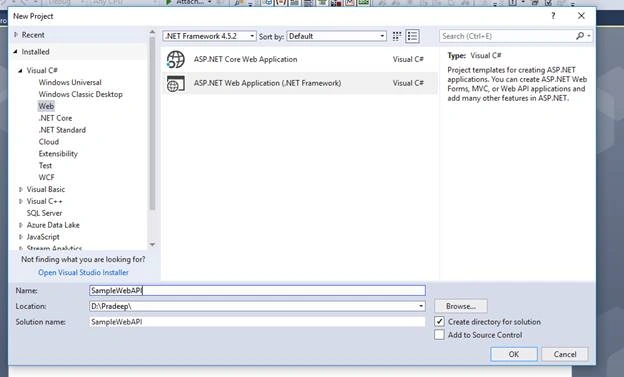
Now, select Web API, as shown below.
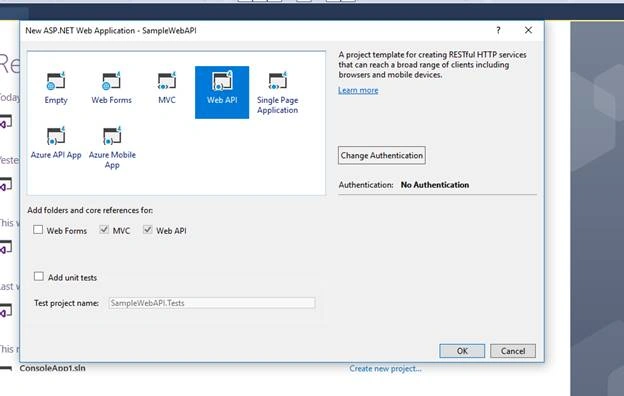
Now, go to VlueController,
- public class ValuesController: ApiController {
- // GET api/values
- public IEnumerable < string > Get() {
- return new string[] {
- "value1",
- "value2"
- };
- }
- // GET api/values/5
- public string Get(int id) {
- return "value";
- }
- // POST api/values
- public void Post([FromBody] string value) {}
- // PUT api/values/5
- public void Put(int id, [FromBody] string value) {}
- // DELETE api/values/5
- public void Delete(int id) {}
- }
The above code contains Get, Post, Put and Delete methods which correspond to GET, PUT, POST and DELTE HTTP Verbs.
Now, keep a break point on each function and run the application and access the below URL http://localhost:XXX /api/values and break point on Get() will get triggered.
Whenever you try to access http://localhost:XXX /api/values/1, then Get(int id) will get triggered.
Note
You can use Fiddler for the same and test all the methods.
Now, in the next article, we will be discussing Content Negotiation and Mediatype Formatters.
Naresh SinghalPosted Jun 19, 2018, 8:45 AM
Nice article, but May to post multiple get and post and put methods routing without changing in config file ?