

Introduction
The jQuery Unobtrusive Ajax library complements jQuery Ajax methods by adding support for specifying options for HTML replacement via Ajax calls HTML5 data.
Step 1
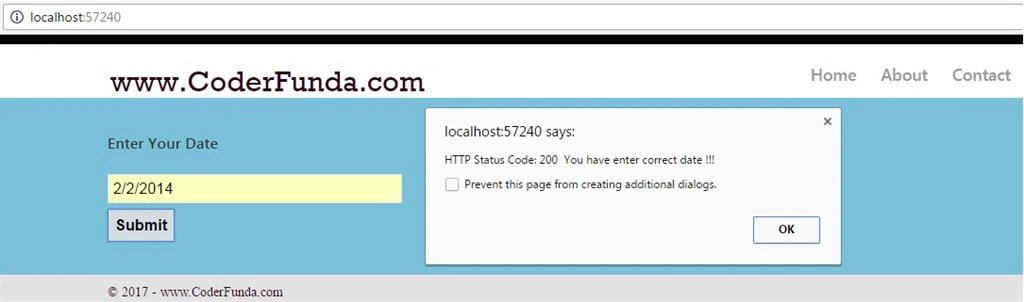
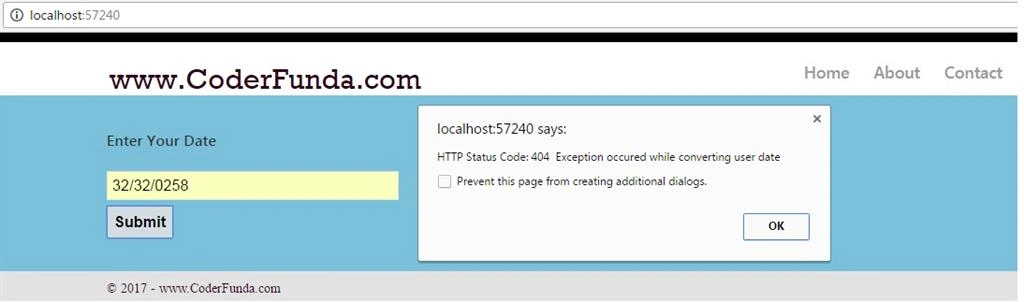
Create a new MVC Empty Project using Visual Studio. This example shows how to return Ajax Begin Form Ajax Options custom arguments for OnSuccess, OnFailure.
Add new Layout.cshtml into shared folder. Add references of Kendo, CSS, and JavaScript into this Layout.cshtml
The jQuery Unobtrusive Ajax library complements jQuery Ajax methods by adding support for specifying options for HTML replacement via Ajax calls HTML5 data.
Step 1
Create a new MVC Empty Project using Visual Studio. This example shows how to return Ajax Begin Form Ajax Options custom arguments for OnSuccess, OnFailure.
Add new Layout.cshtml into shared folder. Add references of Kendo, CSS, and JavaScript into this Layout.cshtml
- <!DOCTYPE html>
- <style>
- .fontColor {
- color:#2f0319 !important
- }
- </style>
- <html>
- <head>
- <title>@ViewBag.Title Ajax Options</title>
- <link href="~/Content/Site.css" rel="stylesheet" />
- <link href="http://cdn.kendostatic.com/2014.2.716/styles/kendo.common.min.css" rel="stylesheet" type="text/css" />
- <link href="http://cdn.kendostatic.com/2014.2.716/styles/kendo.dataviz.min.css" rel="stylesheet" type="text/css" />
- <link href="http://cdn.kendostatic.com/2014.2.716/styles/kendo.default.min.css" rel="stylesheet" type="text/css" />
- <link href="http://cdn.kendostatic.com/2014.2.716/styles/kendo.dataviz.default.min.css" rel="stylesheet" type="text/css" />
- <script src="http://cdn.kendostatic.com/2014.2.716/js/jquery.min.js"></script>
- <script src="http://cdn.kendostatic.com/2014.2.716/js/kendo.all.min.js"></script>
- <script src="http://cdn.kendostatic.com/2014.2.716/js/kendo.aspnetmvc.min.js"></script>
- <script src="~/Scripts/kendo.modernizr.custom.js"></script>
- </head>
- <body>
- <header>
- <div class="content-wrapper">
- <div class="float-left">
- <p class="site-title">@Html.ActionLink("www.CoderFunda.com", "", "", new { @class="fontColor" })</p>
- </div>
- <div class="float-right">
- <nav>
- <ul id="menu">
- <li>@Html.ActionLink("Home", "Index", "Home")</li>
- <li>@Html.ActionLink("About", "About", "Home")</li>
- <li>@Html.ActionLink("Contact", "Contact", "Home")</li>
- </ul>
- </nav>
- </div>
- </div>
- </header>
- <div id="body">
- @RenderSection("featured", required: false)
- <section class="content-wrapper main-content clear-fix">
- @RenderBody()
- </section>
- </div>
- <footer>
- <div class="content-wrapper">
- <div class="float-left">
- <p><span class="fontColor" style="font:14px large"> © @DateTime.Now.Year - www.CoderFunda.com</span> </p>
- </div>
- </div>
- </footer>
- </body>
- </html>
Ken SamsonPosted Jan 10, 2018, 6:59 PM
You have a bug - you're actually never calling the OnFailure method - the message does not contain 'Error Message:' because the status code is not actually set. You need to add Response.StatusCode = 404; to the catch statement to call the ajax OnFailure method.
Jignesh TrivediPosted Feb 22, 2017, 3:04 AM
ASP.NET 5 is rename to ASP.NET core. AM I right?