Let’s start this article.
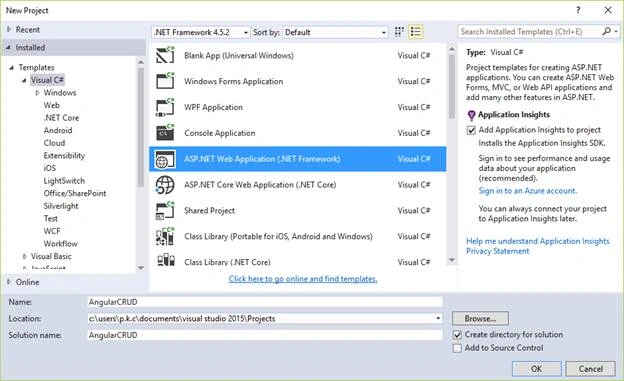
First, we create an MVC project. Go to File-> New-> Project and select “ASP.NET Web Application”.
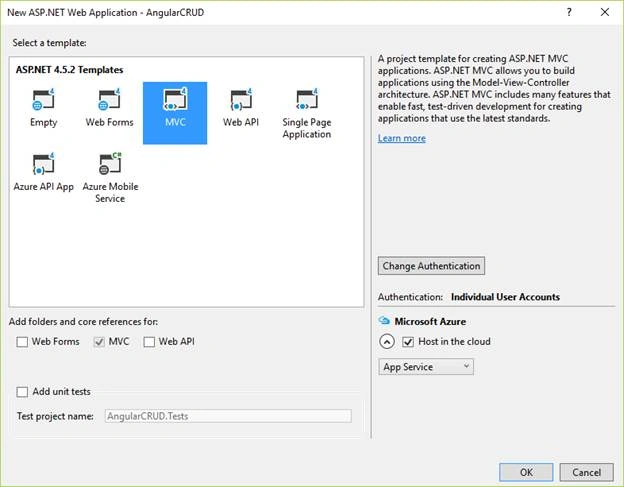
Now, select MVC template for the project.
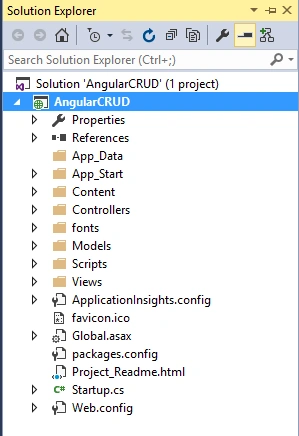
In Solution Explorer window, we can see the structure of our project.
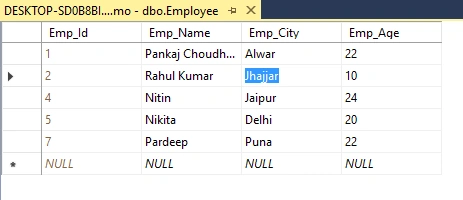
Now, we add the model classes in our project. We have an Employee table which we will use in our project and implement the CRUD operation on.
- CREATE TABLE [dbo].[Employee](
- [Emp_Id] [int] IDENTITY(1,1) NOT NULL,
- [Emp_Name] [varchar](max) NULL,
- [Emp_City] [varchar](max) NULL,
- [Emp_Age] [int] NULL,
- CONSTRAINT [PK_Employee] PRIMARY KEY CLUSTERED
- (
- [Emp_Id] ASC
- )WITH (PAD_INDEX = OFF, STATISTICS_NORECOMPUTE = OFF, IGNORE_DUP_KEY = OFF, ALLOW_ROW_LOCKS = ON, ALLOW_PAGE_LOCKS = ON) ON [PRIMARY]
- ) ON [PRIMARY] TEXTIMAGE_ON [PRIMARY]
-
- GO
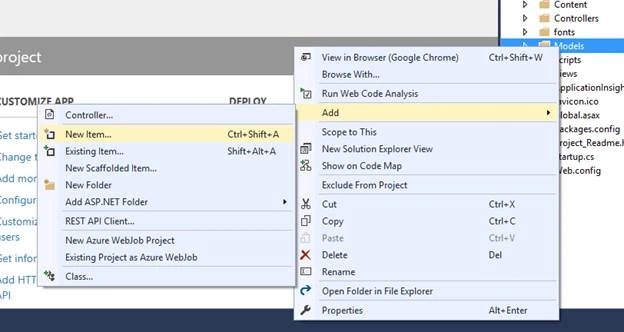
For database CRUD operation, we will use the Entity Framework Data First approach. For this, right click on “Model” folder and click on “New Item” option.
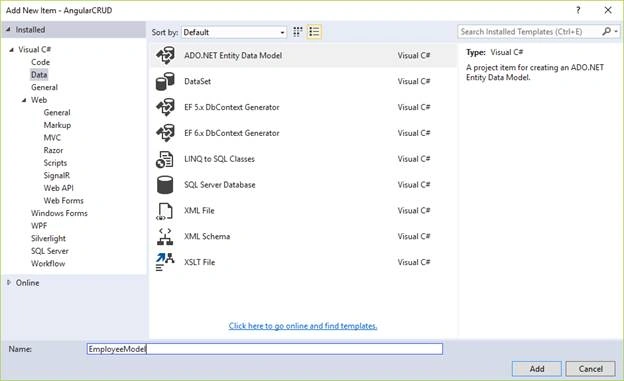
Now, select “ADO.NET Entity Data Model” and name it as “EmployeeModel”.
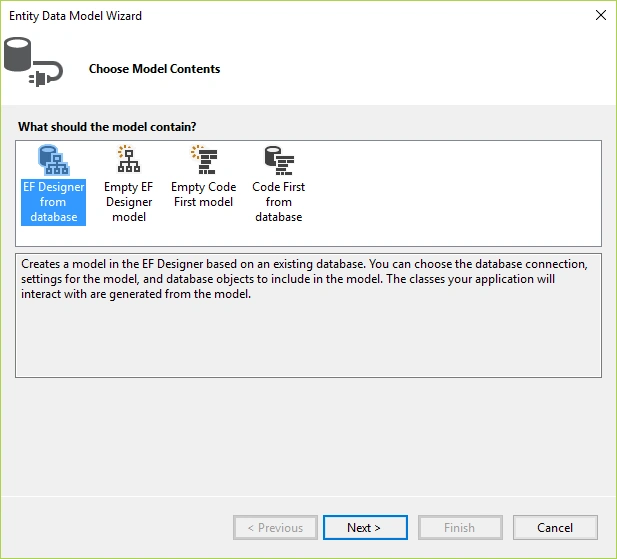
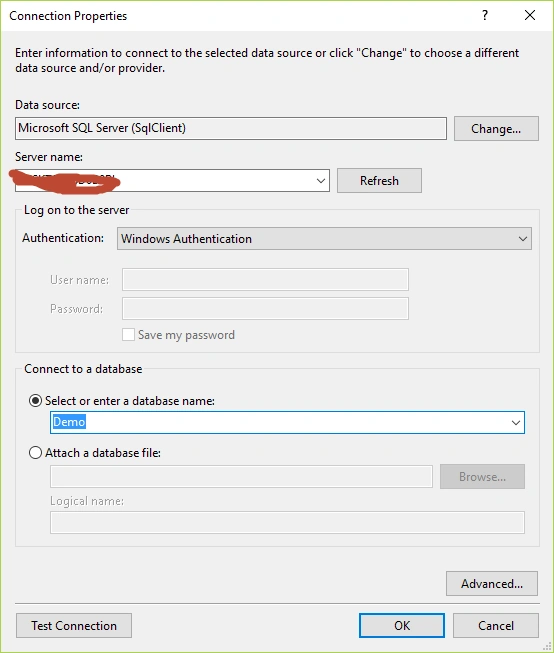
Establish a connection with “SQL Server Database” Engine.
Select Employee table Entity Data Model Wizard and click on Finish button.
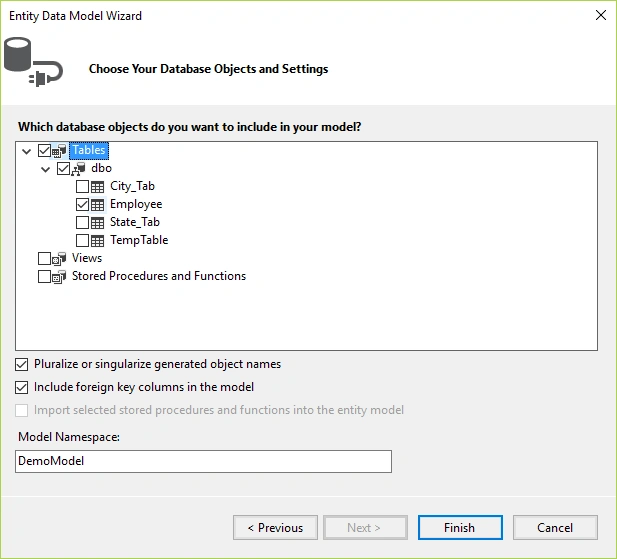
Now, go to your project’s Model folder where you can see that Employee Model class has been created. So, you have successfully created a connection with database.
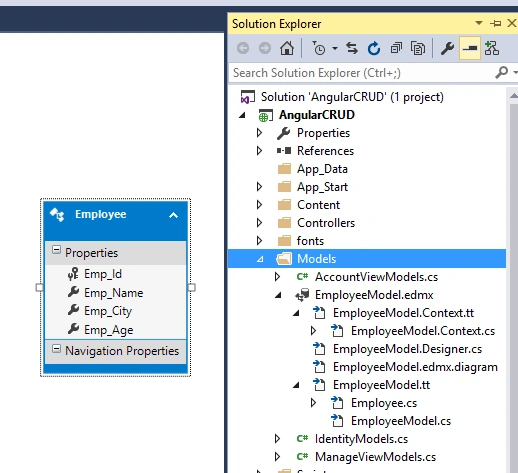
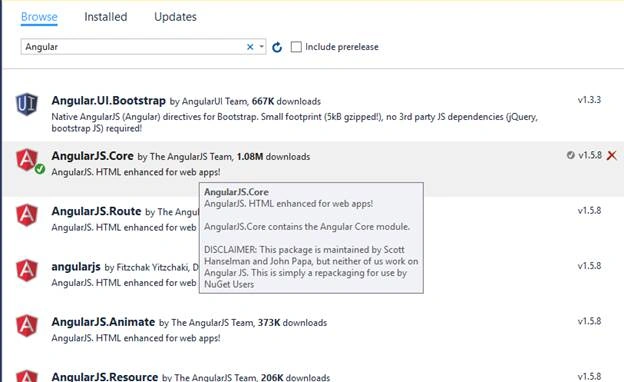
After this, we download and install the AngularJS package. Right click on Project Name and select “Manage NuGet Packages” option and download the AngularJS packages.
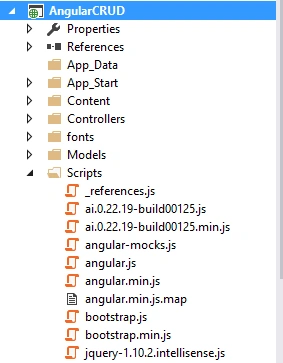
In Scripts folder, you can find that AngularJS files have been installed successfully.
Now, we create the Employee Controller. So, right click on Controller Folder and create an empty Controller.
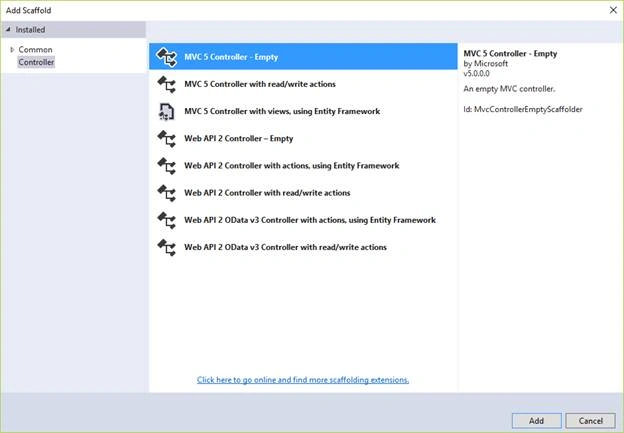
Now, copy and paste the following code into your Employee Controller section.
- using AngularCRUD.Models;
- using System;
- using System.Collections.Generic;
- using System.Linq;
- using System.Web;
- using System.Web.Mvc;
- namespace AngularCRUD.Controllers {
- public class EmployeeController: Controller {
-
- public ActionResult Index() {
- return View();
- }
-
-
-
-
-
- public JsonResult Get_AllEmployee() {
- using(DemoEntities Obj = new DemoEntities()) {
- List < Employee > Emp = Obj.Employees.ToList();
- return Json(Emp, JsonRequestBehavior.AllowGet);
- }
- }
-
-
-
-
-
- public JsonResult Get_EmployeeById(string Id) {
- using(DemoEntities Obj = new DemoEntities()) {
- int EmpId = int.Parse(Id);
- return Json(Obj.Employees.Find(EmpId), JsonRequestBehavior.AllowGet);
- }
- }
-
-
-
-
-
- public string Insert_Employee(Employee Employe) {
- if (Employe != null) {
- using(DemoEntities Obj = new DemoEntities()) {
- Obj.Employees.Add(Employe);
- Obj.SaveChanges();
- return "Employee Added Successfully";
- }
- } else {
- return "Employee Not Inserted! Try Again";
- }
- }
-
-
-
-
-
- public string Delete_Employee(Employee Emp) {
- if (Emp != null) {
- using(DemoEntities Obj = new DemoEntities()) {
- var Emp_ = Obj.Entry(Emp);
- if (Emp_.State == System.Data.Entity.EntityState.Detached) {
- Obj.Employees.Attach(Emp);
- Obj.Employees.Remove(Emp);
- }
- Obj.SaveChanges();
- return "Employee Deleted Successfully";
- }
- } else {
- return "Employee Not Deleted! Try Again";
- }
- }
-
-
-
-
-
- public string Update_Employee(Employee Emp) {
- if (Emp != null) {
- using(DemoEntities Obj = new DemoEntities()) {
- var Emp_ = Obj.Entry(Emp);
- Employee EmpObj = Obj.Employees.Where(x => x.Emp_Id == Emp.Emp_Id).FirstOrDefault();
- EmpObj.Emp_Age = Emp.Emp_Age;
- EmpObj.Emp_City = Emp.Emp_City;
- EmpObj.Emp_Name = Emp.Emp_Name;
- Obj.SaveChanges();
- return "Employee Updated Successfully";
- }
- } else {
- return "Employee Not Updated! Try Again";
- }
- }
- }
- }
After creating the Controller, now, we create a View. Right click on Index method and create an Empty View.
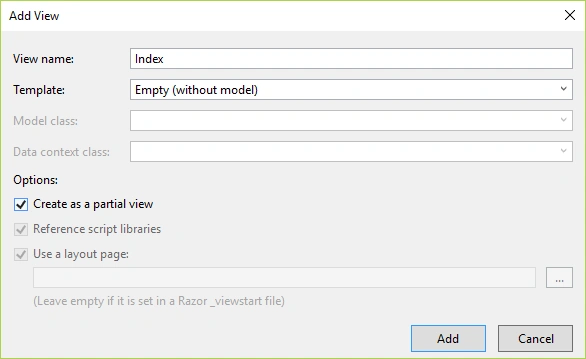
Paste the following code into the Index View:
- @{
- ViewBag.Title = "Index";
- }
-
- <style>
- .btn-space {
- margin-left: -5%;
- background-color: cornflowerblue;
- font-size: large;
- }
- </style>
- <h2>Index</h2>
- <div ng-app="myApp">
- <div ng-controller="myCtrl" ng-init="GetAllData()" class="divList">
- <p class="divHead">List of Employee</p>
- <table cellpadding="12" class="table table-bordered table-hover">
- <tr>
- <td>
- <b>ID</b>
- </td>
- <td>
- <b>Name</b>
- </td>
- <td>
- <b>City</b>
- </td>
- <td>
- <b>Age</b>
- </td>
- <td>
- <b>Actions</b>
- </td>
- </tr>
- <tr ng-repeat="Emp in employees">
- <td>
- {{Emp.Emp_Id}}
- </td>
- <td>
- {{Emp.Emp_Name}}
- </td>
- <td>
- {{Emp.Emp_City}}
- </td>
- <td>
- {{Emp.Emp_Age}}
- </td>
- <td>
- <input type="button" class="btn btn-warning" value="Update" ng-click="UpdateEmp(Emp)" />
- <input type="button" class="btn btn-danger" value="Delete" ng-click="DeleteEmp(Emp)" />
- </td>
- </tr>
- </table>
- <div class="form-horizontal" role="form">
- <div class="container">
- <div class="row">
- <h2>
- <span id="spn">Add New Employee</span>
- </h2>
- </div>
- <div class="row">
- <div class="col-sm-6 col-lg-4">
- <div class="form-group">
- <label class="col-md-4 control-label">Name:</label>
- <div class="col-md-8">
- <input type="text" class="form-control" id="inputEmail" placeholder="Name" ng-model="EmpName">
- </div>
- </div>
- </div>
- <div class="col-sm-6 col-lg-4">
- <div class="form-group">
- <label class="col-md-4 control-label">City:</label>
- <div class="col-md-8">
- <input type="text" class="form-control" id="inputPassword" placeholder="City" ng-model="EmpCity">
- </div>
- </div>
- </div>
- <div class="col-sm-6 col-lg-4">
- <div class="form-group">
- <label class="col-md-4 control-label">Age:</label>
- <div class="col-md-8">
- <input type="text" class="form-control" id="inputLabel3" placeholder="Age" ng-model="EmpAge">
- </div>
- </div>
- </div>
- </div>
- <div class="row">
- <div class="col-sm-6 col-lg-4">
- <input type="button" id="btnSave" class="form-control btn-space" value="Submit" ng-click="InsertData()" />
- </div>
- </div>
- </div>
- </div>
- </div>
- @Html.Hidden("EmpID_")
-
- </div>
For CRUD operations in AngularJS, we create a JavaScript file, write the code into that file, and implement this file into our Index View.
First, create a JavaScript file and copy the following code.
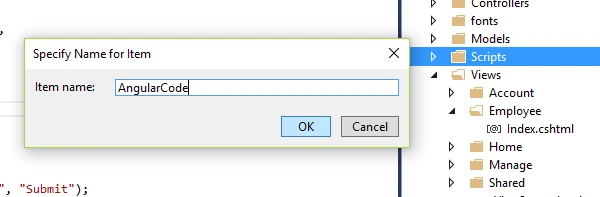 JavaScript code
 - var app = angular.module("myApp", []);
- app.controller("myCtrl", function($scope, $http) {
- debugger;
- $scope.InsertData = function() {
- var Action = document.getElementById("btnSave").getAttribute("value");
- if (Action == "Submit") {
- $scope.Employe = {};
- $scope.Employe.Emp_Name = $scope.EmpName;
- $scope.Employe.Emp_City = $scope.EmpCity;
- $scope.Employe.Emp_Age = $scope.EmpAge;
- $http({
- method: "post",
- url: "http://localhost:39209/Employee/Insert_Employee",
- datatype: "json",
- data: JSON.stringify($scope.Employe)
- }).then(function(response) {
- alert(response.data);
- $scope.GetAllData();
- $scope.EmpName = "";
- $scope.EmpCity = "";
- $scope.EmpAge = "";
- })
- } else {
- $scope.Employe = {};
- $scope.Employe.Emp_Name = $scope.EmpName;
- $scope.Employe.Emp_City = $scope.EmpCity;
- $scope.Employe.Emp_Age = $scope.EmpAge;
- $scope.Employe.Emp_Id = document.getElementById("EmpID_").value;
- $http({
- method: "post",
- url: "http://localhost:39209/Employee/Update_Employee",
- datatype: "json",
- data: JSON.stringify($scope.Employe)
- }).then(function(response) {
- alert(response.data);
- $scope.GetAllData();
- $scope.EmpName = "";
- $scope.EmpCity = "";
- $scope.EmpAge = "";
- document.getElementById("btnSave").setAttribute("value", "Submit");
- document.getElementById("btnSave").style.backgroundColor = "cornflowerblue";
- document.getElementById("spn").innerHTML = "Add New Employee";
- })
- }
- }
- $scope.GetAllData = function() {
- $http({
- method: "get",
- url: "http://localhost:39209/Employee/Get_AllEmployee"
- }).then(function(response) {
- $scope.employees = response.data;
- }, function() {
- alert("Error Occur");
- })
- };
- $scope.DeleteEmp = function(Emp) {
- $http({
- method: "post",
- url: "http://localhost:39209/Employee/Delete_Employee",
- datatype: "json",
- data: JSON.stringify(Emp)
- }).then(function(response) {
- alert(response.data);
- $scope.GetAllData();
- })
- };
- $scope.UpdateEmp = function(Emp) {
- document.getElementById("EmpID_").value = Emp.Emp_Id;
- $scope.EmpName = Emp.Emp_Name;
- $scope.EmpCity = Emp.Emp_City;
- $scope.EmpAge = Emp.Emp_Age;
- document.getElementById("btnSave").setAttribute("value", "Update");
- document.getElementById("btnSave").style.backgroundColor = "Yellow";
- document.getElementById("spn").innerHTML = "Update Employee Information";
- }
- })
Now, provide the references of AngularJS and AngularCode file that we created into Index View.
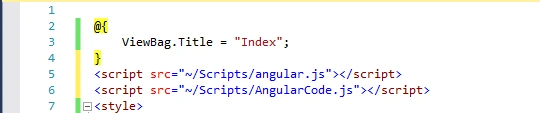
Now, I think our project is ready to work. So, let’s run the application. Press F5 and you can see that following screen will be visible on your browser.
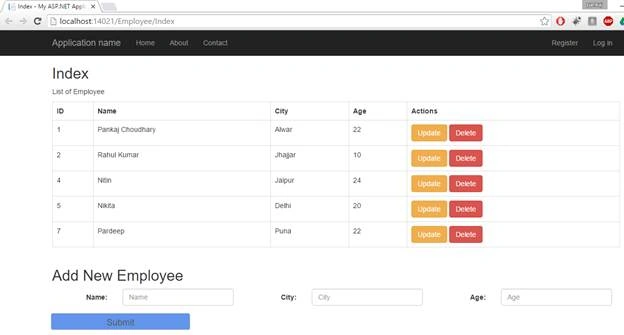
Now, we will learn about all CRUD operations (create, read, update and delete) and understand how they work.
Get all Employee Record
When we run the application, at first, all employees records will retrieve and show up in the grid. You can see that in “ng-init” directive, we call the “getAllData” record. This method is responsible for retrieval of all the records.

In “AngularCode” file you can find this method.
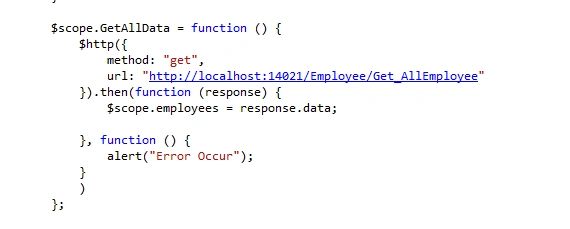
In “GetAllData” method, we used the $http service of AngularJS and call the “Get_AllEmployee” method of “Employee” controller. Code of “Get_AllEmployee” method is the following.
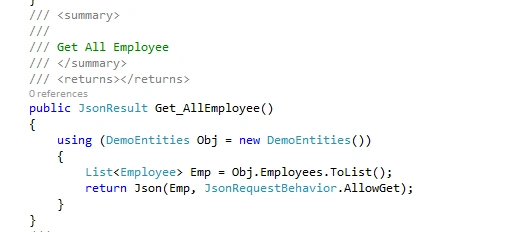
In this method, we get all employees' records from “Employee” entity and pass as JSON result.
Add New Employee
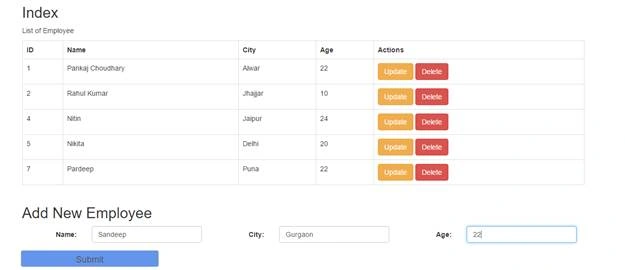
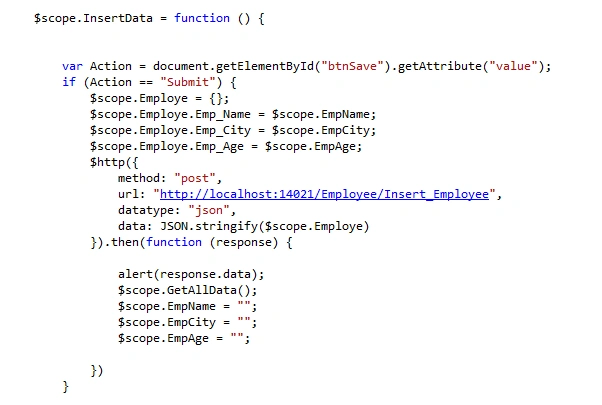
When we click on “Submit” button, the “InsertData” method will be call.

In this method, we retrieve the data from Name, City, and Age field and insert into “Employe” object . We call the “Insert_Employee” method of Employee Controller and Pass the “Employe” object as parameter.
In controller section, we add the “Employe” object into Employee entity.
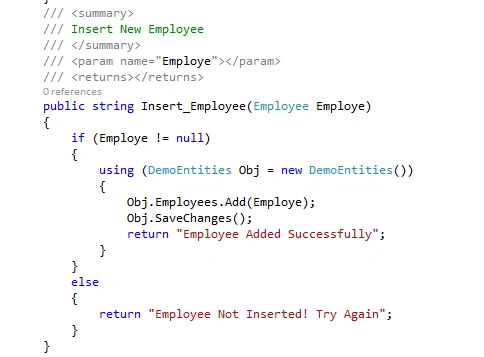
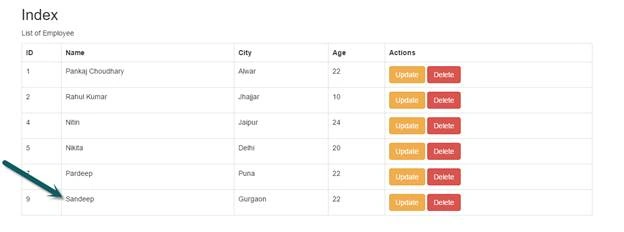
And pass the Confirmation message as confirmation. Now, you can see that the record of “Sandeep” is added successfully.
 Delete The Employee Record
We are using ng-repeat directive and inserting Employee Name, Age, Id and City information into table. You can see that we are creating on extra column(“Action”). In this column, we are adding two buttons for “Delete” and “Update” command and on ng-click directive, we are calling “DeleteEmp” method for deleting operation and “UpdateEmp” for update operation. In both methods, we are passing the Object of Employee.
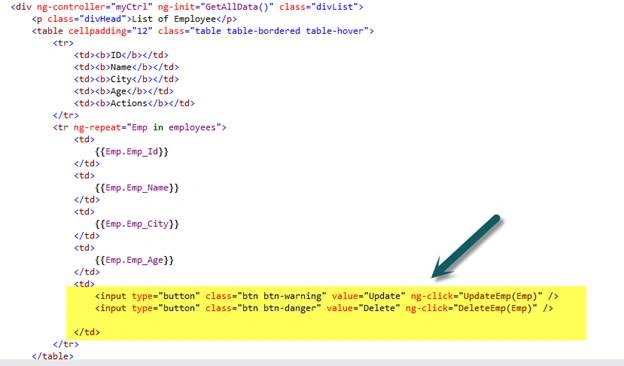
In “DeleteEmp” method, we are calling the “Delete_Employee” of controller using “$http”,
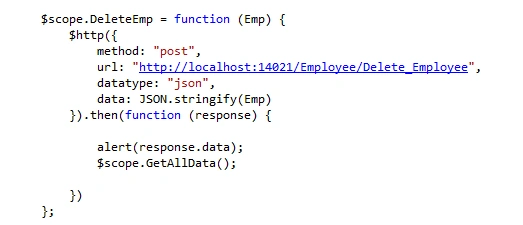
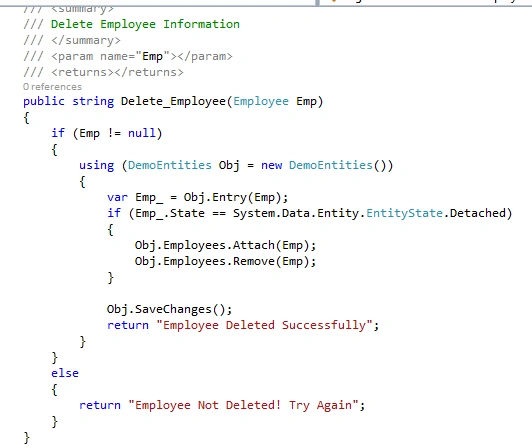
In “Delete_Employee” method, we are removing the Employee record from “Employee” table.
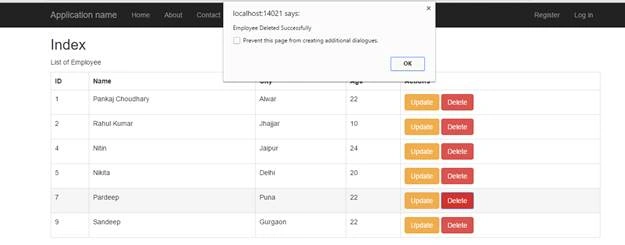
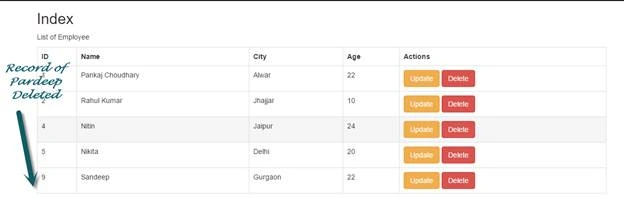
Let’s try to delete the record of “Pardeep” Employee.
 Update Employee Record
In Update command, we are calling the “UpdateEmp” method in which we are inserting the information of employee into textboxes and changing the properties of button and span section.
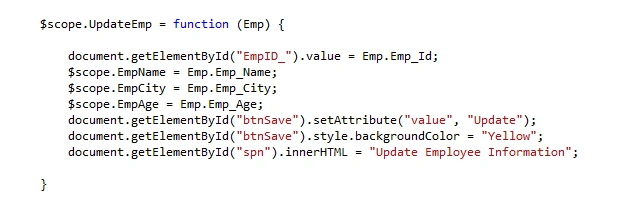
Let’s click on Update button for employee “Nitin”.
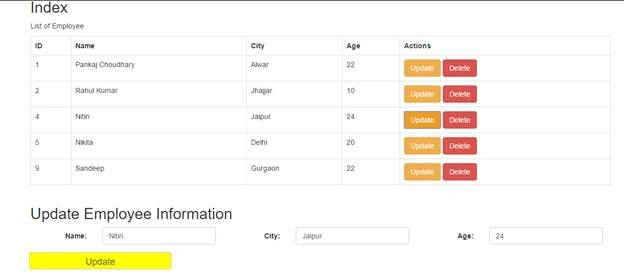
Now, we change the name and City for this employee.

When we click on “Update” button, then “InsertData” method of AngularCode file we will be called and “else” section will execute because the value of the button is not equal to “Submit”.
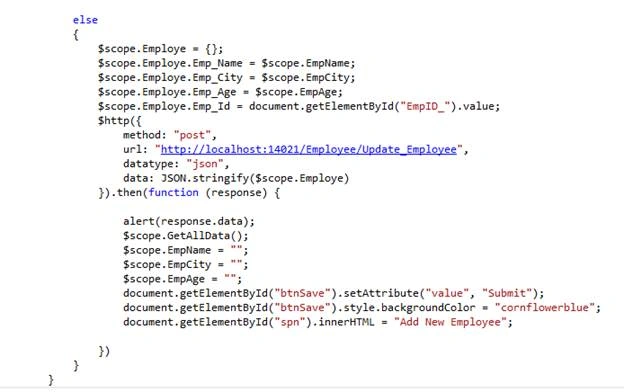
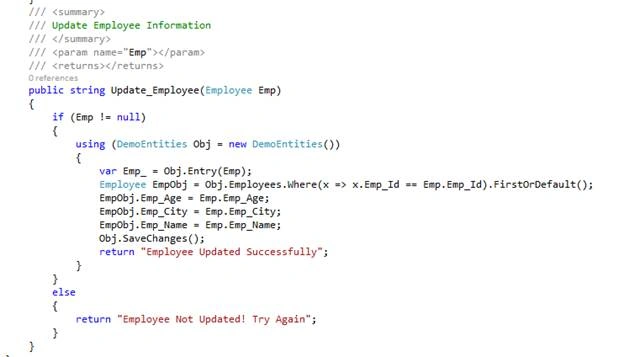
In the above code, we are calling the “Update_Employee” method of Controller. In “Update_Employee” method, we update the record for employee and send the confirmation message.
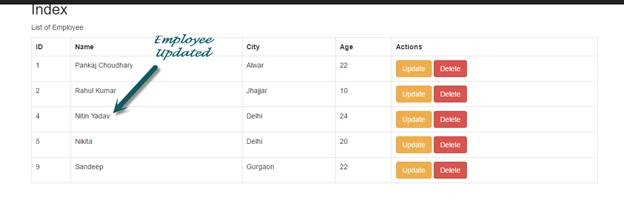
You can check that information for employee “Nitin” has been updated.
I hope you liked the article. Thanks to read the article. If you have any doubt our query, then leave it in the comment section.


vinay gangarapuPosted Apr 6, 2021, 5:27 AM
What is this DemoEntities ? Error CS0246 The type or namespace name 'DemoEntities' could not be found (are you missing a using directive or an assembly reference?)...........Yes please.. Can anyone explain this?
jaimin mahetaPosted Dec 10, 2020, 4:26 AM
How to bind autocomplete text box in this code
jaimin mahetaPosted Dec 10, 2020, 4:25 AM
This is good code now i want to bind dropdown list country and country select then display state in other dd
सुहास कदमPosted Jul 9, 2020, 12:04 AM
Getting error like, Blocked loading mixed active content “http://fonts.googleapis.com/css?family=Open+Sans:300,400,600,700,800|Shadows+Into+Light”2 MenuStructureReferenceError: angular is not defined Crud_Menu.js:1:11 <anonymous> https://localhost:44394/Scripts/Custom_Script/Crud_Menu.js:1 WARNING: Tried to load AngularJS more than once. angular.js:36336:13 ReferenceError: flotDashSales1Data is not defined examples.dashboard.js:22:23 Error: "[$injector:unpr] Unknown provider: $ScopeProvider <- $Scope <- Cntrl_Menu https://errors.angularjs.org/1.8.0/$injector/unpr?p0=%24ScopeProvider%20%3C-%20%24Scope%20%3C-%20Cntrl_Menu" plz replay and explain
Muhammad ShahidPosted Dec 31, 2019, 2:23 PM
Update button is not working in my case.
Chamin RangaPosted Oct 16, 2019, 12:00 AM
What is this DemoEntities ? Error CS0246 The type or namespace name 'DemoEntities' could not be found (are you missing a using directive or an assembly reference?)
s ganapathiPosted Sep 12, 2019, 1:00 AM
Excellent artical
Shahbaz KhanPosted Aug 4, 2019, 11:54 PM
Do you have any project example related to this topic
vishal hatiskarPosted Jan 13, 2019, 8:34 AM
Good article but what in case of deployment to UAT or Prod we have to replace all the URL from localhost to actual IP address. Is there any configurable solution for this.
Zuli CastrejonPosted Dec 2, 2018, 6:32 PM
What is the cod the class AngularJS?
Ahmed AnwarPosted Dec 2, 2018, 3:49 AM
@Html.Hidden(EmpID_)? can you explain
Nelson chantrePosted Oct 10, 2018, 8:22 PM
Greetings. my name is chan I would like you to share the code thank you!
Ishtiaq HaiderPosted Oct 8, 2018, 12:36 PM
I am getting error after editing your code according to my project The server responded with a status of 500 (internal server error) Get_AllProduct:1
Aravind UdhayPosted Sep 19, 2018, 7:47 PM
In getemployee method.....how we can get the employee details from entity model and assign it to same entity by using list<employee>..model?.....list<employee> this is entity model or other model??
Aravind UdhayPosted Sep 19, 2018, 7:45 PM
In getemployee method there is List<employee> emp...here inside the list paranthesis there is employee model...this model is entity model or we need to create another model?...
Sunil LokhandePosted Sep 19, 2018, 12:35 AM
Thanks a lot. to much helpful.
Komal ShahPosted Sep 4, 2018, 7:13 AM
Where is DemoEntities file? Can you please add that file and explain it?
Mithilesh PandeyPosted Sep 1, 2018, 8:20 AM
What is the code for search option by name or id or age or city?
Mithilesh PandeyPosted Sep 1, 2018, 8:19 AM
Seacr option button
Mark ThomasPosted Aug 19, 2018, 11:43 PM
What benefit does Angular 6 js have in simple CRUD? I created simple MVC Core which conducts basic CRUD on a table. (Create, read, update, delete). I took a model, conducted scaffolding, and placed the controller code into a repository. For what reason would I Need to introduce Angular? I read a lot of essays on the internet, for someone starting programming few months ago, trying to learn.
ahmed shalayelPosted Aug 18, 2018, 9:21 AM
What the DemoEntities ??
Sujay AnandPosted Aug 9, 2018, 3:50 AM
How to make page refresh after update?
Debasis DasPosted Aug 2, 2018, 9:38 AM
Thanks for sharing this code. Really it's working.
harish beheraPosted Jul 6, 2018, 7:33 AM
Submit Button not working in Index page to Add Employee Can you please help me in getting rid of this error
Sapana ChaudharyPosted Jun 18, 2018, 5:51 AM
Oh my god this article saved my life, the perfect article for fresher
Vijay KumarPosted Apr 28, 2018, 5:24 AM
I m getting error in update function because controller action method Update_Employee no get the value of employee id please help me to solve this problem
Jasmin BecirevicPosted Apr 17, 2018, 6:56 AM
Hello Pankaj, thank you for the great article. Can you also provide us the code? BR
Muhanad YOUNISPosted Mar 21, 2018, 1:13 AM
Thank you for your efforts, the code works perfect and its a very nice sample.
santhosh kumarPosted Mar 1, 2018, 12:34 AM
Dear Pankaj, Code working Perfectly and am very happy with that., Thank you Brooo
apex patelPosted Jan 25, 2018, 1:34 AM
Thank you for your great insight about MVC and AngularJS
kaleem shaikPosted Dec 13, 2017, 5:49 AM
List <Employee> Emp = Obj.Employees.ToList(); Here what is the difference between Employee and Employees metioned in that code line
youssef azouhriPosted Oct 30, 2017, 10:38 AM
Hey kumar thank you for this article it s really rich . god bless you
sreenivasa kPosted Oct 26, 2017, 8:13 AM
Really good article and worth reading. tried as is and worked perfectly.
Wil CansinoPosted Sep 26, 2017, 10:14 AM
Page does not reload automatically after Update, Add, Delete operations.
Sanjay MirdwalPosted Sep 3, 2017, 10:55 AM
Thanks very useful article.
Jenkins JPosted Aug 23, 2017, 1:54 PM
Really it is very valuable for beginners...Thanks
Navee ChandraPosted Aug 8, 2017, 3:33 AM
Hey i am facing problem with save data using above code,can you please help me out?is there any changes in above code
Kishore MadanapaliPosted Jul 20, 2017, 1:28 AM
Hi,can u post an example on ng -grid filters
Vishal MahajanPosted Jul 6, 2017, 8:18 AM
Nice Article for Angular js Beginners
ib belladPosted Jun 13, 2017, 7:09 AM
Nice article. I had drop down list in registration form while editing how to bind the values to drop down list.
Crest LogixPosted May 25, 2017, 4:26 AM
It's very important learning for beginning
Nirmal RoyPosted May 24, 2017, 6:54 AM
Can you send me full project? so that i can download from here.
Nirmal RoyPosted May 24, 2017, 6:54 AM
Can you send me full project?
Vishal GhadagePosted Mar 17, 2017, 6:58 AM
Really nice article
Hamid TalebiPosted Mar 4, 2017, 5:53 AM
Useful article .thank you
Manav PandyaPosted Sep 19, 2016, 9:33 AM
Great for beginner ....
Vignesh ManiPosted Aug 17, 2016, 7:58 AM
Useful One
Anu VPosted Aug 17, 2016, 4:17 AM
Nice one
Ramesh PalaniappanPosted Aug 16, 2016, 8:31 AM
Nice content
sreenivasa kPosted Aug 16, 2016, 8:28 AM
Really good
Avinash ThakurPosted Aug 16, 2016, 2:08 AM
Very Nice Article sir.
Debasis SahaPosted Aug 16, 2016, 12:58 AM
Nice one..
kalu singh raoPosted Aug 15, 2016, 2:19 PM
Nice share
Shaili DashoraPosted Aug 15, 2016, 12:30 PM
Nice Article,Helpful.