

Before getting into this, we need to understand how auth0 authentication works. In the traditional approach we store user related information in the server as a session to track the authentication related permission. But later we came to the concept of JWT (JSON Web Token) stateless authentication since user state will not be maintained in server side.
In JWT stateless authentication approach, once the user is authenticated token will be generated at server side then that will be passed to client side to store it in browser’s local storage so that in subsequent requests we can call the api with this stored JWT.
JWT comprises some sort of useful information with respect to user such as Id, Name, Roles, etc. Let’s dive into the implementation of the same.

Third party authentication provider Auth0 has various sets of pricing models but they do have a free plan as well with 7000 users registration and two social media accounts (Facebook, Github, Google, Twitter, etc…).
Pre-requisites
- js version > 6
- Angular Cli (Once installed Node.js , then use with “npm install –g @angular/cli@latest”
- Typescript (“npm install –g typescript@latest”)
We will go step by step to proceed with auth0 authentication.
Setup Auth0 Account
- Go to http://auth0.com login with your credentials
- Once done with above step, click on clients tab from left tab navigation
- Create new Client with app name and client type as single page app
- If you want to show social login in login widget then enable corresponding social login through clicking on connections -> Social.
- Up to now we’re ok to go ahead.
Create Angular App
- First, let’s create angular 4 app with cli using
- ng new ng4Auth0 (generates the angular app structure)
- Then, we need to install two important libraries of Auth0 to deal with JWT and login widget.
- npm install –g angular2-jwt auth0-lock --save
- we need to give the reference of lock0 script file in an index.html.

- In app.module.ts file, we need to wire up the reference of Angular2-JWT module as given below in an exported function way.


- Here we tell to Angular2-JWT that our default token name would be ‘id_token’ after user is authenticated then generated token will be stored with id_token in local storage.
Then we specify that exported function in providers array of @NgModule decorator.
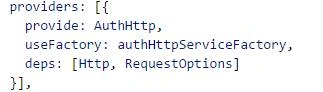
Earlier it was working just by simply giving the below reference and adding that into providers' array would make sense, but in recent versions of angular2-jwt this didn’t work out. So we proceed with the above approach.

- Now we create service.ts file which is solely responsible for communicating with Auth0. Now we can grab the client Id and Domain name from http://auth0.com under your client tab click on the recently created client app.
- There you can get client id and domain name. With that you can create auth0-lock object which helps to display login UI.

We need to give the reference of Auth0Lock to avoid from exception thrown like below

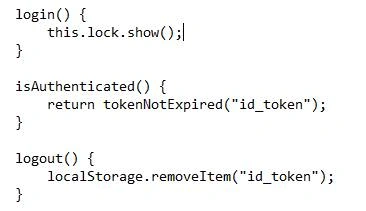
- Login method will show the login UI Widget
- isAuthenticated method will return Boolean it simply checks whether stored JWT token is still valid
- Logout method will remove the stored JWT from local storage
But we need to wire up the main event called ‘authenticated’ in constructor to get the Token like below.
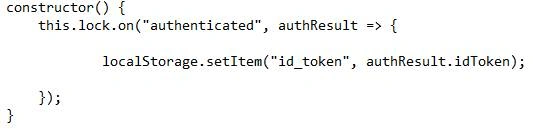
Finally we add the auth.service.ts reference in app.module.ts file under @NgModule decorator in providers array.
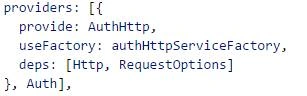
Once authenticated, auth0 will post token back to client side so that we have to specify the url in allowed callback URL under client -> settings tab. In this case we give ‘http://localhost:4200’
Now if you run http://localhost: 4200 in your browser you will be able to see login button, click on that you will get the login widget like below
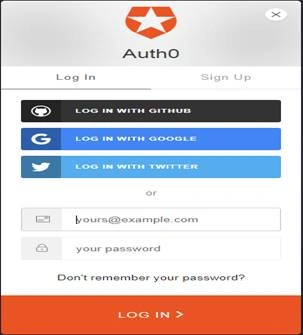
That’s it. You can find the source code here.
I always welcome your comments/feedback about this post.
Rohit PrakashPosted Jul 21, 2017, 8:31 AM
Useful article . thank you
Mahesh ChandPosted Jul 4, 2017, 11:26 PM
I think this article should qualify as intermediate not beginner. Also, please post code as code not an image. Cheers!