

Introduction:
This article addresses the construction of a custom control that will convert
UNIX time into useful and readable dates for display in a Win Forms application.
The control will accept either a standard date or UNIX time value and can
convert the value in either direction (From UNIX Time to Date or from Date to
UNIX Time).
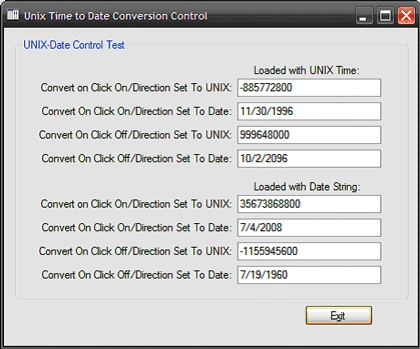
Figure 1: The test application running
The control contains two properties that may be set to control the displayed
output and the usability of the control. The "Convert On Click" property will
enable or disable the control's ability to convert the value back and forth
between UNIX time and normal date when a user clicks on the control; this may be
useful if you wish to permit the user to edit the value in one format and view
it in another. The other property is "Direction". Direction is used to determine
whether or not the control will display the value as UNIX time or as a standard
date.
Getting Started:
In order to get started, unzip the included project and open the solution in the
Visual Studio 2008 environment. In the solution explorer, you should note these
files (Figure 2):
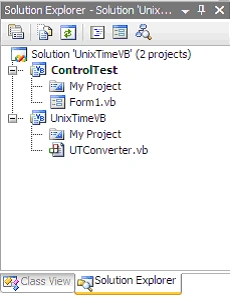
Figure 2: Solution Explorer
As you can see from Figure 2; there are two projects. UnixTime is the
custom control project and it contains a single custom control (UTConverter.vb).
the second project (ControlTest) is a win forms application used to test the
control.
The Custom Control (UTConverter.vb).
The custom control is a class that extends the standard TextBox control.
The code is pretty simple, if you'd care to open the code view up in the IDE you
will see that the code file begins with the following library imports:
Imports
System
Imports
System.ComponentModel
Imports
System.Drawing
Imports
System.Text
Imports
System.Windows.Forms
Following the imports, the class is defined
(note the class inherits TextBox):
Public
Class UTConverter
Inherits TextBox
Next an enumeration is defined; this enumeration is
entitled "Direction". The enumeration is used to define whether or not the date
displayed in the extended textbox control will display dates or UNIX time stamp
values. UNIX time stamp values can be defined as the number of seconds before or
after the date 1/1/1970. Following the declaration of the enumeration, two
private member variables are defined; one to keep track of the selected
Direction option, and one Boolean value used to determine whether or not
"Convert On Click" is enabled.
#Region
"Members"
Public
Enum Direction
ToUnix
ToDate
End Enum
Private mCurrentDirection As Direction
Private mConvertOnClick As Boolean
#End
Region
Next, a constructor is defined;
within the constructor, the default values for the control are set by setting
the CurrentDirection property to Direction.ToDate, and setting the
ConvertOnClick property to true. In this default condition, the control will
normally display the date as a date and will, on click, convert the date back to
the UNIX time stamp value.
#Region "Constructor"
Public Sub New()
' This call is required by the Windows Form Designer.
InitializeComponent()
' Add any initialization after the InitializeComponent() call.
CurrentDirection = Direction.ToDate
ConvertOnClick = True
End Sub
#End
Region
After the constructor, a region is
setup to contain the control's added properties. The first property is
CurrentDirection; it provides public access to the mCurrentDirection member
variable used to determine whether or not the control will display its value as
a date or as a UNIX time stamp value. The other property, ConvertOnClick, is
used to enable or display the functionality that will convert between UNIX and
normal date displays within the control at runtime.
#Region "Properties"
<CategoryAttribute("UNIX Time"), _Browsable(True), _BindableAttribute(False), _DescriptionAttribute("Convert to or from UNIX time.")>
Public Property CurrentDirection() As Direction
Get
Return mCurrentDirection
End Get
Set(ByVal value As Direction)
mCurrentDirection = value
End Set
End Property
<CategoryAttribute("UNIX Time"), _Browsable(True), _BindableAttribute(False), _DescriptionAttribute("Enable or disable On Click UNIX Time format conversion.")>
Public Property ConvertOnClick() As Boolean
Get
Return mConvertOnClick
End Get
Set(ByVal value As Boolean)
mConvertOnClick
= value
End Set
End Property
#End
Region
The next region defined is entitled
"Methods"; this section carries the code used to provide the UNIX-Date
conversion functionality to this custom control.
#Region
"Methods"
The ConvertToDateTime function converts the unix time stamp to a short date
string; this is easily accomplished by adding the number of seconds provided to
the baseline data used for the UNIX time stamp.
''' <summary>
''' Convert unix time to date
''' </summary>
''' <param name="unixTime"></param>
''' <remarks></remarks>
Private Sub ConvertToDateTime(ByVal unixTime As Double)
Dim convertedDateTime As DateTime = _New DateTime(1970, 1, 1, 0, 0, 0).AddSeconds(unixTime)
Me.Text = convertedDateTime.ToShortDateString()
End Sub
The next function converts a date (as
a short date string) to UNIX time format:
''' <summary>
''' Convert date to unix time
''' </summary>
''' <param name="dt"></param>
''' <remarks></remarks>
Private Sub ConvertToUnixTime(ByVal dt As Date)
Me.Text = (dt - New DateTime(1970, 1, 1, 0, 0, _0)).TotalSeconds.ToString()
' Note: This operation will truncate the value to its
' minimum for the date time shown; for example, if "500000000" is
' entered into the textbox, this operation will alter the value to
' "499996800"
' which is the minimum value for the date 11/5/1985. If you need to
' maintain the exact unix time value, create a separate variable to
' store it in and set it to the unix time stamp prior to converting
' from unix time to a date.
End Sub
The controls validated event handler
is used to update the display of the date or UNIX time value based upon whether
or not the control's Current Direction property has been set to display dates or
UNIX time.
''' <summary>
''' Upon validation, update the control to
''' display the converted unix time
''' </summary>
''' <remarks></remarks>
Private Sub UTConverter_Validated(ByVal sender As Object, _ByVal e As EventArgs) Handles MyBase.Validated
Try
If mCurrentDirection = Direction.ToDate Then
ConvertToDateTime(Convert.ToDouble(Me.Text))
Else
ConvertToUnixTime(Convert.ToDateTime(Me.Text))
Join the conversation! Your thoughts help the community grow.