

In this article, I would like to show the most commonly used case expressions with update statements in SQL Server. CASE is the special scalar expression or conditional statement in the SQL language which returns a single value based on the evaluation of a statement. In this article, you use case with an update statement. So let's have a look at a practical example of how to use a case with Update statement in SQL Server 2012. The example is developed in SQL Server 2012 using the SQL Server Management Studio. We'll start by walking through a simple case statement.
Creating a Table in SQL Server
- create table student
- (
- stu_id int,
- stu_name varchar(20),
- marks int
- );
- Insert into student values('101','ravi','65');
- Insert into student values('102','sumit','32');
- Insert into student values('103','rekha','76');
- Insert into student values('104','Yong','34');
- Insert into student values('105','Hem','78');
Case Statement with Simple Expression
The Simple Case expression checks only for equivalent values and cannot contain Boolean expressions. A Simple Case Expression looks for the first expression in the list of all the "when" clauses that matches the expression and evaluates the corresponding when clause. If there is no match, then the else clause is evaluated (if it exists). The general syntax of the Simple CASE expression is:
CASE expression
WHEN exp_1 THEN result_1
[WHEN exp_2 THEN result_2]
[..................]
[WHEN exp_n THEN result_n]
[ELSE expression]
END
Example
- DECLARE @Name varchar(50)
- SET @Name = 'Rohatash'
- SELECT
- Case @Name
- WHEN 'Deepak' THEN 'Name Deepak'
- WHEN 'Manoj' THEN 'Name Found Manoj'
- WHEN 'Rohatash' THEN 'Name Found Rohatash'
- ELSE 'Name not Found'
- END
Case Expression with Select Statement
The Searched Case expression contains Boolean expressions or comparison operators. In the following example we will see how to use a searched expression with comparison operators.
The general syntax of the searched CASE expression is:
CASE
WHEN condition_1 THEN result_1
[WHEN condition_2 THEN result_2]
[..................]
[WHEN condition_n THEN result_n]
[ELSE expression]
[else result_n]
END
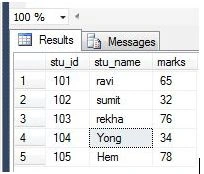
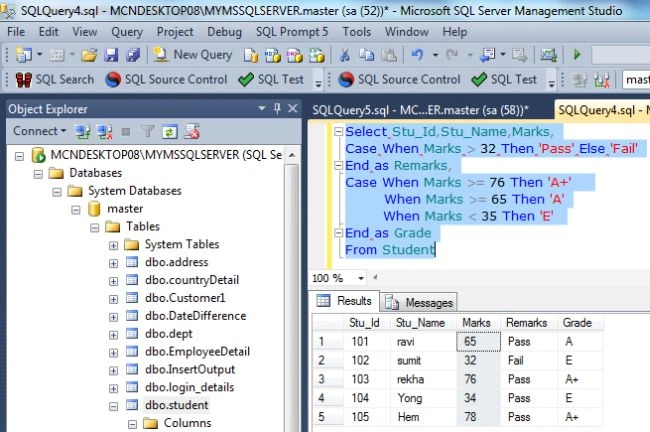
In the above table the student's Id, Name and their marks are given. Now I want the following output with the help of a CASE statement:
| Stu_Id |
Stu_Name |
Marks |
Remarks |
Grade |
| 101 |
Ravi |
65 |
Pass |
A |
| 102 |
Sumit |
32 |
Fail |
E |
| 103 |
Rekha |
76 |
Pass |
A + |
| 104 |
Yong |
34 |
Pass |
E |
| 105 |
Hem |
78 |
Pass |
A+ |
Using CASE Expression
- Select Stu_Id,Stu_Name,Marks,
- Case When Marks > 32 Then 'Pass' Else 'Fail'
- End as Remarks,
- Case When Marks >= 76 Then 'A+'
- When Marks >= 65 Then 'A'
- When Marks < 35 Then 'E'
- End as Grade
- From Student
Using CASE Expression with Update Statement
In the following table the student's Id, Name and their marks and Remarks are given.
| Stu_Id |
Stu_Name |
Marks |
Remarks |
| 101 |
Ravi |
65 |
Pass |
| 102 |
Sumit |
32 |
Fail |
| 103 |
Rekha |
76 |
Pass |
| 104 |
Yong |
34 |
Pass |
| 105 |
Hem |
78 |
Pass |
Now I want the following output with the help of a CASE statement:
| Stu_Id |
Stu_Name |
Marks |
Remarks |
| 101 |
Ravi |
65 |
Fail |
| 102 |
Sumit |
32 |
Pass |
| 103 |
Rekha |
76 |
Fail |
| 104 |
Yong |
34 |
Fail |
| 105 |
Hem |
78 |
Fail |
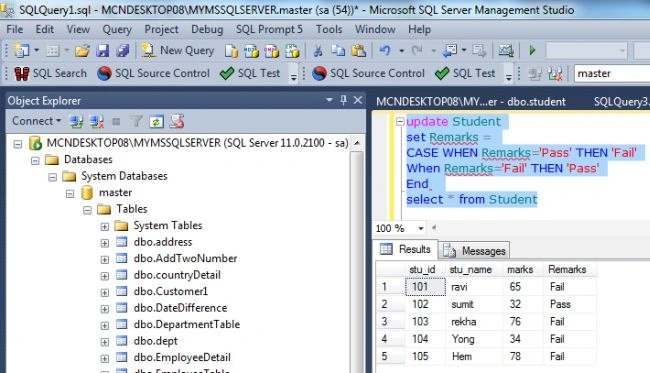
You can see in the above remarks column of the student table which contain Records as Pass or Fail. Your task is to write a query which will change the Remarks Pass to Fail and Fail to Pass. Now I want the preceding output with the help of a CASE statement:
- update Student
- set Remarks =
- CASE WHEN Remarks='Pass' THEN 'Fail'
- When Remarks='Fail' THEN 'Pass'
- End
- select * from Student
Output
Jiyaul MustaphaPosted Jul 23, 2019, 2:08 AM
DECLARE @JCnt int=nullSEt @JCnt=(SELECT COUNT( ISNUll(EmpCode,0)) FROM tbl_Employees WHERE EmpCode=1 ) UPDATE #TempCode SET janCA= CASE WHEN @JCnt>0 THEN (SELECT SUM (ISNUll(Amount,0)) FROM tbl_Salary WHERE Code=1 )ELSE 0 END WHERE code=1