

This article will give you an idea of how to use the space function in SQL Server. Here, you will see the space function with select and print or message statement. For example, if you concatenate two strings containing the first name Rohatash and the last name Kumar. The output will be like: RohatashKumar. That howevr is not the correct way to format a first name and last name without a space. To do that you can use the space function in SQL Server. Let's have a look at a practical example. The example is developed in SQL Server 2012 using the SQL Server Management Studio.
Space Function
The Space string function returns a string with the specified number of space characters (blanks).
Syntax
Space (integer)
This function returns an integer.
Without Space function
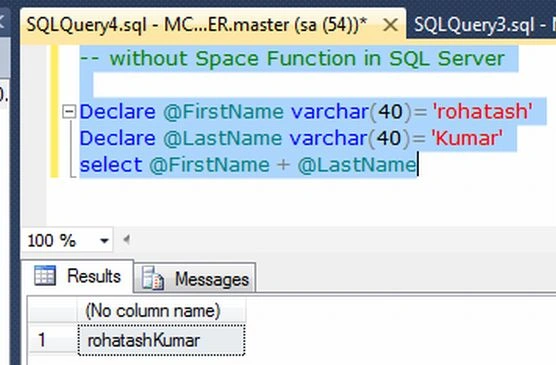
The following example shows concatenation of two string values without using a space function.
Example
Declare @FirstName varchar(40)= 'rohatash'
Declare @LastName varchar(40)= 'Kumar'
select @FirstName + @LastName
Now press F5 to execute it.
Output
Space Function
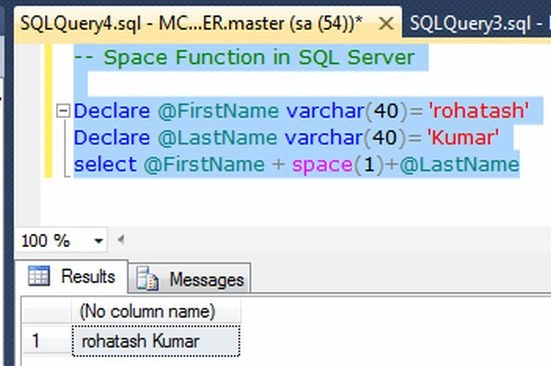
To remove the preceding spacing problem between first name and last name, use the space function.
Example
-- Space Function in SQL Server
Declare @FirstName varchar(40)= 'rohatash'
Declare @LastName varchar(40)= 'Kumar'
select @FirstName + space(1)+@LastName
Output
Example
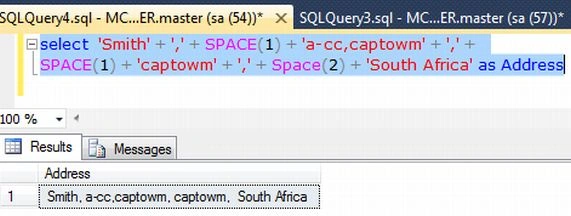
select 'Smith' + ',' + SPACE(1) + 'a-cc,captowm' + ',' +
SPACE(1) + 'captowm' + ',' + Space(2) + 'South Africa' as Address
Output
Space with print statement
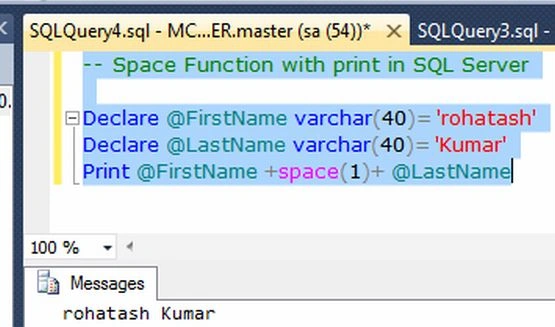
Example
-- Space Function with print in SQL Server
Declare @FirstName varchar(40)= 'rohatash'
Declare @LastName varchar(40)= 'Kumar'
Print @FirstName +space(1)+ @LastName
Output
Join the conversation! Your thoughts help the community grow.