

In this article I provide a quick overview of the various Queries to remove the first and last character from a string in SQL Server. To remove the first and last character, we use as an example a simple string and also use a column of a table which contains some name. To do that we can create various queries using SQL functions. So let's have a look at a practical example of how to remove the first and last character from a string in SQL Server. The example is developed in SQL Server 2012 using the SQL Server Management Studio.
The following are the various queries to remove the first and last character from a string.
Remove first character from string in SQL Server
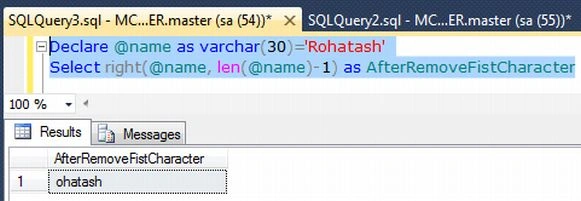
First we remove the first character from a string. Suppose you take a string Rohatash. The output should be ohatash.
1. Using the SQL Right Function
Example
- Declare @name as varchar(30)='Rohatash'
- Select right(@name, len(@name)-1) as AfterRemoveFistCharacter
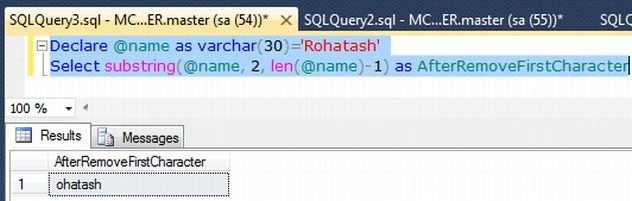
2. Using the Substring Function
- Declare @name as varchar(30)='Rohatash'
- Select substring(@name, 2, len(@name)-1) as AfterRemoveFirstCharacter
Output
Remove last character from a string in SQL Server
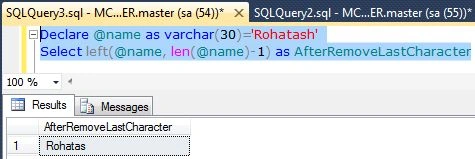
Now remove the first character from the string. Suppose you have the string Rohatash. The output should be Rohatas.
1. Using the SQL Left Function
- Declare @name as varchar(30)='Rohatash'
- Select left(@name, len(@name)-1) as AfterRemoveLastCharacter
2. Using the Substring Function
- Declare @name as varchar(30)='Rohatash'
- Select substring(@name, 1, len(@name)-1) as AfterRemoveLastCharacter

Remove first and last character from a string in SQL Server
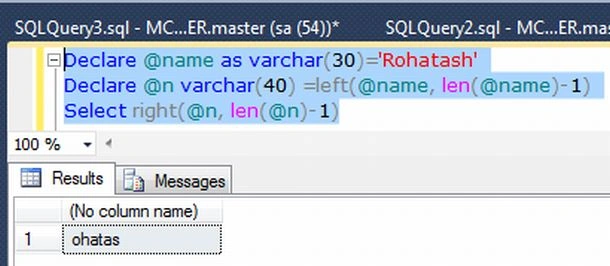
Now we remove the first and last character from a string. Suppose you have the string Rohatash. The output should be ohatas.
1. Using the SQL Left and Right Functions
- Declare @name as varchar(30)='Rohatash'
- Declare @n varchar(40) =left(@name, len(@name)-1)
- Select right(@n, len(@n)-1)
The above query can be defined as follows:
- Select LEFT(RIGHT('rohatash', len('rohatash')-1),len('rohatash')-2)
- Declare @string varchar(50)
- SET @string='rohatash'
- Declare @len varchar(50)
- Declare @middle varchar(50)
- Select @len=LEN(@string)
- Select @middle=substring(@string,2,(@len-2))
- Select @middle

The above query can be defined as follows:
- Declare @name as varchar(30)='Rohatash'
- Select substring(@name,2,(LEN(@name)-2))
Remove first and last character from table column in SQL Server
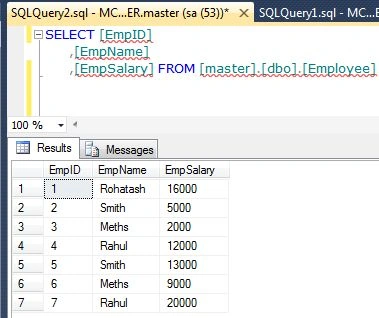
Now we create a table named employee using:
- Create table Employee
- (
- EmpID int,
- EmpName varchar(30),
- EmpSalary int
- )
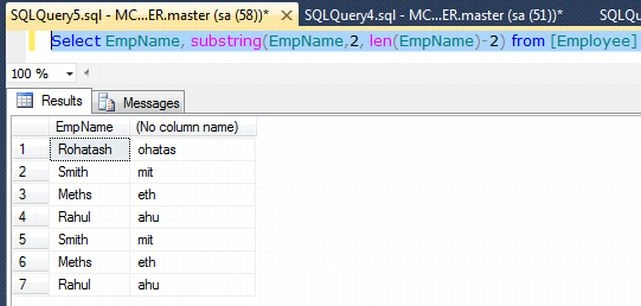
1. Using the Substring and Len Functions
- Select EmpName, substring(EmpName,2, len(EmpName)-2) from [Employee]
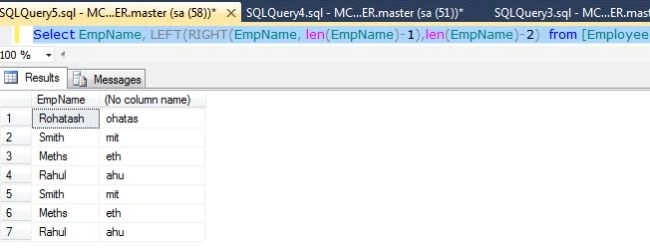
2. Using the SQL Left and Right Functions
- Select EmpName, LEFT(RIGHT(EmpName, len(EmpName)-1),len(EmpName)-2) from [Employee]
Yogesh UpretiPosted Nov 5, 2014, 5:06 AM
Please provide me
Yogesh UpretiPosted Nov 5, 2014, 5:06 AM
why you not give example using STUFF