

This article shows how to implement a nested DataList and also display category and subcategory using a nested DataList. You create two tables, one for category and another for subcategory and also create a stored procedure for selecting category and sub category from both tables in SQL Server. You have to create a web site and add a new page to the website. Drag and drop two DataList controls on the form, one is to bind category and the other is for subcategory. Let's take a look at a practical example. We create tables for category and subcategory.
Creating Table in SQL Server Database
Now create two tables named MajorCategory and MinorCategory. We create CategoryID in MajorCategory table that is the foreign key for the MinorCategory also set the identity property of the CategoryID. The table looks as below.
MajorCategory Table

MinorCategory Table

Creating a Stored Procedure
Now create a stored procedure to select data from both tables.
ALTER PROCEDURE [dbo].[usp_GetProductsForCategories]
AS
SELECT * FROM MajorCategory WHERE CategoryID IN
( SELECT CategoryID FROM MinorCategory )
SELECT p.MinorCategoryId , p.SubCategoryName ,p.CategoryID FROM MinorCategory p
First you have to create a web site.
- Go to Visual Studio 2010
- New-> Select a website application
- Click OK

Now add a new page to the website.
- Go to the Solution Explorer
- Right Click on the Project name
- Select add new item
- Add new web page and give it a name
- Click OK

Now create a new website and drag and drop two DataList controls onto the aspx page. The DataList code looks like this.
<%@ Page Language="C#" AutoEventWireup="true" CodeFile="categorySubcategory.aspx.cs"
Inherits="categorySubcategory" %>
<!DOCTYPE html PUBLIC "-//W3C//DTD XHTML 1.0 Transitional//EN" "http://www.w3.org/TR/xhtml1/DTD/xhtml1-transitional.dtd">
<html xmlns="http://www.w3.org/1999/xhtml">
<head runat="server">
<title></title>
</head>
<body>
<form id="form1" runat="server">
<div>
<ul>
<asp:DataList ID="outerDataList" runat="server" OnItemDataBound="outerRep_ItemDataBound">
<ItemTemplate>
<li>
<asp:Label Font-Size="Large" Font-Bold="true" ID="lblCategoryName" runat="server"
Text='<%# Eval("CategoryName") %>' />
</li>
<ul>
<asp:DataList ID="innerDataList" runat="server">
<ItemTemplate>
<li style="background-color:AliceBlue">
<asp:HyperLink ID="hlProductName" runat="server" Text='<%# Eval("SubCategoryName")%>' />
</li>
</ItemTemplate>
</asp:DataList>
</ul>
</ItemTemplate>
</asp:DataList>
</ul>
</div>
</form>
</body>
</html>
Now add the following namespaces.
using System.Data.SqlClient;
using System.Data;
Now write the connection string to connect to the database.
string strConnection = "Data Source=.; uid=sa; pwd=wintellect;database=registration;";
Now double-click on the page and write the following code for binding the data with the DataList.
private void BindData()
{
SqlConnection myConnection = new SqlConnection("Data Source=.; uid=sa; pwd=wintellect;database=registration;");
SqlCommand myCommand = new SqlCommand("usp_GetProductsForCategories", myConnection);
myCommand.CommandType = CommandType.StoredProcedure;
SqlDataAdapter ad = new SqlDataAdapter(myCommand);
DataSet ds = new DataSet();
ad.Fill(ds);
// Attach the relationship to the dataSet
ds.Relations.Add(new DataRelation("CategoriesRelation", ds.Tables[0].Columns["CategoryID"],
ds.Tables[1].Columns["CategoryID"]));
outerDataList.DataSource = ds.Tables[0];
outerDataList.DataBind();
}
Now write the below code on the OnItemDataBound event of the DataList.
protected void outerRep_ItemDataBound(object sender, DataListItemEventArgs e)
{
if (e.Item.ItemType == ListItemType.Item)
{
DataRowView drv = e.Item.DataItem as DataRowView;
DataList innerDataList = e.Item.FindControl("innerDataList") as DataList;
innerDataList.DataSource = drv.CreateChildView("CategoriesRelation");
innerDataList.DataBind();
}
}
In Codebehind write the following code like this.
Codebehind
using System;
using System.Collections.Generic;
using System.Linq;
using System.Web;
using System.Web.UI;
using System.Web.UI.WebControls;
using System.Data;
using System.Data.SqlClient;
public partial class categorySubcategory : System.Web.UI.Page
{
protected void Page_Load(object sender, EventArgs e)
{
BindData();
}
private void BindData()
{
SqlConnection myConnection = new SqlConnection("Data Source=.; uid=sa; pwd=wintellect;database=registration;");
SqlCommand myCommand = new SqlCommand("usp_GetProductsForCategories", myConnection);
myCommand.CommandType = CommandType.StoredProcedure;
SqlDataAdapter ad = new SqlDataAdapter(myCommand);
DataSet ds = new DataSet();
ad.Fill(ds);
// Attach the relationship to the dataSet
ds.Relations.Add(new DataRelation("CategoriesRelation", ds.Tables[0].Columns["CategoryID"],
ds.Tables[1].Columns["CategoryID"]));
outerDataList.DataSource = ds.Tables[0];
outerDataList.DataBind();
}
protected void outerRep_ItemDataBound(object sender, DataListItemEventArgs e)
{
if (e.Item.ItemType == ListItemType.Item)
{
DataRowView drv = e.Item.DataItem as DataRowView;
DataList innerDataList = e.Item.FindControl("innerDataList") as DataList;
innerDataList.DataSource = drv.CreateChildView("CategoriesRelation");
innerDataList.DataBind();
}
}
}
Now run the application and test it.
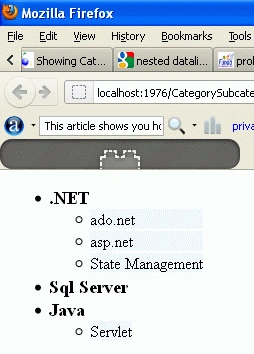
The above output displays subcategory according to the category.
Some Helpful Resources
dipika prajapatiPosted Jan 6, 2015, 1:54 AM
but want to know what did this line means this condition if ((e.Item.ItemType == ListItemType.Item) || (e.Item.ItemType == ListItemType.AlternatingItem)) . please explain
dipika prajapatiPosted Jan 6, 2015, 1:53 AM
sir sorry i get solution read all comment
dipika prajapatiPosted Jan 6, 2015, 1:43 AM
I have a problem with inner datalist bind. i hv category and subcategory table. i add relation but it display all category name but not display all subcategory. means display only even category to subcategory Value...in database all data according category to subcategory then also not display subcategory of odd position.. plz help me.... i have to create dynemic menu to submenu. ihv project about onlineshopping. for that i have to create menu. for example if category Man then subcategory footweare, clothes and all
dipika prajapatiPosted Jan 6, 2015, 1:40 AM
Hello sir
Diego DiasPosted Dec 23, 2012, 1:29 PM
Hello Mst. Kumar. I found the solution. Follow below if ((e.Item.ItemType == ListItemType.Item) || (e.Item.ItemType == ListItemType.AlternatingItem))
Diego DiasPosted Dec 23, 2012, 1:21 PM
Hello. I try add plus one category, but when i get database values display only two SubCategory and not the three. can you help me? I'm from Brazil. I not write english very well.
Rohatash KumareditedPosted Oct 9, 2012, 11:30 PMEdited Oct 9, 2012, 11:34 PM
Moaatar. This line defines the relation between two tables, one table ds.Tables[0].Columns["CategoryID") Second one is: ds.Tables[1].Columns["CategoryID"]. You can check it using break point.
Moaataz AamerPosted Oct 9, 2012, 3:59 PM
what is this line of code : ds.Relations.Add(new DataRelation("CategoriesRelation", ds.Tables[0].Columns["CategoryID"], ds.Tables[1].Columns["CategoryID"]));
Moaataz AamerPosted Oct 9, 2012, 3:59 PM
what is this line of code : ds.Relations.Add(new DataRelation("CategoriesRelation", ds.Tables[0].Columns["CategoryID"], ds.Tables[1].Columns["CategoryID"]));
Moaataz AamerPosted Oct 9, 2012, 3:59 PM
what is this line of code : ds.Relations.Add(new DataRelation("CategoriesRelation", ds.Tables[0].Columns["CategoryID"], ds.Tables[1].Columns["CategoryID"]));
Lucas OldfieldPosted Jul 17, 2012, 2:17 AM
I had to add Select Case e.Item.ItemType Case ListItemType.AlternatingItem, ListItemType.Item to the ItemDataBound event.. incase anyone has missing binds using alternating CSS styles
Frank LazloPosted May 19, 2012, 2:02 AM
Hello Rohatash, I liked the simplicity of your code, however I've noticed your second category 'Sql Server' does not show any sub categories. I'm experiencing the same problem. The third does category does. Tried AlternateItemTemplate but has the same problem. Do you know what's going on?