

This article shows how to create three DropDownList to display countries, states and cities. When you select a country then its automatically shows the states name of that country in next DropDownList. Then when you select a state, the cities DropDownList will fetch the related cities for that state.
Creating table for country, state and city.
Country Table
- Create Table Country
- (
- CountryId Int Primary Key,
- County Varchar(30)
- )
Countrystate Table
- Create Table countryState
- (
- StateId Int Primary Key,
- CountryId Int Foreign Key References Country(CountryId),
- State Varchar(30)
- )
StateCity Table
- Create Table stateCity
- (
- CityId Int,
- StateId Int Foreign Key References countryState(StateId),
- City Varchar(30)
- )
Now insert values in the table.
- Insert Into Country Values(101,'India')
- Insert Into Country Values(102,'USA')
- Insert Into Country Values(103,'Pakistan')
- Insert Into countryState Values(1001,101,'U.P')
- Insert Into countryState Values(1002,101,'Kerala')
- Insert Into countryState Values(1003,101,'Kasmir')
- Insert Into countryState Values(2001,102,'Colorado')
- Insert Into countryState Values(2002,102,'Delaware')
- Insert Into countryState Values(2003,102,'Georgia')
- Insert Into countryState Values(3001,103,'Punjap')
- Insert Into countryState Values(3002,103,'Baluchistan')
- Insert Into countryState Values(3003,103,'Sind')
- Insert Into stateCity Values(11,1001,'Kanpur')
- Insert Into stateCity Values(12,1001,'Dg')
- Insert Into stateCity Values(21,1002,'Pal')
- Insert Into stateCity Values(22,1002,'Tri')
- Insert Into stateCity Values(31,1003,'Jammu')
- Insert Into stateCity Values(32,1003,'Manali')
- Insert Into stateCity Values(41,2001,'Alabama')
- Insert Into stateCity Values(42,2001,'Arizona')
- Insert Into stateCity Values(51,2002,'Bellefonte')
- Insert Into stateCity Values(52,2002,'Felton')
- Insert Into stateCity Values(61,2003,'Rustavi')
- Insert Into stateCity Values(62,2003,'Kobulati')
- Insert Into stateCity Values(71,3001,'Lahore')
- Insert Into stateCity Values(72,3001,'Faisalabad')
- Insert Into stateCity Values(81,3002,'Quetta')
- Insert Into stateCity Values(82,3002,'Nasirabad')
- Insert Into stateCity Values(91,3003,'Krachi')
- Insert Into stateCity Values(92,3003,'Mirpur khas')
Now select it.
- select * from Country;
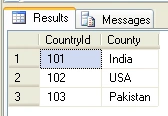
Countrytable
- select * from countryState;
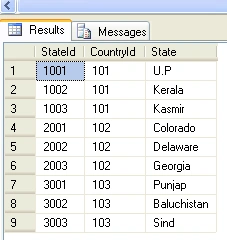
Statetable
- select * from stateCity;
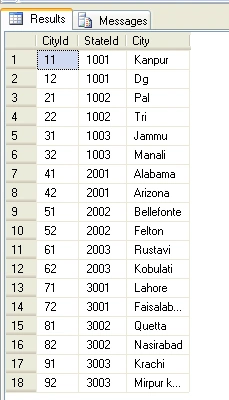
Citytable
Now drag and drop three DropDownList to display countries, states and cities and three update panel control on the page.
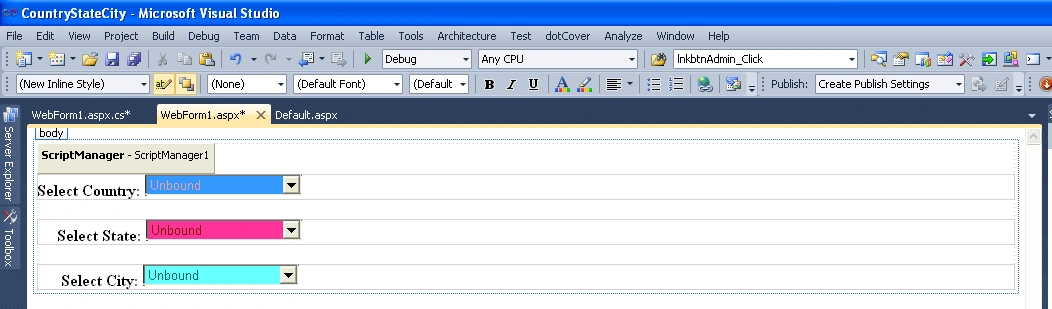
Figure1
.aspx code
- <headrunat="server">
- <title></title>
- </head>
- <body>
- <formid="form1"runat="server">
- <asp:ScriptManagerID="ScriptManager1"runat="server">
- </asp:ScriptManager>
- <div>
- <asp:UpdatePanelID="countrypanel"runat="server">
- <ContentTemplate>
- <spanclass="style1"><strong>Select Country:</strong></span>
- <asp:DropDownListID="ddlcountry"AutoPostBack ="true" AppendDataBoundItems
- ="true" runat="server"Height="20px"Width="156px"
- onselectedindexchanged="ddlcountry_SelectedIndexChanged"BackColor="#3399FF"
- ForeColor="#FF9999">
- </asp:DropDownList>
- </ContentTemplate>
- <Triggers>
- <asp:AsyncPostBackTriggerControlID ="ddlcountry" />
- </Triggers>
- </asp:UpdatePanel>
- <br/>
- <asp:UpdatePanelID="statepanel"runat="server">
- <ContentTemplate>
- <spanclass="style1"><strong> Select State:</strong></span>
- <asp:DropDownListID="ddlstate"AutoPostBack ="true"
- AppendDataBoundItems="true" runat="server"Height="20px"
- Width="155px" onselectedindexchanged="ddlstate_SelectedIndexChanged"
- BackColor="#FF3399"ForeColor="Maroon">
- </asp:DropDownList>
- </ContentTemplate>
- <Triggers>
- <asp:AsyncPostBackTriggerControlID ="ddlstate"/>
- </Triggers>
- </asp:UpdatePanel>
- <br/>
- <asp:UpdatePanelID="citypanel"runat="server">
- <ContentTemplate>
- <spanclass="style1"><strong> Select City:</strong></span>
- <asp:DropDownListID="ddlcity" AutoPostBack ="true"
- AppendDataBoundItems="true" runat="server"Height="20px"Width="155px"
- BackColor="#66FFFF"ForeColor="#006666">
- </asp:DropDownList>
- </ContentTemplate>
- <Triggers>
- <asp:AsyncPostBackTrigger ControlID ="ddlcity"/> </Triggers>
- </asp:UpdatePanel>
- </div>
- </form>
- </body>
- </html>
.VB code
- using System;
- using System.Collections.Generic;
- using System.Linq;
- using System.Web;
- using System.Web.UI;
- using System.Web.UI.WebControls;
- using System.Data.SqlClient;
- namespace CountryStateCity
- {
- public partialclass WebForm1 : System.Web.UI.Page
- {
- private SqlConnection conn = new SqlConnection("Data source=.; uid=sa; pwd=Password$2; database=CountryStateCity");
- public void Bind_ddlCountry()
- {
- conn.Open();
- SqlCommand cmd =new SqlCommand("select County,CountryId from Country", conn);
- SqlDataReader dr = cmd.ExecuteReader();
- ddlcountry.DataSource = dr;
- ddlcountry.Items.Clear();
- ddlcountry.Items.Add("--Please Select country--");
- ddlcountry.DataTextField = "County";
- ddlcountry.DataValueField = "CountryId";
- ddlcountry.DataBind();
- conn.Close();
- }
- public void Bind_ddlState()
- {
- conn.Open();
- SqlCommand cmd =new SqlCommand("select State,StateID from countryState where CountryId='" + ddlcountry.SelectedValue +"'", conn);
- SqlDataReader dr = cmd.ExecuteReader();
- ddlstate.DataSource = dr;
- ddlstate.Items.Clear();
- ddlstate.Items.Add("--Please Select state--");
- ddlstate.DataTextField = "State";
- ddlstate.DataValueField = "StateID";
- ddlstate.DataBind();
- conn.Close();
- }
- public void Bind_ddlCity()
- {
- conn.Open();
- SqlCommand cmd =new SqlCommand("select * from stateCity where StateId ='" + ddlstate.SelectedValue +"'", conn);
- SqlDataReader dr = cmd.ExecuteReader();
- ddlcity.DataSource = dr;
- ddlcity.Items.Clear();
- ddlcity.Items.Add("--Please Select city--");
- ddlcity.DataTextField = "City";
- ddlcity.DataValueField = "CityID";
- ddlcity.DataBind();
- conn.Close();
- }
- protectedvoid Page_Load(object sender, EventArgs e)
- {
- if (!IsPostBack)
- {
- Bind_ddlCountry();
- }
- }
- protectedvoid ddlcountry_SelectedIndexChanged(object sender, EventArgs e)
- {
- Bind_ddlState();
- }
- protectedvoid ddlstate_SelectedIndexChanged(object sender, EventArgs e)
- {
- Bind_ddlCity();
- }
- }
- }
Now run the application and test it.
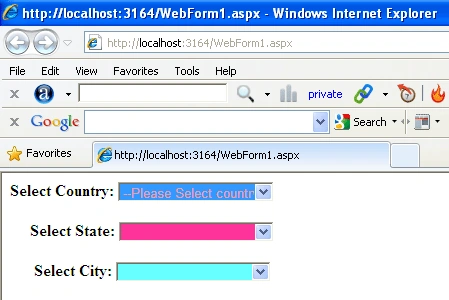
Figure2
Now select a country, then its automatically shows the states name of that country in next DropDownList. For example we select USA.
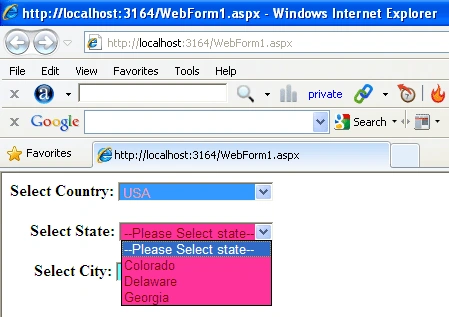
Figure3
Now select a State, then its automatically shows the cities name of that state in next DropDownList. For example we select Punjab.
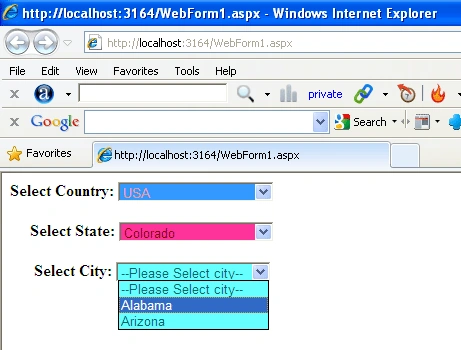
Figure4
Note
You can see a demo of this article by downloading this application.
Raghvinder PanchalPosted Oct 16, 2018, 2:36 AM
Thank you...
Aditya NashikkarPosted Mar 15, 2017, 12:46 AM
Thank you so much. It is very useful.
Jainish ShahPosted Mar 8, 2015, 5:29 AM
Thank you... useful example
shadi rahimiPosted Aug 12, 2014, 5:25 PM
Thanks so much :)
Aman JainPosted Jun 21, 2014, 4:38 AM
nice article
Niraj TiwariPosted Apr 24, 2014, 11:47 AM
Hiii Guys – Today i am going to write – how we bind country,state,city in asp.net,C#,Sql server. In many cases, we need to bind hierarchical country – state – city like first select country than state will be bind on the basis of selected country and select state then bind city on the basis of selected state. You can use this below code -through copy paste else you can also download attached example here : -Download demo http://nirajtiwari.com/bind-countrystatecity-asp-netcsql-server/
sonu asatiPosted Apr 6, 2014, 3:59 AM
nice
javed sayyedPosted Mar 28, 2014, 10:46 PM
nice
waris kantroPosted Jun 24, 2013, 3:41 AM
simple and nicely done...
darsh antaniPosted Feb 16, 2013, 12:31 AM
I have one page Country.aspx through that i add country in my database... I have another page name State.aspx through which i can add states in my database.. Now The country i have added in database through first page when i want to add states in database i want that added country to be shown in drop down list in my state.aspx page.. here in state.aspx page i have one drop down for country which i select and one textbox for state which i want to add...how can i add states with this....here when i click on save the state should be saved in database how can i do that?? I have taken three different tables name country,state and city for that and 3 different pages country.aspx,state.aspx,city.aspx ..
Rohatash KumarPosted Oct 28, 2012, 10:56 PM
Thanks Harika to appreciate my article.
harikaPosted Oct 25, 2012, 11:47 AM
Thanks 4r ur article......
Musa SheikhPosted Aug 29, 2012, 7:22 AM
baaaaaaaad
Vimlesh MishraPosted Jul 25, 2012, 6:59 AM
Thanx Yaar..........Gr8 coding
esha vishwanathPosted Jun 25, 2012, 9:49 AM
Both DataSource and DataSourceID are defined on 'ddlcountry'. Remove one definition.
Richa GargPosted Jun 11, 2012, 12:23 AM
nice article.
sahil chhabraPosted Dec 8, 2011, 11:05 AM
sir, that pgm is written above is not working properly..
David RibeiroPosted Oct 27, 2011, 7:29 AM
You can also use the AJAX CascadingDropDown control: http://www.asp.net/ajaxlibrary/AjaxControlToolkitSampleSite/CascadingDropDown/CascadingDropDown.aspx
David RibeiroPosted Oct 27, 2011, 7:21 AM
I recommend you to use Firebug, with network option. Monitorize the posts on "Network" tab, and you will see that my solution will have _ASYNCPOST as true!
David RibeiroPosted Oct 27, 2011, 7:15 AM
This is a common scenario on the real world, however, consider these two tips: a) You only need an update panel where there is information to update (do you need to update anything on countrypanel?) b) You need specific controls to update other controls (you change a value on one DropDownList, it affects the datasource of another). So, why do you put an update panel on all DropDownLists and allow child to act as triggers? Your idea is great and happens a lot, but it doesn't solve itself just by wrapping DropDownLists inside an update panel! So, being concrete: 1. You don't need countrypanel - there won't be any update to its contents, so no need to update it 2. On statepanel, you should apply childactastriggers to false, updatemode to conditional, and apply asyncpostback to ddlcountry SelectedIndexChanged method 3. On citypanel, you should apply childactastriggers to false, updatemode to conditional, and apply asyncpostback to ddlstate SelectedIndexChanged method This is the correct way to use update panels (I had these issues like... a lot!)
Pradip PandeyPosted Sep 23, 2011, 4:13 AM
Good