

All of us are very aware of Master Pages in ASP.Net applications. What is a Master Page? Why do we need a Master Page in our application? How to create a Master Page in ASP.NET MVC applications?
Master Pages
Master Pages allow you to create a consistent look and behaviour for all the pages (or group of pages) in your web application.
A Master Page provides a template for other pages, with shared layout and functionality. The Master Page defines placeholders for the content that can be overridden by content pages. The output result is a combination of the Master Page and the content page.
- The content pages contain the content you want to display.
- Now we will learn how to do this in ASP.NET MVC applications.
- Open Visual Studio and click on New Project then select ASP.NET MVC Application.
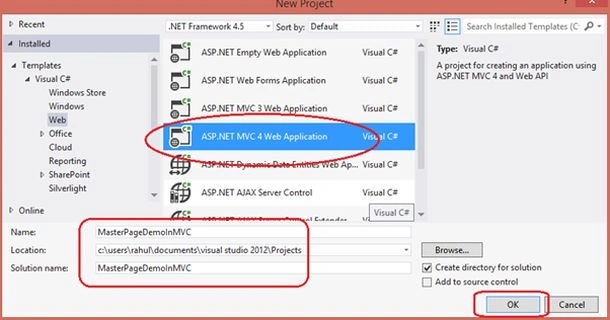
Image 1.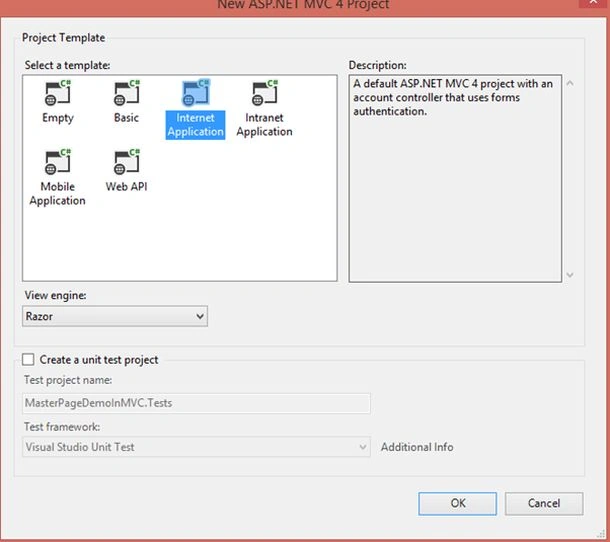
Image 2.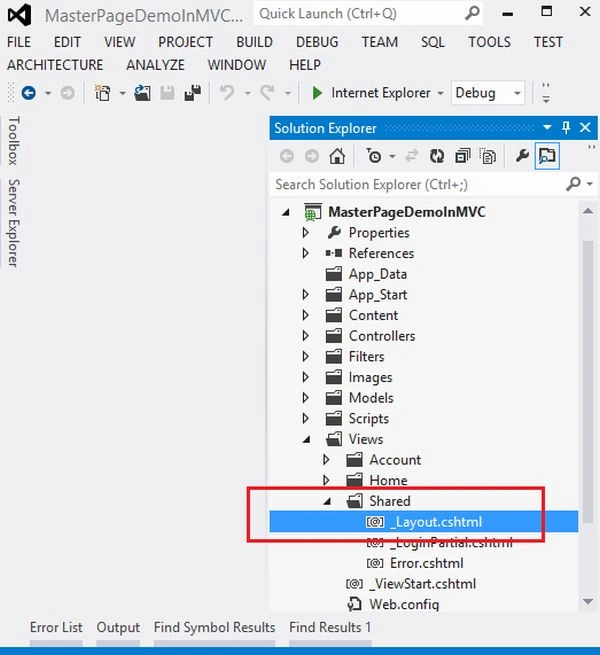
Image 3.
- Here the ASP.NET MVC application's _Layout.cshtml is inside Views -> Shared folder. It works as the Master Page.
- Now we will add 2 partial views (such as User Control in ASP.NET application), Header and Footer and we will add these two in the _Layout.cshtml page.
- Right-click on the Shared Folder then select Add -> View.
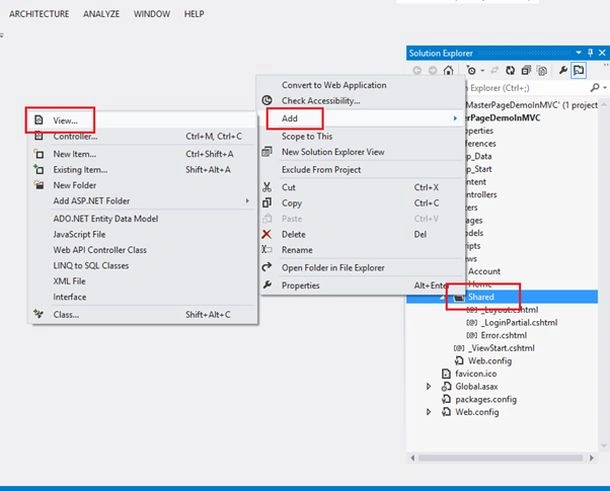
Image 4.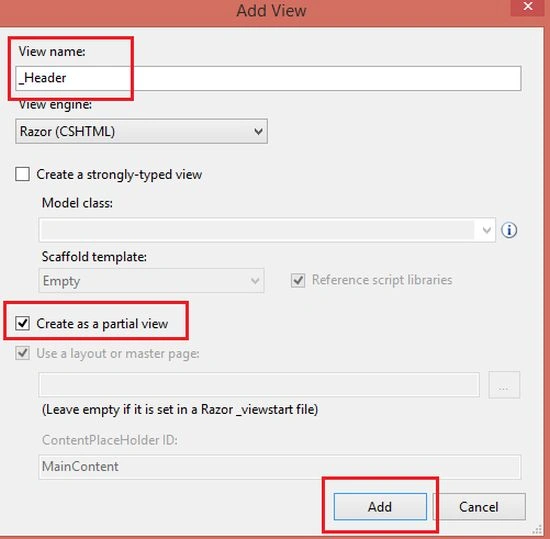
Image 5.
- Here in _Header.cshtml write your text or add the Site logo. Whatever look you want to give to your header do it here.
- Now again right-click on the Shared Folder and select Add-> View.
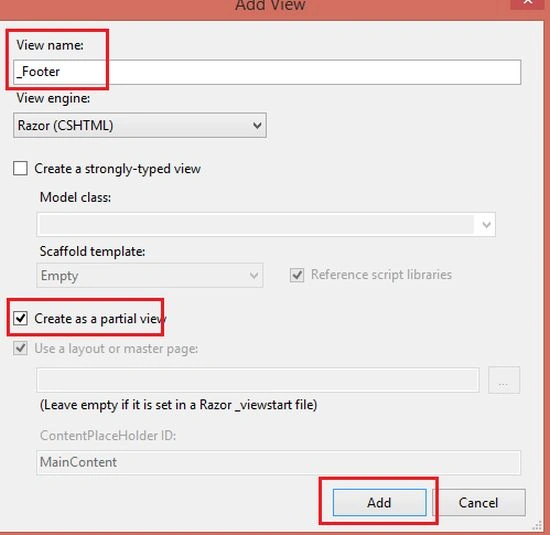
Image 6.
- Now decorate your _Layout.cshtml like the following:
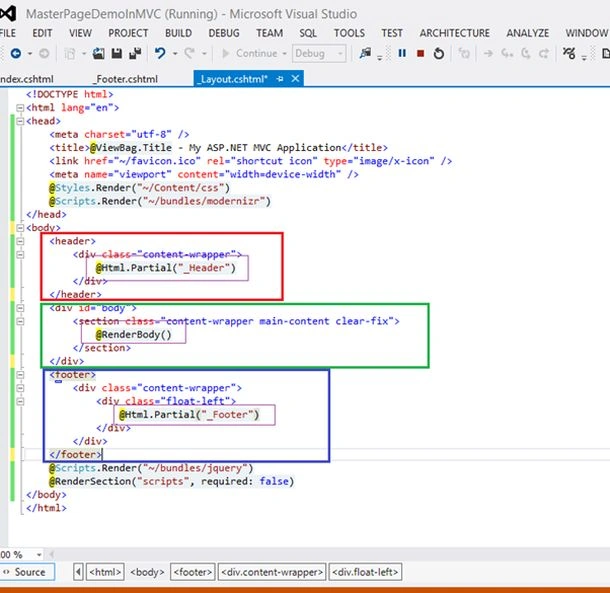
Image 7.
- <!DOCTYPE html>
- <html lang="en">
- <head>
- <meta charset="utf-8" />
- <title>@ViewBag.Title - My ASP.NET MVC Application</title>
- <link href="~/favicon.ico" rel="shortcut icon" type="image/x-icon" />
- <meta name="viewport" content="width=device-width" />
- @Styles.Render("~/Content/css")
- @Scripts.Render("~/bundles/modernizr")
- </head>
- <body>
- <header>
- <div class="content-wrapper">
- @Html.Partial("_Header")
- </div>
- </header>
- <div id="body">
- <section class="content-wrapper main-content clear-fix">
- @RenderBody()
- </section>
- </div>
- <footer>
- <div class="content-wrapper">
- <div class="float-left">
- @Html.Partial("_Footer")
- </div>
- </div>
- </footer>
- @Scripts.Render("~/bundles/jquery")
- @RenderSection("scripts", required: false)
- </body>
- </html>
- Now add a View by right-clicking on the Action Method Name and select your Layout or Master Page like the following.
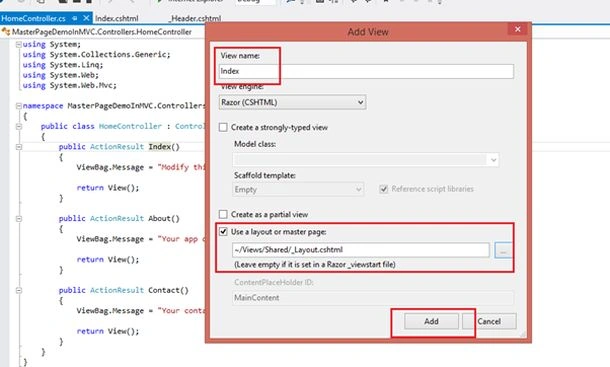
Image 8.
- Now run your application.
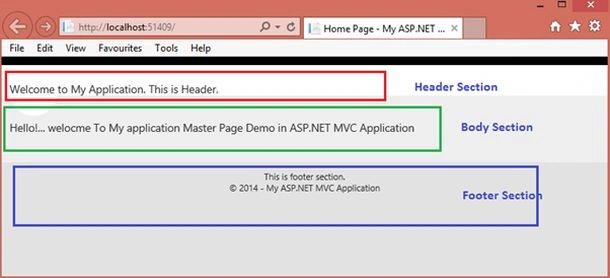
Image 9.
Priti KumariPosted Oct 9, 2015, 3:02 AM
Rahul Saxena .I have one question....can we delete _layout.cshtml file and create new one with own layout.is it necessary to use layout of MVC?.and can we create a shared view for layout purpose?
Rahul Kumar SaxenaPosted Aug 16, 2015, 4:13 AM
Welcome anil kumar
Rahul Kumar SaxenaPosted Apr 17, 2015, 9:57 PM
Thanku Humayun Kabir Mamun...
Rahul Kumar SaxenaPosted Apr 17, 2015, 9:57 PM
Thanku Manish Kumar Choudhary...
Humayun Kabir MamunPosted Dec 22, 2014, 4:09 AM
Very Helpful @Rahul
Manish Kumar ChoudharyPosted Dec 21, 2014, 11:06 PM
Nice one Rahul Saxena sir.
Vithal WadjePosted Dec 21, 2014, 10:12 PM
nice explanation