

1. Create and Consume WCF Restful Service
This article will show how to create Representational State Transfer (REST) services in WCF and how to consume REST WCF services in ASP.NET and C# applications using jQuery.
Representational State Transfer (REST)
REST is a protocol for exchanging data over a distributed environment. The main idea of REST is that we should treat our distributed services as a resource and we should be able to use simple HTTP protocols to do various operations on that resource.
When we talk about the database as a resource we usually talk in terms of the CRUD operations Create, Retrieve, Update and Delete. Now the philosophy of REST is that for a remote resource all these operations should be possible and they should be possible using simple HTTP protocols.
Now the basic CRUD operations are mapped to the HTTP protocols in the following manner:
- GET: Retrieve the required data (representation of data) from the remote resource.
- POST: Update the current representation of the data on the remote server.
- PUT: Insert new data.
- DELETE: Delete the specified data from the remote server.
Now we will learn this REST WCF service by creating an example.
Now open Visual Studio and select "File" -> "New" -> "Project..." then select WCF in the left Side then select WCF Service Application then click "OK".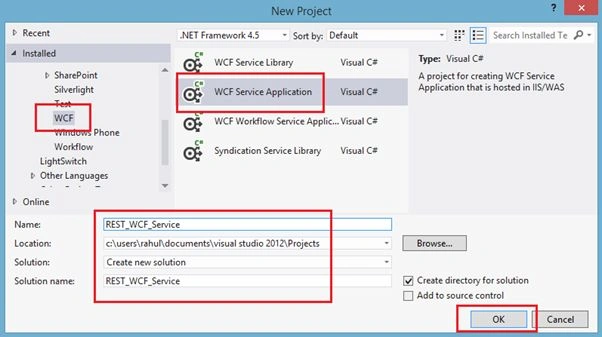
Image 1.
Now delete the IService.cs and Service.cs files.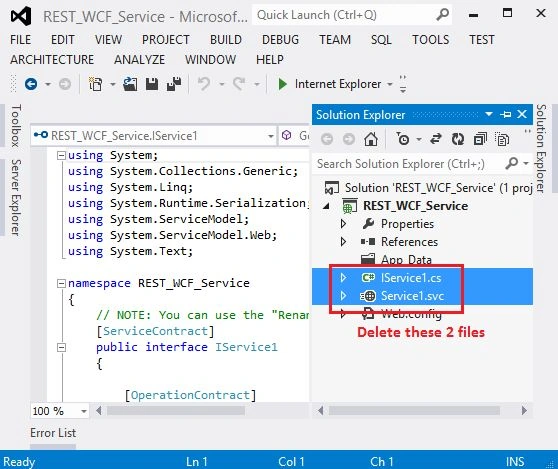
Image 2.
Now right-click on the project in the Solution Explorer then select "Add New Item" then select "WCF Service" then name it "EmployeeService".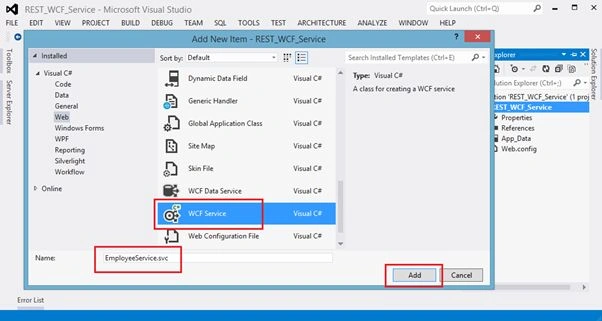
Image 3.
Now I will create a Data Contract as EmployeeDataContract. Right-click on the project in Solution Explorer then select "Add New Item" then add a .cs file and enter the following code into it.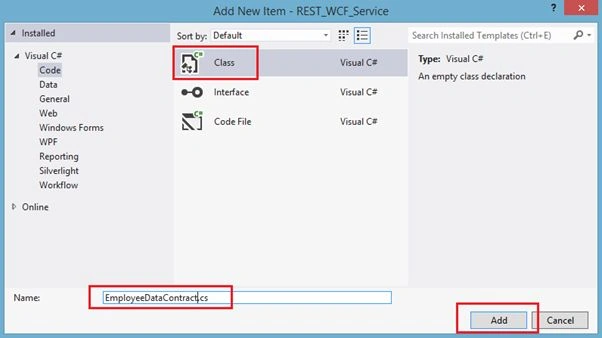
Image 4.
- using System;
- using System.Collections.Generic;
- using System.Linq;
- using System.Web;
- using System.Runtime.Serialization;
- namespace REST_WCF_Service
- {
- [DataContract]
- public class EmployeeDataContract
- {
- [DataMember]
- public string EmployeeID { get; set; }
- [DataMember]
- public string Name { get; set; }
- [DataMember]
- public string JoiningDate { get; set; }
- [DataMember]
- public string CompanyName { get; set; }
- [DataMember]
- public string Address { get; set; }
- }
- }
Now open IEmployeeService.cs to define an interface.
- using System;
- using System.Collections.Generic;
- using System.Linq;
- using System.Runtime.Serialization;
- using System.ServiceModel;
- using System.ServiceModel.Web;
- using System.Text;
- namespace REST_WCF_Service
- {
- // NOTE: You can use the "Rename" command on the "Refactor" menu to change the interface name "IEmployeeService" in both code and config file together.
- [ServiceContract]
- public interface IEmployeeService
- {
- [OperationContract]
- [WebInvoke(Method = "GET",
- RequestFormat = WebMessageFormat.Json,
- ResponseFormat = WebMessageFormat.Json,
- UriTemplate = "/GetAllEmployee/")]
- List<EmployeeDataContract> GetAllEmployee();
- [OperationContract]
- [WebGet(UriTemplate = "/GetEmployeeDetails/{EmpId}", RequestFormat = WebMessageFormat.Json, ResponseFormat = WebMessageFormat.Json)]
- EmployeeDataContract GetEmployeeDetails(string EmpId);
- [OperationContract]
- [WebInvoke(UriTemplate = "/AddNewEmployee", RequestFormat = WebMessageFormat.Json, ResponseFormat = WebMessageFormat.Json, Method = "POST")]
- bool AddNewEmployee(EmployeeDataContract emp);
- [OperationContract]
- [WebInvoke(Method = "PUT", ResponseFormat = WebMessageFormat.Json)]
- void UpdateEmployee(EmployeeDataContract contact);
- [OperationContract]
- [WebInvoke(Method = "DELETE", RequestFormat = WebMessageFormat.Json, ResponseFormat = WebMessageFormat.Json, UriTemplate = "DeleteEmployee/{EmpId}")]
- void DeleteEmployee(string EmpId);
- }
- }
Now Open EmployeeService.cs
- using System;
- using System.Collections.Generic;
- using System.Linq;
- using System.Runtime.Serialization;
- using System.ServiceModel;
- using System.Text;
- using System.Xml.Linq;
- namespace REST_WCF_Service
- {
- // NOTE: You can use the "Rename" command on the "Refactor" menu to change the class name "EmployeeService" in code, svc and config file together.
- // NOTE: In order to launch WCF Test Client for testing this service, please select EmployeeService.svc or EmployeeService.svc.cs at the Solution Explorer and start debugging.
- public class EmployeeService : IEmployeeService
- {
- public List<EmployeeDataContract> GetAllEmployee()
- {
- List<EmployeeDataContract> empList = new List<EmployeeDataContract>();
- XElement xelement = XElement.Load("H:\\EmployeeData.xml");
- IEnumerable<XElement> employees = xelement.Elements();
- foreach (var employee in employees)
- {
- Console.WriteLine(employee.Element("Name").Value);
- empList.Add(new EmployeeDataContract
- {
- EmployeeID = employee.Element("EmployeeID").Value,
- Name = employee.Element("Name").Value,
- JoiningDate = employee.Element("JoiningDate").Value,
- CompanyName = employee.Element("CompanyName").Value,
- Address = employee.Element("Address").Value
- });
- }
- return empList;
- }
- public EmployeeDataContract GetEmployeeDetails(string EmpId)
- {
- EmployeeDataContract emp = new EmployeeDataContract();
- try
- {
- XDocument doc = XDocument.Load("H:\\EmployeeData.xml");
- IEnumerable<XElement> employee =
- (from result in doc.Descendants("DocumentElement").Descendants("Employees")
- where result.Element("EmployeeID").Value == EmpId.ToString()
- select result);
- emp.EmployeeID = employee.ElementAt(0).Element("EmployeeID").Value;
- emp.Name = employee.ElementAt(0).Element("Name").Value;
- emp.JoiningDate = employee.ElementAt(0).Element("JoiningDate").Value;
- emp.CompanyName = employee.ElementAt(0).Element("CompanyName").Value;
- emp.Address = employee.ElementAt(0).Element("Address").Value;
- }
- catch (Exception ex)
- {
- throw new FaultException<string>
- (ex.Message);
- }
- return emp;
- }
- public bool AddNewEmployee(EmployeeDataContract employee)
- {
- try
- {
- XDocument doc = XDocument.Load("H:\\EmployeeData.xml");
- doc.Element("DocumentElement").Add(
- new XElement("Employees",
- new XElement("EmployeeID", employee.EmployeeID),
- new XElement("Name", employee.Name),
- new XElement("JoiningDate", employee.JoiningDate),
- new XElement("CompanyName", employee.CompanyName),
- new XElement("Address", employee.Address)));
- doc.Save("H:\\EmployeeData.xml");
- }
- catch (Exception ex)
- {
- throw new FaultException<string>
- (ex.Message);
- }
- return true;
- }
- public void UpdateEmployee(EmployeeDataContract employee)
- {
- try
- {
- XDocument doc = XDocument.Load("H:\\EmployeeData.xml");
- var target = doc
- .Element("DocumentElement")
- .Elements("Employees")
- .Where(e => e.Element("EmployeeID").Value == employee.EmployeeID)
- .Single();
- target.Element("Name").Value = employee.Name;
- target.Element("JoiningDate").Value = employee.JoiningDate;
- target.Element("CompanyName").Value = employee.CompanyName;
- target.Element("Address").Value = employee.Address;
- doc.Save("H:\\EmployeeData.xml");
- }
- catch (Exception ex)
- {
- throw new FaultException<string>
- (ex.Message);
- }
- }
- public void DeleteEmployee(string EmpId)
- {
- try
- {
- XDocument doc = XDocument.Load("H:\\EmployeeData.xml");
- foreach (var result in doc.Descendants("DocumentElement").Descendants("Employees"))
- {
- if (result.Element("EmployeeID").Value == EmpId.ToString())
- {
- result.Remove();
- break;
- }
- }
- doc.Save("H:\\EmployeeData.xml");
- }
- catch (Exception ex)
- {
- throw new FaultException<string>
- (ex.Message);
- }
- }
- }
- }
Now make the the following changes in <system.serviceModel> in your web.config:
- <system.serviceModel>
- <serviceHostingEnvironment aspNetCompatibilityEnabled="true"
- multipleSiteBindingsEnabled="true" />
- <services>
- <service name="REST_WCF_Service.EmployeeService">
- <endpoint address="" behaviorConfiguration="REST_WCF_Service.EmployeeServiceAspNetAjaxBehavior"
- binding="webHttpBinding" contract="REST_WCF_Service.IEmployeeService" />
- </service>
- </services>
- <behaviors>
- <endpointBehaviors>
- <behavior name="REST_WCF_Service.EmployeeServiceAspNetAjaxBehavior">
- <webHttp/>
- </behavior>
- </endpointBehaviors>
- </behaviors>
- </system.serviceModel>
Now our WCF REST is ready to use so create a client application to consume this REST WCF. Here I will create a new web application and by using jQuery I will consume this REST WCF.
The following is my screen.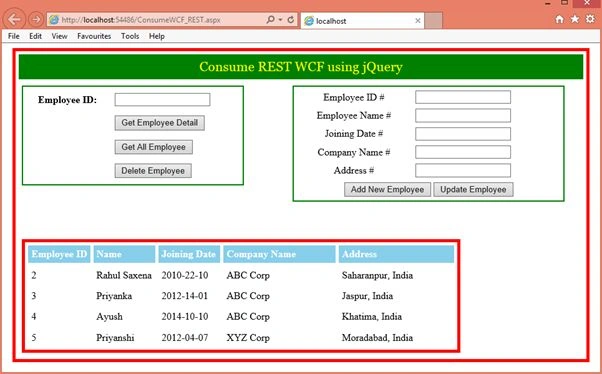
Image 5.
The Aspx code is:
- <%@ Page Language="C#" AutoEventWireup="true" CodeBehind="ConsumeWCF_REST.aspx.cs" Inherits="Web_ClientApplication.ConsumeWCF_REST" %>
- <!DOCTYPE html>
- <html xmlns="http://www.w3.org/1999/xhtml">
- <head runat="server">
- <title></title>
- <script type="text/javascript" src="http://code.jquery.com/jquery-1.8.2.js"></script>
- <script type="text/javascript">
- $(function () {
- $('#tbDetails').hide();
- $('#btnGetAllEmployee').click(function () {
- $.ajax({
- type: "GET",
- url: "http://localhost:23610/EmployeeService.svc/GetAllEmployee",
- contentType: 'json',
- dataType: 'json',
- success: function (data) {
- $.each(data, function (key, value) {
- var jsonData = JSON.stringify(value);
- var objData = $.parseJSON(jsonData);
- var EmployeeID = objData.EmployeeID;
- var Name = objData.Name;
- var JoiningDate = objData.JoiningDate;
- var CompanyName = objData.CompanyName;
- var Address = objData.Address;
- $('<tr><td>' + EmployeeID + '</td><td>' + Name + '</td><td>' + JoiningDate + '</td><td>' + CompanyName + '</td><td>' + Address + '</td></tr>').appendTo('#tbDetails');
- });
- $('#tbDetails').show();
- },
- error: function (xhr) {
- alert(xhr.responseText);
- }
- });
- });
- $('#btnGetEmpDetail').click(function () {
- var Emp_ID = $("#txtEmpID").val();
- $.ajax({
- type: "GET",
- url: "http://localhost:23610/EmployeeService.svc/GetEmployeeDetails/" + Emp_ID,
- contentType: 'json',
- dataType: 'json',
- success: function (data) {
- var jsonData = JSON.stringify(data);
- var objData = $.parseJSON(jsonData);
- var EmployeeID = objData.EmployeeID;
- var Name = objData.Name;
- var JoiningDate = objData.JoiningDate;
- var CompanyName = objData.CompanyName;
- var Address = objData.Address;
- $('<tr><td>' + EmployeeID + '</td><td>' + Name + '</td><td>' + JoiningDate + '</td><td>' + CompanyName + '</td><td>' + Address + '</td></tr>').appendTo('#tbDetails');
- $('#tbDetails').show();
- },
- error: function (xhr) {
- alert(xhr.responseText);
- }
- });
- });
- $('#btnAddNewEmployee').click(function () {
- var EmployeeData = {
- "EmployeeID": $("#txtAddEmpID").val(),
- "Name": $("#txtAddEmpName").val(),
- "JoiningDate": $("#txtAddEmpJoining").val(),
- "CompanyName": $("#txtAddEmpCompany").val(),
- "Address": $("#txtAddEmpAddress").val()
- };
- $.ajax({
- type: "POST",
- url: "http://localhost:23610/EmployeeService.svc/AddNewEmployee",
- data: JSON.stringify(EmployeeData),
- contentType: "application/json; charset=utf-8",
- dataType: "json",
- processData: true,
- success: function (data, status, jqXHR) {
- alert("success…" + data);
- },
- error: function (xhr) {
- alert(xhr.responseText);
- }
- });
- });
- $('#btnUpdateEmployee').click(function () {
- var EmployeeData = {
- "EmployeeID": $("#txtAddEmpID").val(),
- "Name": $("#txtAddEmpName").val(),
- "JoiningDate": $("#txtAddEmpJoining").val(),
- "CompanyName": $("#txtAddEmpCompany").val(),
- "Address": $("#txtAddEmpAddress").val()
- };
- $.ajax({
- type: "PUT",
- url: "http://localhost:23610/EmployeeService.svc/UpdateEmployee",
- data: JSON.stringify(EmployeeData),
- contentType: "application/json; charset=utf-8",
- dataType: "json",
- processData: true,
- success: function (data, status, jqXHR) {
- alert("Employee Updated Successfully.");
- },
- error: function (xhr) {
- alert(xhr.responseText);
- }
- });
- });
- $('#btnDeleteEmployee').click(function () {
- var Emp_ID = $("#txtEmpID").val();
- $.ajax({
- type: "DELETE",
- url: "http://localhost:23610/EmployeeService.svc/DeleteEmployee",
- contentType: "application/json; charset=utf-8",
- data: JSON.stringify(Emp_ID),
- dataType: "json",
- success: function (data, status, jqXHR) {
- alert("Employee Data deleted successfully.");
- },
- error: function (jqXHR, status) {
- alert("Error occured in Delete Process");
- }
- });
- });
- });
- </script>
- </head>
- <body>
- <form id="form1" runat="server">
- <table cellpadding="5" cellspacing="5" style="border: solid 5px red;" width="98%" align="center">
- <tr>
- <td style="background-color: green; color: yellow; height: 30px; font-size: 16pt; font-family: Georgia; text-align: center;" colspan="2">Consume REST WCF using jQuery</td>
- </tr>
- <tr>
- <td style="vertical-align: top;">
- <table cellpadding="5" cellspacing="5" style="border: solid 2px Green; width: 90%; text-align: center;">
- <tr>
- <td><b>Employee ID:</b></td>
- <td style="text-align: left;">
- <input type="text" id="txtEmpID" />
- </td>
- </tr>
- <tr>
- <td></td>
- <td style="text-align: left;">
- <input type="button" id="btnGetEmpDetail" value="Get Employee Detail" /></td>
- </tr>
- <tr>
- <td></td>
- <td style="text-align: left;">
- <input type="button" id="btnGetAllEmployee" value="Get All Employee" /></td>
- </tr>
- <tr>
- <td></td>
- <td style="text-align: left;">
- <input type="button" id="btnDeleteEmployee" value="Delete Employee" /></td>
- </tr>
- </table>
- </td>
- <td style="vertical-align: top; width: 55%; text-align: center;">
- <table cellpadding="2" cellspacing="4" style="border: solid 2px Green;" width="90%" align="center">
- <tr>
- <td>Employee ID #
- </td>
- <td style="text-align: left;">
- <input type="text" id="txtAddEmpID" /></td>
- </tr>
- <tr>
- <td>Employee Name #
- </td>
- <td style="text-align: left;">
- <input type="text" id="txtAddEmpName" /></td>
- </tr>
- <tr>
- <td>Joining Date #
- </td>
- <td style="text-align: left;">
- <input type="text" id="txtAddEmpJoining" /></td>
- </tr>
- <tr>
- <td>Company Name #
- </td>
- <td style="text-align: left;">
- <input type="text" id="txtAddEmpCompany" /></td>
- </tr>
- <tr>
- <td>Address #
- </td>
- <td style="text-align: left;">
- <input type="text" id="txtAddEmpAddress" /></td>
- </tr>
- <tr>
- <td colspan="2">
- <input type="button" id="btnAddNewEmployee" value="Add New Employee" />
- <input type="button" id="btnUpdateEmployee" value="Update Employee" />
- </td>
- </tr>
- </table>
- </td>
- </tr>
- <tr>
- <td height="30px"></td>
- </tr>
- <tr>
- <td colspan="2">
- <table id="tbDetails" cellpadding="5" cellspacing="5" style="border: solid 5px red;">
- <thead style="background-color: skyblue; color: White; font-weight: bold">
- <tr style="border: solid 1px #000000">
- <td width="15%">Employee ID</td>
- <td width="15%">Name</td>
- <td width="15%">Joining Date</td>
- <td>Company Name</td>
- <td>Address</td>
- </tr>
- </thead>
- <tbody>
- </tbody>
- </table>
- </td>
- </tr>
- </table>
- </form>
- </body>
- </html>
The following is my XML: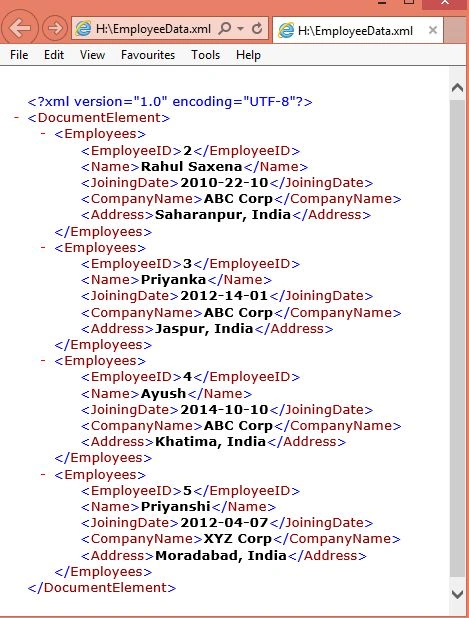
Image 6.
prachin bariPosted Aug 23, 2018, 12:11 AM
Please It's Urgent
prachin bariPosted Aug 23, 2018, 12:11 AM
Code Is not Working
ramkrishna dwivediPosted Apr 5, 2018, 9:55 AM
Hi Code is not working..Where is the problem..
EPosted Nov 6, 2016, 11:13 PM
I got the same problem, jquery is not working...It returns error and no error description but if i run this directly on the browser address it return a json result. something definitely not right or missing with jquery part but the rest of the application is good.
Gowtham RajamanickamPosted Apr 21, 2016, 6:39 AM
very good
Yashwanth KiranPosted Apr 14, 2016, 6:35 AM
i am not getting output ..it says local host says blank msz..wen i am clicking any one of d mszs
Souza ItamarPosted May 18, 2015, 11:24 PM
Error: Cannot obtain Metadata from http://localhost:4245/EmployeeService If this is a Windows (R) Communication Foundation service to which you have access, please check that you have enabled metadata publishing at the specified address. For help enabling metadata publishing, please refer to the MSDN documentation at http://go.microsoft.com/fwlink/?LinkId=65455.WS-Metadata Exchange Error URI: http://localhost:4245/EmployeeService Metadata contains a reference that cannot be resolved: 'http://localhost:4245/EmployeeService'. There was no endpoint listening at http://localhost:4245/EmployeeService that could accept the message. This is often caused by an incorrect address or SOAP action. See InnerException, if present, for more details. The remote server returned an error: (404) Not Found.HTTP GET Error URI: http://localhost:4245/EmployeeService There was an error downloading 'http://localhost:4245/EmployeeService'. The request failed with HTTP status 404: Not Found.
Souza ItamarPosted May 18, 2015, 11:24 PM
Hello Rahul Saxena, after developing the model got the following error:
Rahul Kumar SaxenaPosted Mar 10, 2015, 1:17 AM
Thanks Vithal Wadjee
Rahul Kumar SaxenaPosted Mar 10, 2015, 1:17 AM
Thanks Asif Mulla...
Rahul Kumar SaxenaPosted Mar 10, 2015, 1:16 AM
Yes Jopet Cervantes This is XML file which will read by WCF service .. you should have this file physically...
Jopet CervantesPosted Mar 9, 2015, 11:24 PM
What is H:\\EmployeeDate.xml used for? should i create an xml file?
Asif MULLAPosted Feb 19, 2015, 1:38 AM
@Rahul Nice article for beginners.But my jquery function didnt get called.
Vithal WadjePosted Nov 18, 2014, 1:27 AM
this is not single Article your T4 Template article from C# corner also an article of the day ,keep posting
Praveen KumarPosted Nov 18, 2014, 12:23 AM
Great Rahul
Vithal WadjePosted Nov 17, 2014, 11:33 PM
this is your article on Asp.net official site listed as Article of the day http://www.asp.net/community/articles