

You are unable to access the reporting site for your TFS
(Team Foundation Server) project. You are able to view individual reports
from VS, but you cannot get to the reporting site to edit them. Whenever you
try to go to it (By right clicking on Reports->Show Report Site in Team
Explorer), you get the following error page:
SQL Server Reporting Services Error :
"The permissions granted to user are insufficient for
performing this operation. (rsAccessDenied)"
Now, this
error message is fairly well described but almost every solution work towards
that you don't have any permission set in Reporting Services.
You need to set the permissions up via SQL Server
Management Studio. Run it
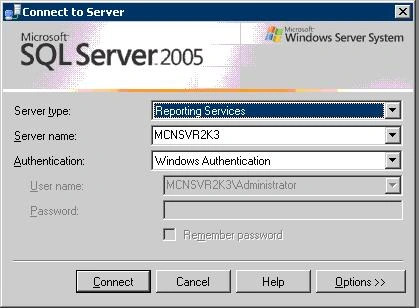
as administrator, click Connect in Object Explorer, select Reporting Services
from the dropdown, then enter server name.
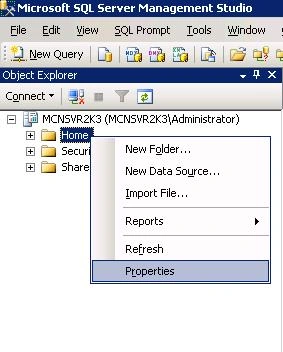
Once connected, right click on Home and do Properties,
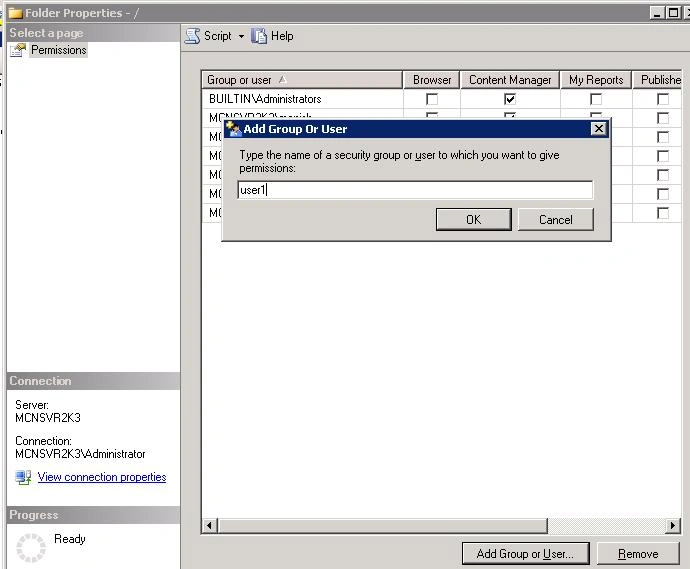
then you can add
your user and apply the permissions you need.
noa coPosted May 30, 2012, 2:57 PM
I don't see the HOME folder above the SECURITY folder. Any ideas?
AbPosted Jan 15, 2012, 4:17 PM
The solution you posted is for SQL SERVER 2005. i use 2008 R2 SQL and i followed the steps well. but on getting to clicking connect - select reporting services - putting the server name - Ok, i discovered that the list i saw in your solution had a different item. I saw Jobs,Security and Shared Schedule., didnt find "home" you mentioned. I tried doing a right click on each of them, but also discovered that the Properties of these items were greyed out. I have been battling with these for some days now and i need to get it resolved. Pls how do i get this solved, thanks.. Is it possible to have a report link from your MS Access Report to the reports on reportserver on SQL?