

C# List<T> class provides methods and properties to create a list of objects (classes).
List is a generic class. You must import the following namespace before using the List<T> class.
- using System.Collections.Generic;
List.Item
The Item property gets and sets the value associated with the specified index.
The following code snippet gets and sets the first item in a list.
- using System;
- using System.Collections.Generic;
- namespace ConsoleApp1
- {
- class Program
- {
- static void Main(string[] args)
- {
- // Create a list of strings
- List<string> AuthorList = new List<string>();
- AuthorList.Add("Mahesh Chand");
- AuthorList.Add("Praveen Kumar");
- AuthorList.Add("Raj Kumar");
- AuthorList.Add("Nipun Tomar");
- AuthorList.Add("Dinesh Beniwal");
- // Get first item of a List
- string auth = AuthorList[0];
- Console.WriteLine(auth);
- Console.WriteLine("-------------");
- // Set first item of a List
- AuthorList[0] = "New Author";
- foreach (var author in AuthorList)
- {
- Console.WriteLine(author);
- }
- }
- }
- }
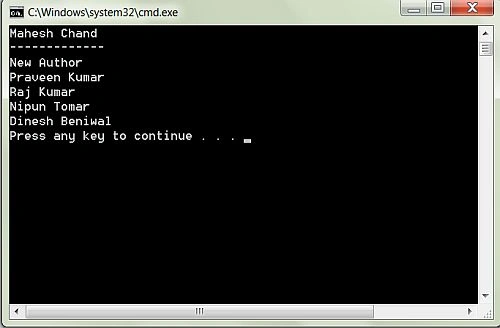
The output from above code listing is shown in below figure.
Next >> C# List Tutorial
Rajan MishraPosted Oct 8, 2018, 3:43 AM
Easy and complete.
Rushi MehtaPosted Aug 31, 2018, 3:35 AM
Nicely explain Example
Praveen KumarPosted Aug 30, 2018, 4:55 AM
Updated on 8/30/2018.
Debasis SahaPosted Dec 4, 2015, 1:33 PM
nice example