

Introduction
COUNT_BIG returns the number of items within a group. It works same as COUNT function. The only difference between these two functions is the return type. COUNT_BIG returns bigint data type whereas COUNT returns int data type value.
Syntax
COUNT_BIG ( { [ ALL | DISTINCT ] expression } | * )
- ALL: Count function applies the aggregate function to all values. This is the default.
- DISTINCT: This specifies COUNT_BIG function returns the number of unique non-null values.
- Expression: It is an expression of any type. This does not work with aggregate functions and subqueries.
- *: This specifies that all the rows should be counted to return total number of rows in query. COUNT_BIG (*) does not take an expression as argument. Also includes null value of column.
Example:
In the following example, I have created one temporary table and inserted some dummy data in the table. I have also added row with null data.
- Create table #emp (
- Id int,
- name varchar(50)
- ) --Inserting some dummy data
- Insert into #emp values(1,'Jignesh')
- Insert into #emp values(2,'Tejas')
- Insert into #emp values(1,'Jignesh')
- Insert into #emp values(2,'Tejas')
- Insert into #emp values(1,'Jignesh 1')
- Insert into #emp values(null,null)
- select* from #emp
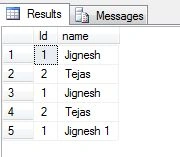
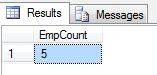
Query: SQL Query with ALL attribute.
- SELECT COUNT_BIG(ALL Id) AS EmpCount FROM #emp
Query: SQL Query with DISTINCT attribute.
- SELECT COUNT_BIG(DISTINCT Id) AS EmpCount FROM #emp
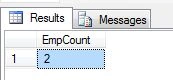
In above two queries, SQL server engine ignore null value row while counting row.
Query:
- SELECT COUNT_BIG(*) AS EmpCount FROM #emp
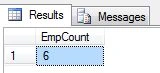
COUNT (*) Vs COUNT_BIG (*)
| Count (*) | Count_Big (*) |
| It returns int data type value | It returns bigint data type value |
| We cannot create cluster index on view when view has COUNT (*) in it | Index could be created if it has COUNT_BIG (*) |
Summary
COUNT_BIG works similar to COUNT function. It is used to count particular item in a group.
Point to remember
- COUNT_BIG (*) returns the number of items in a group and it also includes NULL values and duplicates.
- COUNT_BIG (ALL expression) evaluates expression for each row in a group and includes duplicate data and non-null values count.
- COUNT_BIG (DISTINCT expression) evaluates expression for each row in a group and returns the number of unique non-null values.
Santhakumar MunuswamyPosted Nov 18, 2015, 2:25 PM
Good one
Banketeshvar NarayanPosted Nov 18, 2015, 11:04 AM
Nice share
Yashwant VishwakarmaPosted Nov 18, 2015, 8:07 AM
good explanation !!!
Raja TPosted Nov 18, 2015, 7:32 AM
Nice One,thanks for sharing
Sibeesh VenuPosted Nov 18, 2015, 7:26 AM
Nice Share
Harshad PansuriyaPosted Nov 18, 2015, 7:25 AM
Nice one
Humayun Kabir MamunPosted Nov 18, 2015, 6:53 AM
Nice...