

Introduction
- CREATE TABLE[dbo]. [tblStudentInfo](
- [Sid][int] IDENTITY(1, 1) NOT NULL,
- [sName][varchar](50) NOT NULL,
- [sAdd][varchar](50) NOT NULL,
- [emailId][varchar](50) NOT NULL,
- [sRollNo][varchar](50) NOT NULL,
- CONSTRAINT[PK_tblStudentInfo] PRIMARY KEY CLUSTERED(
- [Sid] ASC
- ) WITH(PAD_INDEX = OFF, STATISTICS_NORECOMPUTE = OFF,
- IGNORE_DUP_KEY = OFF, ALLOW_ROW_LOCKS = ON, ALLOW_PAGE_LOCKS = ON) ON[PRIMARY]
- ) ON[PRIMARY]
- CREATE TABLE[dbo]. [TriggerData](
- [RollNo][varchar](50) NULL,
- [InsertedDate][datetime] NULL,
- [Command][varchar](max) NOT NULL,
- [InsertedBy][nvarchar](256) NULL,
- [Action][varchar](50) NULL
- ) ON[PRIMARY]
- <table id="tblUser" class="auto-style1" runat="server">
- <tr>
- <td>Enter User Name </td>
- <td>
- <asp:TextBox ID="txtuserName" runat="server"></asp:TextBox>
- </td>
- <td>
- <asp:Button ID="btnContinue" runat="server" OnClick="btnContinue_Click" Text="Continue" />
- </td>
- </tr>
- </table>
- <table id="StudentTbl" class="auto-style1" runat="server" visible="false">
- <tr>
- <td colspan="4">
- <center>
- <h2>
- Student Information Entry</h2>
- </center>
- </td>
- </tr>
- <tr>
- <td colspan="2">Student Roll Number
- </td>
- <td>
- <asp:TextBox ID="txtRollNo" runat="server"></asp:TextBox>
- <asp:Label ID="libid" runat="server" Visible="False"></asp:Label>
- <asp:RequiredFieldValidator ID="RequiredFieldValidator1" runat="server" ControlToValidate="txtRollNo" ErrorMessage="*" ForeColor="Red"></asp:RequiredFieldValidator>
- <br />
- </td>
- <td rowspan="6">
- <asp:GridView ID="gvStudent" runat="server" OnSelectedIndexChanged="GridView1_SelectedIndexChanged" BackColor="White" BorderColor="#336666" BorderStyle="Double" BorderWidth="3px" CellPadding="4" GridLines="Horizontal" AutoGenerateColumns="False">
- <Columns>
- <asp:ButtonField ButtonType="Button" CommandName="Select" Text="Select" HeaderText="Select" />
- <asp:BoundField DataField="Sid" HeaderText="Id" />
- <asp:BoundField DataField="sRollNo" HeaderText="Roll No" />
- <asp:BoundField DataField="sName" HeaderText="Name" />
- <asp:BoundField DataField="sAdd" HeaderText="Address" />
- <asp:BoundField DataField="emailId" HeaderText="EmailId" />
- </Columns>
- <FooterStyle BackColor="White" ForeColor="#333333" />
- <HeaderStyle BackColor="#336666" Font-Bold="True" ForeColor="White" />
- <PagerStyle BackColor="#336666" ForeColor="White" HorizontalAlign="Center" />
- <RowStyle BackColor="White" ForeColor="#333333" />
- <SelectedRowStyle BackColor="#339966" Font-Bold="True" ForeColor="White" />
- <SortedAscendingCellStyle BackColor="#F7F7F7" />
- <SortedAscendingHeaderStyle BackColor="#487575" />
- <SortedDescendingCellStyle BackColor="#E5E5E5" />
- <SortedDescendingHeaderStyle BackColor="#275353" />
- </asp:GridView>
- </td>
- </tr>
- <tr>
- <td colspan="2">Student Name
- </td>
- <td>
- <asp:TextBox ID="txtSName" runat="server"></asp:TextBox>
- <br />
- </td>
- </tr>
- <tr>
- <td colspan="2">Student Address
- </td>
- <td>
- <asp:TextBox ID="txtSAdd" runat="server"></asp:TextBox>
- <br />
- </td>
- </tr>
- <tr>
- <td colspan="2">Student Email Id
- </td>
- <td>
- <asp:TextBox ID="txtSEId" runat="server"></asp:TextBox>
- <br />
- </td>
- </tr>
- <tr>
- <td colspan="2">
- </td>
- <td>
- <asp:Label ID="libmsg" runat="server" Visible="False"></asp:Label>
- </td>
- </tr>
- <tr>
- <td>
- <asp:Button ID="btnInsert" runat="server" OnClick="btnInsert_Click" Text="Insert" Style="height: 26px" />
- </td>
- <td class="auto-style2">
- <asp:Button ID="btnUpdate" runat="server" Text="Update" OnClick="btnUpdate_Click" />
- </td>
- <td>
- <asp:Button ID="btnDelete" runat="server" Text="Delete" OnClick="btnDelete_Click" />
- </td>
- </tr>
- </table>
- <table id="triggerAction" class="auto-style2" runat="server" visible="false">
- <tr>
- <td>
- <center>
- <h2>Action List By <asp:Label ID="lbluser" runat="server"></asp:Label>
- </h2>
- </center>
- </td>
- </tr>
- <tr>
- <td>
- <asp:GridView ID="gvTriggerAction" runat="server" BackColor="White" BorderColor="#336666" BorderStyle="Double" BorderWidth="3px" CellPadding="4" GridLines="Horizontal" AutoGenerateColumns="False">
- <Columns>
- <asp:BoundField DataField="RollNo" HeaderText="Roll No" />
- <asp:BoundField DataField="Command" HeaderText="Command" />
- <asp:BoundField DataField="Action" HeaderText="Action" />
- <asp:BoundField DataField="InsertedDate" DataFormatString="{0:dd-MMM-yyyy}" HeaderText="Date" />
- </Columns>
- <FooterStyle BackColor="White" ForeColor="#333333" />
- <HeaderStyle BackColor="#336666" Font-Bold="True" ForeColor="White" />
- <PagerStyle BackColor="#336666" ForeColor="White" HorizontalAlign="Center" />
- <RowStyle BackColor="White" ForeColor="#333333" />
- <SelectedRowStyle BackColor="#339966" Font-Bold="True" ForeColor="White" />
- <SortedAscendingCellStyle BackColor="#F7F7F7" />
- <SortedAscendingHeaderStyle BackColor="#487575" />
- <SortedDescendingCellStyle BackColor="#E5E5E5" />
- <SortedDescendingHeaderStyle BackColor="#275353" />
- </asp:GridView>
- </td>
- </tr>
- </table>
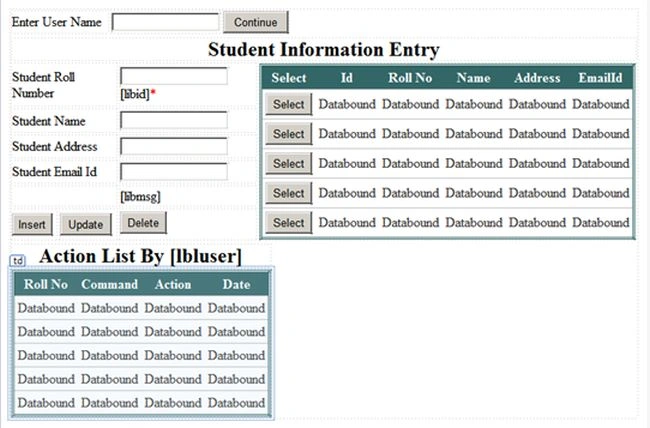
Now by using the following 3 functions I simply do the CRUD operations with the database table studentInfo.
- void AddRecordToDb() {
- SqlConnection con = new SqlConnection(
- System.Configuration
- .ConfigurationManager
- .ConnectionStrings["DbCS"]
- .ConnectionString
- );
- SqlCommand cmd = new SqlCommand();
- con.Open();
- SetContext(con, txtuserName.Text.Trim());
- try {
- cmd.CommandText = "insert into tblStudentInfo (sName,sAdd,emailId,sRollNo)" +
- "values (@sName,@sAdd,@emailId,@sRollNo); SELECT SCOPE_IDENTITY();";
- cmd.Connection = con;
- cmd.Parameters.AddWithValue("@sName", txtSName.Text);
- cmd.Parameters.AddWithValue("@sAdd", txtSAdd.Text);
- cmd.Parameters.AddWithValue("@emailId", txtSEId.Text);
- cmd.Parameters.AddWithValue("@sRollNo", txtRollNo.Text);
- int id = Convert.ToInt32(cmd.ExecuteScalar());
- libmsg.Visible = true;
- libmsg.Text = "Record Inserted At Positon " + id.ToString() + ".";
- } catch {
- libmsg.Visible = true;
- libmsg.Text = "Error..";
- }
- }
- void UpdateRecordToDb() {
- SqlConnection con = new SqlConnection(
- System.Configuration
- .ConfigurationManager
- .ConnectionStrings["DbCS"]
- .ConnectionString
- );
- SqlCommand cmd = new SqlCommand();
- con.Open();
- SetContext(con, txtuserName.Text.Trim());
- cmd.CommandText = "UPDATE tblStudentInfo SET sName = @sName, sAdd = @sAdd ," + "emailId = @emailId , sRollNo = @sRollNo WHERE Sid = @Sid ";
- cmd.Connection = con;
- int sid = Convert.ToInt32(libid.Text);
- string sname = txtSName.Text;
- string sadd = txtSAdd.Text;
- string seid = txtSEId.Text;
- string rol = txtRollNo.Text;
- cmd.Parameters.AddWithValue("@Sid", sid);
- cmd.Parameters.AddWithValue("@sName", sname);
- cmd.Parameters.AddWithValue("@sAdd", sadd);
- cmd.Parameters.AddWithValue("@emailId", seid);
- cmd.Parameters.AddWithValue("@sRollNo", rol);
- cmd.ExecuteNonQuery();
- }
- void DeleteRecordToDb() {
- SqlConnection con = new SqlConnection(
- System.Configuration.ConfigurationManager
- .ConnectionStrings["DbCS"].ConnectionString);
- SqlCommand cmd = new SqlCommand();
- con.Open();
- SetContext(con, txtuserName.Text.Trim());
- cmd.CommandText = "DELETE FROM tblStudentInfo WHERE Sid = @Sid ";
- cmd.Connection = con;
- int sid = Convert.ToInt32(libid.Text);
- cmd.Parameters.AddWithValue("@Sid", sid);
- cmd.ExecuteNonQuery();
- }
When all the three functions have been created, call those functions from their respective button click events.
Now as I told earlier it is not possible to directly send data to trigger from our front end. So for doing that I am setting a value to the context and writing a Stored Procedure to read that context and make that content available for the trigger.
Stored Procedure
- Create PROCEDURE[dbo]. [sp_set_context]
- @username nvarchar(256)
- AS
- BEGIN
- --SET NOCOUNT ON added to prevent extra result sets from
- --interfering with SELECT statements.
- SET NOCOUNT ON;
- declare @Ctx varbinary(128)
- select @Ctx = convert(varbinary(128), @username)
- set context_info @Ctx
- END
- protected virtual void SetContext(IDbConnection conn, string UserName) {
- string currentUserName = UserName;
- string spName = "sp_set_context";
- if (conn != null) {
- if (conn.State != ConnectionState.Open)
- conn.Open();
- IDbCommand cmd = conn.CreateCommand();
- cmd.CommandType = CommandType.StoredProcedure;
- cmd.CommandText = spName;
- IDbDataParameter param = cmd.CreateParameter();
- param.ParameterName = "@username";
- param.DbType = DbType.String;
- param.Size = 255;
- param.Value = currentUserName;
- cmd.Parameters.Add(param);
- cmd.ExecuteNonQuery();
- }
- }
- After Insert Trigger
- Create TRIGGER[dbo]. [TrackStudentInfo]
- ON[dbo]. [tblStudentInfo]
- AFTER INSERT
- AS
- BEGIN
- DECLARE @id uniqueidentifier;
- Declare @sName varchar(50);
- Declare @sAdd varchar(50);
- Declare @emailId varchar(50);
- Declare @RollNo varchar(50);
- Declare @Sid varbinary(128);
- Declare @InsertedBy nvarchar(256);
- Declare @Command varchar(max);
- SELECT @InsertedBy = convert(nvarchar(256), CONTEXT_INFO());
- select @RollNo = i.sRollNo from inserted i;
- select @sName = i.sName from inserted i;
- select @sAdd = i.sAdd from inserted i;
- select @emailId = i.emailId from inserted i;
- select @Command = 'INSERT INTO [TrakingInfoDb].[dbo].[tblStudentInfo]([sName],[sAdd],[emailId],[sRollNo]) VALUES('
- '' +
- @sName + ''
- ','
- '' + @sAdd + ''
- ','
- '' + @emailId + ''
- ','
- '' + @RollNo + ''
- ');';
- DECLARE @data datetime;
- select @data = getdate();
- Insert TriggerData values(@RollNo, @data, @Command, @InsertedBy, 'Insert')
- END
- After Update Trigger
- CREATE TRIGGER [dbo].[trgAfterUpdate] ON [dbo].[tblStudentInfo]
- FOR UPDATE
- AS
- BEGIN
- DECLARE @id uniqueidentifier;
- Declare @sName varchar(50);
- Declare @sAdd varchar(50);
- Declare @emailId varchar(50);
- Declare @RollNo varchar(50);
- Declare @Sid int;
- Declare @InsertedBy nvarchar(256);
- Declare @Command varchar(max);
- SELECT @InsertedBy = convert(nvarchar(256), CONTEXT_INFO());
- select @RollNo=i.sRollNo from inserted i;
- select @sName=i.sName from inserted i;
- select @sAdd=i.sAdd from inserted i;
- select @emailId=i.emailId from inserted i;
- select @Sid=i.[Sid] from inserted i;
- select @Command='UPDATE [TrakingInfoDb].[dbo].[tblStudentInfo] SET [sName]='''
- + @sName+ ''',[sAdd]='''+@sAdd+''',[emailId]='''
- +@emailId+''',[sRollNo]='''+@RollNo
- +'''WHERE [Sid]='''+cast(@Sid as varchar(20))+''');';
- DECLARE @data datetime;
- select @data =getdate();
- Insert TriggerData values(@RollNo,@data,@Command,@InsertedBy,'After Update')
- END
- After Delete Trigger
- ALTER TRIGGER [dbo].[trgAfterDelete] ON [dbo].[tblStudentInfo]
- AFTER DELETE
- AS
- BEGIN
- Declare @RollNo varchar(50);
- Declare @Sid int;
- Declare @InsertedBy nvarchar(256);
- Declare @Command varchar(max);
- select @RollNo=d.sRollNo from deleted d;
- select @Sid=d.[Sid] from deleted d;
- SELECT @InsertedBy = convert(nvarchar(256), CONTEXT_INFO());
- select @Command='DELETE FROM [TrakingInfoDb].[dbo].[tblStudentInfo]'
- +' WHERE [Sid]='''+cast(@Sid as varchar(20))+''';';
- DECLARE @data datetime;
- select @data =getdate();
- Insert TriggerData values(@RollNo,@data,@Command,@InsertedBy,'After Delete')
- END
Once we have done this everything is done; run the web page and you will get output like this:
 Enter the user name to do a CRUD operation and click the Continue button.
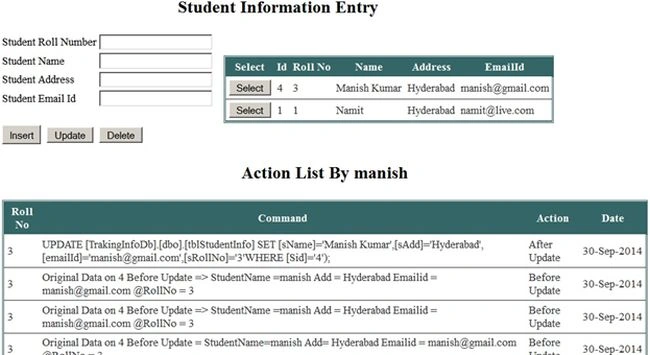 The first grid will show the record in the student info table and all the action down by the user Manish will be listed below in descending order. For organized code please find the attachment.
This article showed how to track user information using a trigger. Please post your feedback, question, or comments about this article.
The first grid will show the record in the student info table and all the action down by the user Manish will be listed below in descending order. For organized code please find the attachment.
This article showed how to track user information using a trigger. Please post your feedback, question, or comments about this article.
FAROOKH MANSURIPosted Apr 9, 2015, 3:26 AM
its really good article ..
Venkat KumarPosted Nov 10, 2014, 12:41 AM
Nice Article