

Introduction
This article demonstrates how and when to use a factory design pattern. This article begins with the intent of the Factory Pattern. After that, it demonstrates a logical and physical model of factory. Then step-by-step implementation of factory pattern. In the end, the article discusses how it is useful.
Consider a Scenario
Consider a scenario where you developed your application for a SQL Server database. And in the future you need to shift from SQL Server to Oracle database. Then you have to change your code if you have not designed your application using a factory method.
Intent
Define an interface for creating an object, but let subclasses decide which class to instantiate.
Logical Model
Rather than creating a product directly, the client uses a factory and the factory creates the product.
Physical Model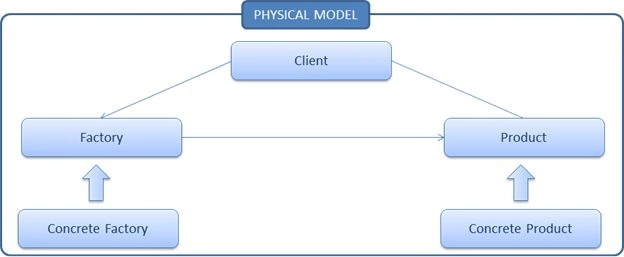
In physical model there is Factory which is an abstract class and implementation of this abstract class is in Concrete Factory. Similarly Product is an abstract class and implementation of this abstract class in Concrete Product.
Let's try to understand using a class diagram
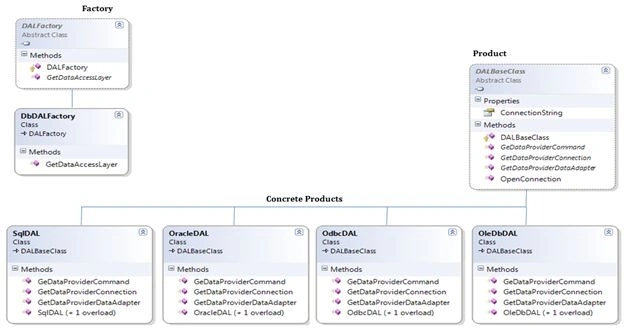
- Products : Declares an abstract class to define products
- Concrete Product : It implements the product to define a concrete object
- Factory : An abstract class, used to create a Factory
- Concrete Factory : It implements the factory methods declared within the factory
Step 1
- Open Visual Studio
- File >> New >> Project >> Class Library
- Give it the name "Product"
- Add one class, "DALBaseClass"
- Copy the following segment of code:
using System;
using System.Data;
namespace Product
{
public abstract class DALBaseClass
{
private string strConnectionString;
private IDbConnection connection;
private IDbCommand command;
private IDbTransaction transaction;
public string ConnectionString
{
get
{
if (strConnectionString == string.Empty || strConnectionString.Length == 0)
throw new ArgumentException("Invalid database connection string.");
return strConnectionString;
}
set
{ strConnectionString = value; }
}
protected DALBaseClass() { }
public abstract IDbConnection GetDataProviderConnection();
public abstract IDbCommand GeDataProviderCommand();
public abstract IDbDataAdapter GetDataProviderDataAdapter();
#region Database Transaction
public string OpenConnection()
{
string Response = string.Empty;
try
{
connection = GetDataProviderConnection(); // instantiate a connection object
//connection.ConnectionString = this.ConnectionString;
//connection.Open(); // open connection
Response = ((System.Reflection.MemberInfo)(connection.GetType())).Name + "
Open Successfully";
}
catch
{
connection.Close();
Response = "Unable to Open " +
((System.Reflection.MemberInfo)(connection.GetType())).Name;
}
return Response;
}
#endregion
}
}
Step 2
- Right-click on the solution file
- Add >> New Project >> Class Library
- Give it the name "Concrete Products"
- Create the concrete product i.e. add classes for SQL, Oracle, ODBC and OleDb and inherit the DALBaseClass i.e. Product; see:
SQL Server
using System.Data;
using System.Data.SqlClient;
using Product;
namespace ConcreteProducts
{
public class SqlDAL : DALBaseClass
{
// Provide class constructors
public SqlDAL() { }
public SqlDAL(string connectionString)
{
this.ConnectionString = "Data Source=xxxx;Initial Catalog=xxxx;
User ID=xxxx;Password=xxxx";
}
// DALBaseClass Members
public override IDbConnection GetDataProviderConnection()
{
return new SqlConnection();
}
public override IDbCommand GeDataProviderCommand()
{
return new SqlCommand();
}
public override IDbDataAdapter GetDataProviderDataAdapter()
{
return new SqlDataAdapter();
}
}
}
Oracle
using System.Data;
using System.Data.OracleClient;
using Product;
namespace ConcreteProducts
{
public class OracleDAL : DALBaseClass
{
// Provide class constructors
public OracleDAL() { }
public OracleDAL(string connectionString)
{
this.ConnectionString = "Data Source=Oracle8i;Integrated Security=yes";
}
// DALBaseClass Members
public override IDbConnection GetDataProviderConnection()
{
return new OracleConnection();
}
public override IDbCommand GeDataProviderCommand()
{
return new OracleCommand();
}
public override IDbDataAdapter GetDataProviderDataAdapter()
{
return new OracleDataAdapter();
}
}
}
ODBC
using System.Data;
using System.Data.Odbc;
using Product;
namespace ConcreteProducts
{
public class OdbcDAL : DALBaseClass
{
// Provide class constructors
public OdbcDAL() { }
public OdbcDAL(string connectionString)
{
this.ConnectionString = "DSN=dsnname";
}
// DALBaseClass Members
public override IDbConnection GetDataProviderConnection()
{
return new OdbcConnection();
}
public override IDbCommand GeDataProviderCommand()
{
return new OdbcCommand();
}
public override IDbDataAdapter GetDataProviderDataAdapter()
{
return new OdbcDataAdapter();
}
}
}
OleDb
using System.Data;
using System.Data.OleDb;
using Product;
namespace ConcreteProducts
{
public class OleDbDAL : DALBaseClass
{
// Provide class constructors
public OleDbDAL() { }
public OleDbDAL(string connectionString)
{
this.ConnectionString = "Provider=Microsoft.Jet.OLEDB.4.0;
Data Source=C:\\Development\\Mine\\DataAccessLayer\\Northwind.mdb";
}
// DALBaseClass Members
public override IDbConnection GetDataProviderConnection()
{
return new OleDbConnection();
}
public override IDbCommand GeDataProviderCommand()
{
return new OleDbCommand();
}
public override IDbDataAdapter GetDataProviderDataAdapter()
{
return new OleDbDataAdapter();
}
}
}
In the above four classes you can observe one common thing which is implementation of a common abstract class.
In product there is three abstract methods and you can find the implementation of each of these three abstract methods in concrete classes.
For example in the class SqlDAL:
GetDataProviderConnection returns SqlConnection
GeDataProviderCommand returns SqlCommand
GetDataProviderDataAdapter returns SqlDataAdapter
In the same manner Oracle returns OracleConnection, OracleCommand and OracleDataAdapter. And the same for the ODBC and OleDb classes.
Now let's move on to the Factory.
Step 3
- Right-click on the solution file
- Add >> New Project >> Class Library
- Give name as Factory
- Create one class 'DALFactory'
using Product;
namespace Factory
{
public enum DataProviderType
{
Access,
Odbc,
OleDb,
Oracle,
Sql
}
public abstract class DALFactory
{
public abstract DALBaseClass GetDataAccessLayer(DataProviderType dataProviderType);
}
}
Here we create an abstract class DALFactory. We also create an enum to pass our db choice.
Step 4
- right-click on solution file
- Add >> New Project >> Class Library
- Give it the name "ConcreteFactory"
- Create one class "DbDALFactory"
using System;
using ConcreteProducts;
using Factory;
using Product;
namespace ConcreteFactory
{
public class DbDALFactory : DALFactory
{
public override DALBaseClass GetDataAccessLayer(DataProviderType dataProviderType)
{
switch (dataProviderType)
{
case DataProviderType.Access:
case DataProviderType.OleDb:
return new OleDbDAL();
case DataProviderType.Odbc:
return new OdbcDAL();
case DataProviderType.Oracle:
return new OracleDAL();
case DataProviderType.Sql:
return new SqlDAL();
default:
throw new ArgumentException("Invalid DAL provider type.");
}
}
}
}
This class implements an abstract method of DALFactory i.e. Factory. And create an object of Concrete Product.
Now let's see how the client uses the factory.
Step 5
-
Right-click on the solution file
-
Add >> New Project >> Console Application
-
Give it the name "Client"
using System;
using ConcreteFactory;
using Factory;
namespace FPClient
{
class Program
{
static void Main(string[] args)
{
string choice = string.Empty, dbProvider = string.Empty;
bool done = false;
do
{
Console.Clear();
Console.WriteLine("\t Select one of the Database Providers \n");
Console.WriteLine("\t 1. Access / OleDb");
Console.WriteLine("\t 2. Odbc");
Console.WriteLine("\t 3. Oracle");
Console.WriteLine("\t 4. Sql \n");
Console.WriteLine("===============================================");
Console.Write("\t Enter Your Selection (0 to exit) : ");
choice = Console.ReadLine();
switch (choice)
{
case "0" :
done = true;
break;
case "1":
dbProvider = "Access";
break;
case "2":
dbProvider = "Odbc";
break;
case "3":
dbProvider = "Oracle";
break;
case "4":
dbProvider = "Sql";
break;
}
if (choice != "0")
{
Console.WriteLine("===========================================");
DALFactory Factory = new DbDALFactory()
var DAL = Factory.GetDataAccessLayer((DataProviderType)Enum.Parse (typeof(DataProviderType), dbProvider));
Console.WriteLine(DAL.OpenConnection());
Console.ReadKey();
}
} while (!done);
}
}
}
Here in the client code, we can see that the client creates an object of DALFactory i.e. Factory and Factory creates an object of Concrete Products. The main thing in this pattern is that the client is totally unaware of the concrete products.
Summary
In this article, I discussed how we can create a Factory Design Pattern. We also saw intent, logical model, and physical model. After that, we saw a step-by-step implementation of the Factory Method.
Reference from: http://msdn.microsoft.com/en-us/library/ee817667.aspx
Hope you enjoyed reading the article.
Don't forget to share the link and provide some good comments.
Ravi SPosted Oct 3, 2018, 8:41 AM
Very nice article Akshay..Thank you
Wei ChenPosted Nov 2, 2017, 4:24 AM
When i run it , it only ruturn databsename is open but no data form table return . can you please help me
Rohit SharmaPosted Jun 28, 2017, 2:14 AM
Can we use NSQL in this pattern if yes then how?
Humayun Kabir MamunPosted Jan 2, 2015, 3:02 AM
Nice...
venkadesan perumalPosted Nov 20, 2013, 6:02 AM
good.
waseem malikPosted Nov 20, 2013, 3:08 AM
good explanation for beginners thanks...
Uriel ParPosted Sep 12, 2013, 11:20 AM
Hi, i a, sorry in advanced for the basic qustion. i used this great article to write DAL for our new product.now,from som class i want to use the DAL to excecute an oracle query but i am facing some issues.the connection has been made without any errors but it seems that when i am calling the command using DAL.GetDataProviderCommand() the connection is empty can any one please help?
thiruvengadam thiruPosted Jul 29, 2013, 5:49 AM
Good one
sairam nagothuPosted Jun 25, 2013, 7:28 AM
excellent sir..
Timothy PowerPosted Oct 9, 2012, 10:18 AM
Great work, when I first studied OO design the samples I'd study were easy to follow but made no sense until I saw the concepts used in practical examples, likewise with some design patterns. It would be helpful for many I'm sure if you did this with some of the other design patterns.
Rajender PonnalaPosted Oct 6, 2012, 7:49 AM
Akshay Patel ..it's excellent post by u..
Boris IriartePosted Sep 29, 2012, 11:24 AM
Excellent sample in design patterns. Great work and I look forward to your next articles !! Keep up the good work
Mayur GujrathiPosted Sep 17, 2012, 3:21 AM
very nice explaination
Nachiket JorapurPosted Sep 3, 2012, 1:36 AM
it was very good experience to learn and do some research on this topic...would like to learn more on this topic keep posting...Thanks very much.