

Introduction
This article explains how to update a profile name with jQuery and Ajax in PHP. This is very simple. First you will design a database and insert a profile name or data for updating In the next step you will write some jQuery code. Then you will write some PHP and HTML code. In the PHP code I will write a query for selecting data from MySQL and print them and create a link for editing or updating this data. This technique is mostly used for Facebook profiles and such.
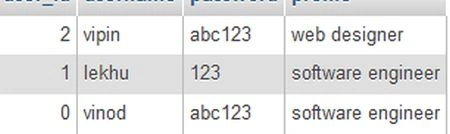
This is your table architecture:
CREATE TABLE `test` (
`user_id` INT NOT NULL primary key AUTO_INCREMENT ,
`username` VARCHAR(100) NULL ,
`password` VARCHAR(100) NULL ,
`post` TEXT
);
Example
This is your "config.php" file for creating a simple connection.
<?php
$hostname = "localhost";
$username = "root";
$password = "";
$database_name = "demo";
$con = mysql_connect($hostname, $username, $password) or die("error in your connection");
mysql_select_db("$database_name", $con) or die("error in your database");
?>
This is your edit "editPost.php" file and in this file I wrote a jQuery, Ajax and PHP code.
<html>
<head>
<style>
.displayBox
{
width:250px;
margin:100px;
}
.main
{
border:solid 2px #0099CC;
padding:2px;
width:250px;
}
.link
{
float:right
}
.change_box
{
overflow: hidden;
border:solid 2px #0099CC;
width:250px;
font-size:14px;
font-family: verdana, sans-serif;
padding:2px
}
</style>
<script type="text/javascript" src="http://ajax.googleapis.com/ajax/libs/jquery/1.4.2/jquery.min.js"></script>
<script type="text/javascript">
$(document).ready(function()
{
$('.link').click(function()
{
$('.main').hide();
var data=$('.main').html();
$('.link').show();
$('.change_box').html(data);
$('.change_box').focus();
});
$(".change_box").mouseup(function()
{
return false


Join the conversation! Your thoughts help the community grow.