

Introduction
In this article, we are describing SQL Server Profiler Terminology and Architecture. SQL Server Profiler is a powerful tool.
SQL Server Profiler
SQL Server Profiler tool is very important for DBAs and developers. It allows us to capture and explore events, such as the execution of a Stored Procedure, occurring within the SQL Server. The SQL Server Profiler GUI is actually an SMO-based application that interacts with SQL Trace.
SQL Server Profiler consumes many resources and degrades your server which is already negatively impacted by performance.
SQL Server Profiler can help DBAs and Developers in various ways. We can understand the following.
For DBAs
For DBAs SQL Server Profiler
- DBA Monitors all types of actions of the SQL Server Database Engine, Analysis Services, and Integration Services and identify performance-related problems with front-end application, queries-SQL, transactions, SQL Server errors and warnings, and so on.
- Performs a query analysis of execution plans
- Captures and replays traces of activity to replicate problems
- Audits user activity
- Analyzes trace results by grouping or aggregating them
- Creates your own custom traces, and saves them, for use whenever you wish
- Correlates Profiler trace events with the System Monitor performance counters to identify
- Captures data for analysis in the Database Engine Tuning Wizard
- Saves trace results to a file, a database table, or XML for later analysis
- Traces Profiler events programmatically, instead of using only the Profiler GUI
For developers
For developers SQL Server Profiler
- Shows how SQL Server works when interacting with a client
- Shows T-SQL code and Stored Procedures
- Performs stress testing
- Performs quality assurance testing
We can understand SQL Server Architecture in the following figure.
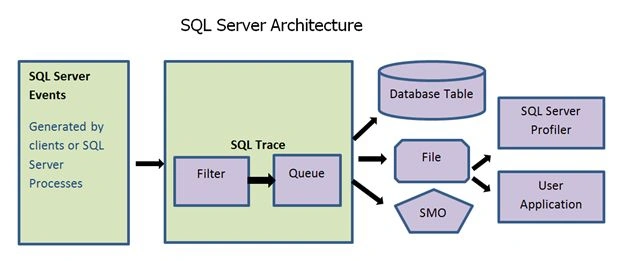
- SQL Server Events- An event is any T-SQL or performing any process in the SSMS that is related to a database, running Stored Procedures, and creating jobs.
- SQL Trace- SQL Trace is a very simple tool. It captures SQL Server-related communication between a client and SQL Server.
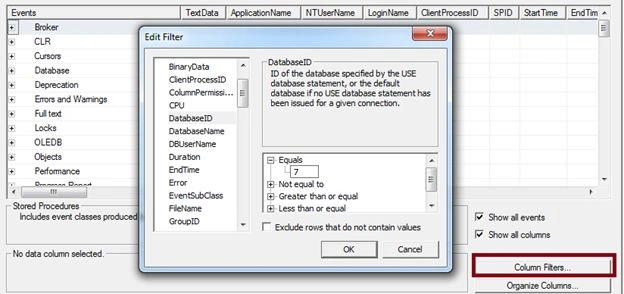
- Filter- Filters are used to create selectiveness in data that are collected in the trace.
- Server Management Objects (SMO)- it is an object model that can be used to directly access SQL Server, including SQL Trace.


Join the conversation! Your thoughts help the community grow.