

Introduction
This is a simple application showing how to create an application cache using the HTML 5 tools. The application cache is used to store static resources. The application cache is just like a browser used to run
the offline application and this article also helps to show how to create a manifest file
in your application.
Use the offline application cache to store
HTML, JavaScript, CSS, and media resources locally, to create web-based
applications that work even when a returning user is not connected to the
Internet. You can also use the offline application cache simply to store static
resources locally to speed access to your website and reduce the server load
when a user returns to your site.
The application cache is similar to the
standard browser cache in that subsequent requests for cached files are served
from the local cache as opposed to making a network call to retrieve the
requested file. The primary differences between the application cache and
browser cache is the level of persistence and the ability to list specific
files without concern about expired headers and last modified dates.
Step 1: Define the Event of manifest
file
- Checking: The checking event used to check what is new changes in a manifest file.
- Noupdate : This event shows no any changes in a manifest file.
- Downloading: This event used to download the change resource of the manifest file.
- Updateready : This event used to downloaded all listed resources into the cache.
- Obsolete: This event used to delete the manifest file.
- Error: The error event used to show the error of the manifest file.
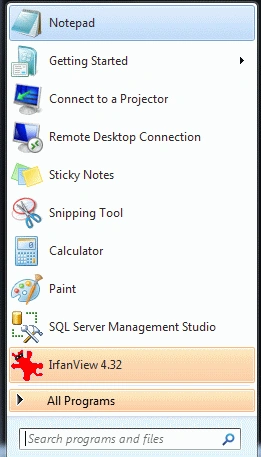
Step 2 : Open Notepad
- Click->Start button->Notepad
- Give the file a name of your choice
- Click New button->save
- There the name is "Jackson.html"
Step 3 : Create a Folder in save application
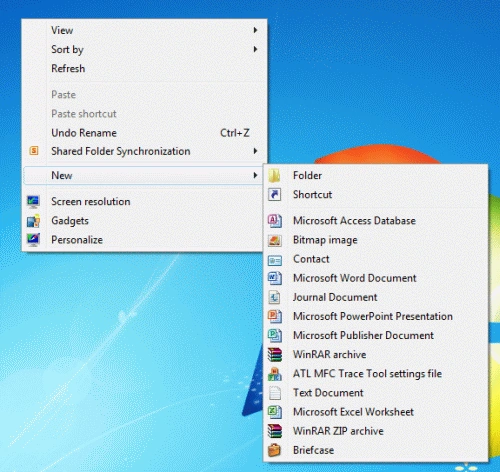
- Right click of Desktop Screen-> New-> Folder
- Name of Folder is "hunter"
- Finally, all HTML files and related sources are saved in that folder
Step 4: Section of Cache manifest file
- CACHE: section header are explicitly cached after they are downloaded for the first time.
- NETWORK: section header in the cache manifest file are whitelisted resources that require a connection to the server.
- FALLBACK: section specifies fallback pages the browser should use if a resource is inaccessible
Step 5 :
The extinction of the manifest file is
- Extinction is a ".appcache".
- Always set the header section.
- <html manifest="Tom.appcache">
- strong>
Step 6: Create a simple
manifest file
Code
- <html manifest="Tom.appcache">
- <head>
- <title>Tom</title>
- <script src="Tom.js"></script>
- <link rel="stylesheet" href="Tom.css">
- </head>
- <body>
- <p>Diaply the Time:
- <output id="clock"></output>
- </p>
- </body>
- </html>
Step 7: Provide resources.
- Create Tom.css file.
Code
- output { font: 2em sans-serif; }
Step 8: Provide the second
resources of our application
- Create the Tom.Js file.
Code
- setTimeout(function () {
- document.getElementById('clock').value = new Date();
- "}, 1000);
Step 9 :
The complete application is given below
Code
- <!DOCTYPE HTML>
- <html manifest="TOm.appcache">
- <head>
- <title>Tom</title>
- <script src="Tom.js"></script>
- <link rel="stylesheet" href="Tom.css">
- </head>
- <body>
- <p>Diaply the Time:
- <output id="clock"></output>
- </p>
- </body>
- </html>
- </* Tom.js */>
- setTimeout(function () {
- document.getElementById('clock').value = new Date();
- "}, 1000);
- undefined</* Tom.css */>
- output { font: 2em sans-serif; }
Step 10 : Run the code in browser
-
C:\Users\<username>\AppData\Local\Mozilla\Firefox\Profiles\<salt>.<profile name>\OfflineCache.
-
This is the location for storing the manifest file.
Output

Resource
Daniel KingeryPosted Sep 10, 2021, 5:31 PM
Hello. What you present seems like it should work. I am an extreme beginner-level with websites and code. What I seek is a really basic, but complete code, with exact set up instructions to do the following: I have the CleanHonestGov.Com website; I want to be able pass complete copies that a person can open for the first time OFF LINE and have it work just as it would if on line; I want to be able to make these available via sd cards, sim cards, thumb drives, etc. as user desires; i want the user to be able to print the entire off line website, but not to alter any content;I have images, video, pdfs, and will be adding illustrations and animations as budget allows. The content, I already have, but have not been able to get it to work entirely off line, especially with images, video, and pdfs, etc. Text works great, as do most modal functions and such. At present, the only compensation I can offer is the promise of clean honest government as this project advances. I can present your marketing information on the present page title People Helping Clean Honest Gov. reserved for thos who provide the most help and also desire to have it published. THANK YOU