
Introduction
Hi guys, In previous article we have learned about the Basic use of
exceptions. In this article we going to understand the next four error handling methods. An exception is the abnormal termination of the program. It is known as run time errors.To avoid the abnormal termination of program we use exception handling.
Different error handling methods
- Basic use of exceptions
- Creating a custom exception handler
- Multiple exceptions
- Re-throwing an exception
- Setting a top level exception handler
Creating a custom exception handler
Here we will understand the concept creating a custom exception handler is quite simple. We simply create a special class with functions that can be called when an exception occurs in PHP. The class must be an extension of the exception class.
Script for Custom exception handler
<html>
<body
bgcolor="lavender">
<center>
<h3>
Creating a custom exception handler
<h3>
<hr>
<?php
class
customException
extends
Exception
{
public
function
errorMessage()
{
//error
message
$errorMsg =
'Error on
line '.$this->getLine().'
in '.$this->getFile()
.':
<b>'.$this->getMessage().'</b>
is not a valid E-Mail address';
return
$errorMsg;
}
}
$email =
"[email protected]";
try
{
//check if
if(filter_var($email,
FILTER_VALIDATE_EMAIL) ===
FALSE)
{
//throw
exception if email is not valid
throw new
customException($email);
}
}
catch
(customException $e)
{
//display custom message
echo
$e->errorMessage();
}
?>
</center>
</body>
</html>
Save it as custom.php
Elaboration of above script
The above script is used to put the custom exception prevention to rectify the
problems. Here in the code we use customException class.
- The customException() class is created as an extension of the old exception class. This way it inherits all methods and properties from the old exception class.
- The errorMessage() function is created.
This function returns an error message if an e-mail address is invalid.
Multiple exceptions
Here we will understand the how we can handle the multiple exception
checking. It is possible to use several if..else blocks, a switch, or nest
multiple exceptions. These exceptions can use different exception classes and
return different error messages.
Script
<html>
<body
bgcolor="pink">
<center>
<h3>
Multiple exceptions
<h3>
<hr>
<?php
class
customException
extends
Exception
{
public function
errorMessage()
{
//error message
$errorMsg =
'Error on
line '.$this->getLine().'
in '.$this->getFile()
.':
<b>'.$this->getMessage().'</b>
is not a valid E-Mail address';
return
$errorMsg;
}
}
$email =
"[email protected]";
try
{
//check if
if(filter_var($email,
FILTER_VALIDATE_EMAIL) ===
FALSE)
{
//throw
exception if email is not valid
throw new
customException($email);
}
//check for "example" in mail address
if(strpos($email,
"example")
!==
FALSE)
{
throw new
Exception("$email
is an example e-mail");
}
}
catch
(customException $e)
{
echo
$e->errorMessage();
}
catch(Exception
$e)
{
echo
$e->getMessage();
}
?>
</center>
</body>
</html>
Save it as custom.php
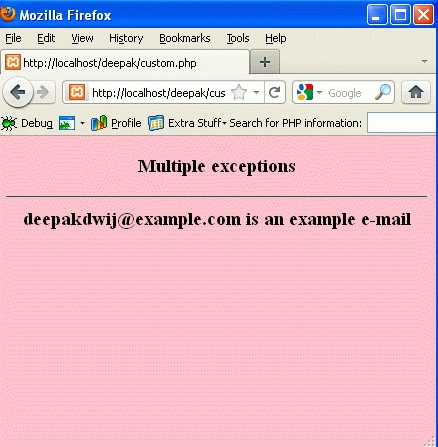
Output
To run the code, Open the XAMPP server and start the services like Apache and
MySQL. Open the browser type: http://localhost/yourfoldername/custom.php
Elaboration of above
script
The code is used to handled the multiple exception.
- The "try" block is executed and an exception is not thrown on the first condition
- The second condition triggers an exception since the e-mail contains the string "example"
- The "catch" block catches the exception and displays the correct error message
Re-throwing Exceptions Method in PHP
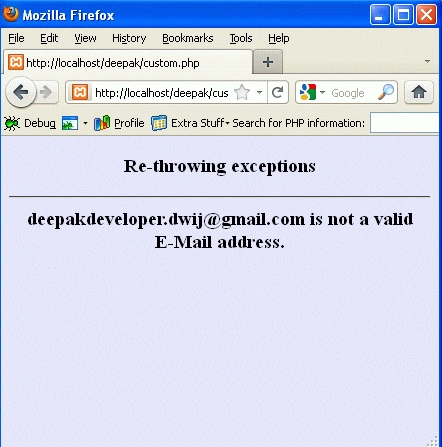
The concept behind the re-throwing exception is sometimes what happens, when an exception is thrown, you may wish to handle it differently than the standard way. It is possible to throw an exception a second time within a "catch" block.
Lets see the re-throwing with example
<html>
<body
bgcolor="lavender">
<center>
<h3>
Re-throwing exceptions
<h3>
<hr>
<?php
class
customException
extends
Exception
{
public
function
errorMessage()
{
//error
message
$errorMsg = $this->getMessage().'
is not a valid E-Mail address.';
return
$errorMsg;
}
}
$email =
"[email protected]";
try
{
try
{
//check
for "gmail" in mail address
if(strpos($email,
"gmail")
!==
FALSE)
{
//throw
exception if email is not valid
throw new
Exception($email);
}
}
catch(Exception
$e)
{
//re-throw
exception
throw new
customException($email);
}
}
catch
(customException $e)
{
//display custom message
echo
$e->errorMessage();
}
?>
</center>
</body>
</html>
Save it as custom.php
Output
To run the code, Open the XAMPP server and start the services like Apache and
MySQL. Open the browser type: http://localhost/yourfoldername/custom.php
If the exception is not caught
in its current "try" block, it will search for a catch block on "higher levels".
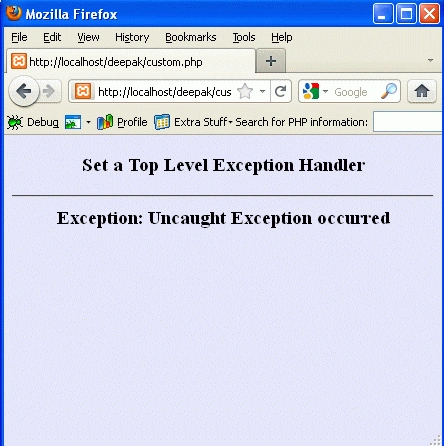
Set a Top Level Exception Handler
Join the conversation! Your thoughts help the community grow.