

Introduction
This article explains how to get "title and meta description" of a URL using ASP.Net. To do that just use the following procedure.
Step 1
Download "Html Agility Pack" from http://html-agility-pack.net/?z=codeplex
I will explain how to use that downloaded file later in this article.
Step 2
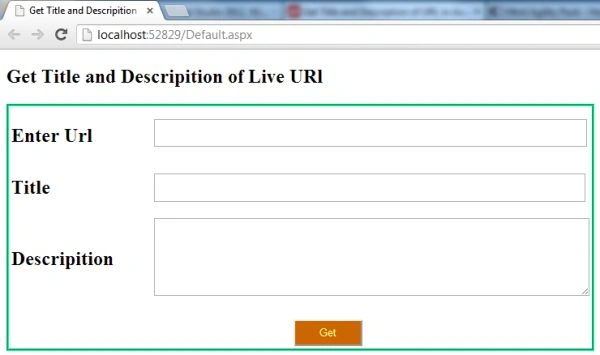
Make the design to get the "title and meta description" of a URL.
Code for the design
Default.aspx
- <%@ Page Language="C#" AutoEventWireup="true" CodeFile="Default.aspx.cs" Inherits="_Default" %>
- <!DOCTYPE html>
- <html xmlns="http://www.w3.org/1999/xhtml">
- <head id="Head1" runat="server">
- <title>Get Title and Descripition of Live URl</title>
- <style type="text/css">
- .auto-style1 {
- width: 100%;
- }
- .auto-style2 {
- height: 15px;
- }
- .auto-style3 {
- height: 15px;
- width: 172px;
- }
- .auto-style4 {
- width: 172px;
- }
- </style>
- </head>
- <body>
- <form id="form1" runat="server">
- <div>
- <h2>Get Title and Descripition of Live URl</h2>
- </div>
- <table style="border:groove #00FF99">
- <tr>
- <td class="auto-style3"><h2 style="width: 167px; height: 20px">Enter Url</h2></td>
- <td class="auto-style2">
- <asp:TextBox ID="TextBox1" runat="server" Width="530px" style="margin-left: 0px" Height="28px"></asp:TextBox>
- </td>
- </tr>
- <tr>
- <td class="auto-style4"><h2>Title</h2></td>
- <td>
- <asp:TextBox ID="TextBox2" runat="server" Width="528px" Height="29px" Font-Bold="True" Font-Names="Times New Roman" Font-Size="Medium"></asp:TextBox>
- </td>
- </tr>
- <tr>
- <td class="auto-style4"><h2>Descripition</h2></td>
- <td>
- <asp:TextBox ID="TextBox3" runat="server" TextMode="MultiLine" Width="531px" Height="90px" Font-Bold="True" Font-Names="Times New Roman" Font-Size="Medium"></asp:TextBox>
- </td>
- </tr>
- <tr>
- <td colspan="2">
- <br />
- <asp:Button ID="Button1" runat="server" Text="Get" BackColor="#CC6600" ForeColor="#FFFF99" Height="33px" Width="85px" OnClick="Button1_Click" />
- </td>
- </tr>
- </table>
- </form>
- </body>
- </html>
Step 3
Add the reference of the preceding download "HtmlAgilitypack".
Now let's move to the "Default.aspx.cs" code.
In this you require the following namespaces:
- using System;
- using System.Net;
- using System.Text.RegularExpressions;
- using HtmlAgilityPack;
The code given below enables you to retrieve the title and meta description of a live "URL" in ASP.Net.
- using System;
- using System.Net;
- using System.Text.RegularExpressions; // Provides access to regular expression related api.
- using HtmlAgilityPack;
- public partial class _Default : System.Web.UI.Page
- {
- protected void Page_Load(object sender, EventArgs e)
- {
- }
- protected void Button1_Click(object sender, EventArgs e)
- {
- String url = TextBox1.Text;
- WebClient x = new WebClient();
- string sourcedata = x.DownloadString(url);
- TextBox2.Text = Regex.Match(sourcedata, @"\<title\b[^>]*\>\s*(?<Title>[\s\S]*?)\</title\>", RegexOptions.IgnoreCase).Groups["Title"].Value;
- GetMetaTagValue(url);
- }
- private void GetMetaTagValue(string url)
- {
- var getHtmlDoc = new HtmlWeb();
- var document = getHtmlDoc.Load(url);
- var metaTags = document.DocumentNode.SelectNodes("//meta");
- if (metaTags != null)
- {
- foreach (var sitetag in metaTags)
- {
- if (sitetag.Attributes["name"] != null && sitetag.Attributes["content"] != null && sitetag.Attributes["name"].Value == "description")
- {
- TextBox3.Text = sitetag.Attributes["content"].Value;
- }
- }
- }
- }
- }
Join the conversation! Your thoughts help the community grow.