

A calendar is a schedule of events. In this article you will learn how to build a web based PHP calendar. I also describe PHP calendar functions in my previous article, and this article shows how to make a simple PHP calendar. Basically a PHP calendar is very useful, you can do things as simple as showing the date.
Example of Creating Calendar in PHP
<html >
<body>
<?php
function create_Calendar($month,$year) {
//array containing days of week.
$WeeksDays = array('Su','Mo','Tu','We','Th','Fr','Sa');
// define first day of the month.
$firstDayOfMonth = mktime(0,0,0,$month,1,$year);
// no of days in month.
$numberDays = date('t',$firstDayOfMonth);
//get first day of month
$dateComponents = getdate($firstDayOfMonth);
// What is the name of the month in question?
$NameofMonth = $dateComponents['month'];
// What is the index value (0-6) of the first day of the
// month in question.
$dayOfWeek = $dateComponents['wday'];
// Create the table tag opener and day headers
$Calendar = "<table class='Calendar'>";
$Calendar .= "<caption>$NameofMonth $year</caption>";
$Calendar .= "<tr>";
// Create the Calendar headers
foreach($WeeksDays as $day) {
$Calendar .= "<th class='header'>$day</th>";
}
// Create the rest of the Calendar
// Initiate the day counter, starting with the 1st.
$currentDay = 1;
$Calendar .= "</tr><tr>";
if ($dayOfWeek > 0) {
$Calendar .= "<td colspan='$dayOfWeek'> </td>";
}
$month = str_pad($month, 2, "0", STR_PAD_LEFT);
while ($currentDay <= $numberDays) {
// when cloumn position is 7 means Saturday then starts a new row.
if ($dayOfWeek == 7) {
$dayOfWeek = 0;
$Calendar .= "</tr><tr>";
}
$currentDayRel = str_pad($currentDay, 2, "0", STR_PAD_LEFT);
$date = "$year-$month-$currentDayRel";
$Calendar .= "<td class='day' rel='$date'>$currentDay</td>";
$currentDay++;
$dayOfWeek++;
}
// Complete the row of the last week in month, if necessary
if ($dayOfWeek != 7) {
$remainingDays = 7 - $dayOfWeek;
$Calendar .= "<td colspan='$remainingDays'> </td>";
}
$Calendar .= "</tr>";
$Calendar .= "</table>";
return $Calendar;
}
echo create_Calendar(01,2013); // calling create calendar function
echo " </br>";
echo create_Calendar(02,2013); // calling create calendar function
?>
</body>
</html>
Output: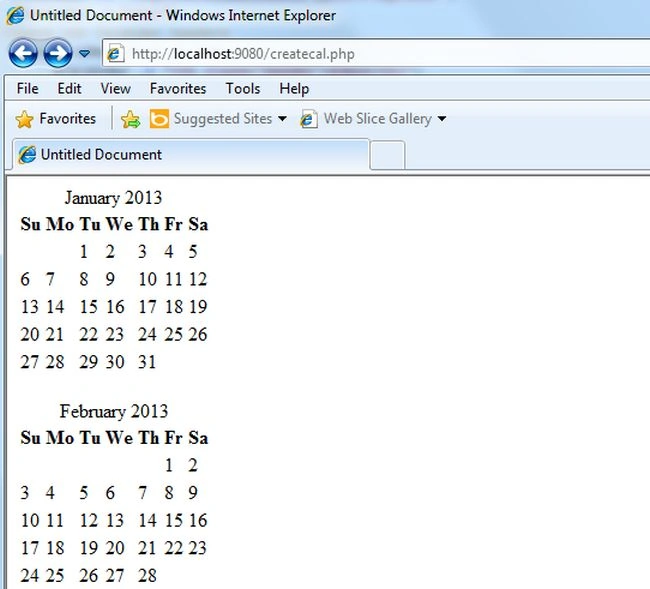
Note: Here I create a simple PHP function ("create_Calendar()"). You can call this function, as needed. Here I called this function like, for month of January and month of February, like "echo create_Calendar(01,2013)" and "echo create_Calendar(02,2013)", you can set it as needed. In it I create an array which consists of the name of the days. For determining the first date of the month here I used the mktime() function.
The mktime function returns the UNIX timestamp for a date.
For example
If you write like "echo(mktime(0,0,0,1,1,13));" then it will return 1356998400. After that I use the date() function to calculate the number of days in the month. After that I used the getdate() function for obtaining the first day of the month and another process shows step-by-step and when you have finished your function code then just call it by passing the arguments like month and year ("create_Calendar(02,2013)").
Join the conversation! Your thoughts help the community grow.