

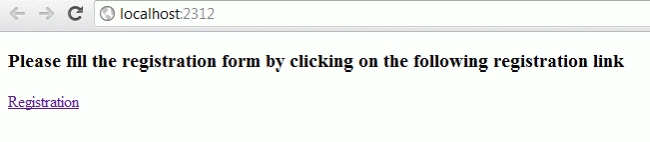
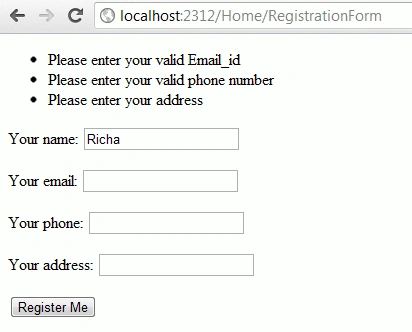
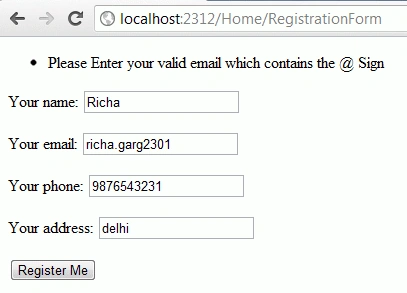
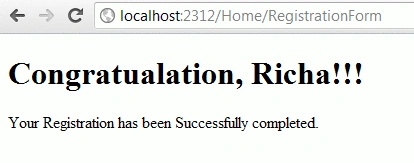
In my previous article I explained how to create controls in ASP.Net MVC 3 using Razor view. In this I give the example of how to create the registration form. Now in this article I an going to apply the validation to this registration form. For some fields like Name, Email, Phone_No and Address I apply the Required validation that gives the message please enter your Name, Email, Phone_No and Address respectively and a regular expression field for email_id that contain the @ sign. It also gives the validation summary. Now to start, use the following steps.
Step 1 : First of all please follow my previous article link, and make the form application like that.
Step 2 : Modify some files in order to apply validation, like
Code for Registration.cs file.
using System.ComponentModel.DataAnnotations;
namespace MvcApplication4.Models
{
public class Registration
{
[Required(ErrorMessage="Please enter your Name")]
public string Name { get; set; }
[Required(ErrorMessage="Please enter your valid Email_id")]
[RegularExpression(".+\\@.+\\..+",ErrorMessage="Please Enter your valid email which contains the @ Sign")]
public string Email { get; set; }
[Required(ErrorMessage="Please enter your valid phone number")]
public string Phone { get; set; }
[Required(ErrorMessage="Please enter your address")]
public string Address { get; set; }
}
}
Code for HomeController.cs file
namespace MvcApplication4.Controllers
{
public class HomeController : Controller
{
public ViewResult Index()
{
return View();
}
[HttpGet]
public ViewResult RegistrationForm()
{
return View();
}
[HttpPost]
public ViewResult RegistrationForm(Registration registration)
{
if (ModelState.IsValid)
{
return View("Congratualation", registration);
}
else
{
// there is a validation error - redisplay the form
return View();
}
}
}
}
Code for RegistrationForm.cshtml file
@model MvcApplication4.Models.Registration
@{
Layout = null;
}
<!DOCTYPE html>
<html>
<head>
<title>RsvpForm</title>
Manav PandyaPosted May 24, 2017, 2:18 AM
Nice share ...................
Ayush NautiyalPosted Feb 13, 2015, 1:56 AM
For same thing (and addition of a drop down) if you use database, it will be great and complete article.........
kalu singh raoPosted Apr 3, 2014, 2:42 AM
Thank you very much for learning in ease.