

Content: Suppose we have a Razor file named Employee Details.
Where you have to fill in the required employee details. Now in this form we have a "Gender" field name.
You have already created your Model Classes and Controller Classes. So in the Razor file how you will create the Radio Button.
We already know that @Html.Editorfor is for taking input data i.e. Textbox and @Html.Label is for displaying the label control.
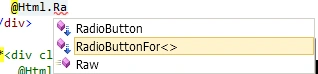
Now you have to type @Html.RadibuttonFor just like Fig 1 and give the necessary parameters like the code given below.
Fig 1
@Html.RadioButtonFor(model =>model.Gender,"Male",true) Male
@Html.RadioButtonFor(model =>model.Gender,"Female",false) Female
Here the Radiobutton takes 3 parameters.
-
The attribute of your Model Class. For mine it is gender.
-
The passing value when you click the particular RadioButton. For my case when you click the 1st RadioButton and click the Submit Button. In the database it will save "Male".
-
By default which RadioButton will be selected? For mine in the case that the first RadioButton name "Male" will be selected.
Here I am giving the complete code for the Razor File. I hope You will get some information from here.
@model CabAutomationSystem.Employee
@{
ViewBag.Title = "Create";
}
<h2>Create</h2>
<scriptsrc="@Url.Content("~/Scripts/jquery.validate.min.js")"type="text/javascript"></script>
<scriptsrc="@Url.Content("~/Scripts/jquery.validate.unobtrusive.min.js")"type="text/javascript"></script>
@using (Html.BeginForm()) {
@Html.ValidationSummary(true)
<fieldset>
<legend>Employee</legend>
<divclass="editor-label">
@Html.LabelFor(model =>model.EmployeeName)
</div>
<divclass="editor-field">
@Html.EditorFor(model =>model.EmployeeName)
@Html.ValidationMessageFor(model =>model.EmployeeName)
</div>
<divclass="editor-label">
@Html.LabelFor(model =>model.EmployeeID)
</div>
<divclass="editor-field">
@Html.EditorFor(model =>model.EmployeeID)
@Html.ValidationMessageFor(model =>model.EmployeeID)
</div>
<divclass="editor-label">
@Html.LabelFor(model =>model.ProjectName)
</div>
<divclass="editor-field">
@Html.EditorFor(model =>model.ProjectName)
@Html.ValidationMessageFor(model =>model.ProjectName)
</div>
<divclass="editor-label">
@Html.LabelFor(model =>model.Gender)
</div>
<divclass="editor-field">
@*@Html.EditorFor(model =>model.Gender)*@
@Html.RadioButtonFor(model =>model.Gender,"Male",true) Male @Html.RadioButtonFor(model
=>model.Gender,"Female",false) Female
@Html.ValidationMessageFor(model =>model.Gender)<br/>
</div>
@*<div class="editor-label">
@Html.LabelFor(model =>model.Cab.BookTime )
</div>
<div class="editor-field">
@Html.EditorFor(model =>model.Cab.BookTime)
@Html.ValidationMessageFor(model =>model.Cab.BookTime)
</div>*@
<divclass="editor-label">
@Html.LabelFor(model =>model.Cab.JourneyTime )
</div>
<divclass="editor-field">
@Html.EditorFor(model =>model.Cab.JourneyTime)
@Html.ValidationMessageFor(model =>model.Cab.JourneyTime)
</div>
@*<div class="editor-label">
@Html.LabelFor(model =>model.Cab.BookId)
</div>
<div class="editor-field">
@Html.EditorFor(model =>model.Cab.BookId)
@Html.ValidationMessageFor(model =>model.Cab.BookId)
</div>*@
<p>
<inputtype="submit"value="Create"/>
</p>
</fieldset>
}
<div>
@Html.ActionLink("Back to List", "Index")
</div>
Here I have described the Razor file according to my model classes. So if there are any requirements of RadioButton in your mvc3 razor application you can easily see this reference and implement in your application.
Here is the screenshot of my application.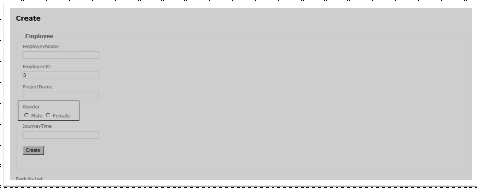
Manav PandyaPosted Jun 1, 2017, 8:34 AM
Nice ........................................
Arvind UpadhyayPosted Jun 22, 2016, 8:52 AM
Thanks for sharing, I wanna know about that hw to multiple radio buttonslist in multiple groups..
Gabby San RuizPosted Mar 9, 2015, 2:20 AM
Hello.....how would I use the RadioButtonFor if the option will be coming from the DB? So if there would be like 5 items in the database table, then I would have 5 radiobuttons. Example, in the DB table "Product", I have "Clothing", "Accessory", "Eyewear", "Watches" and "Bags". I would like to have 5 radiobuttons with these 5 ProductName as options. So the 1st RdioButton would be "Clothing" and is the default value, 2nd would be "Accessory", and so on
Rocky RoyalsonPosted Mar 7, 2013, 7:42 AM
Hi, How can we retain radio button on Cancel Button click. If already Male is selected and If if select Female RadioButton and then click on Cancel button then How to get old selected radio button. Please help me as soon as possible. Thanks in Advance Regards, Rocky Royalson.
Sudhir SharmaPosted Feb 18, 2013, 3:55 AM
I want to know how can get control's id in mvc 4 razor application. Ex . <label>E-mail Id @Html.RadioButton("Search","E-mail" )</label> @Html.EditorFor(model => model.User_Email_Id) How can i get radio id and textbox's id in java script.
Kai AbateditedPosted Jan 31, 2013, 10:47 PMEdited Feb 1, 2013, 2:01 AM
Tnx for this.. :) but do you know how to add for loop in your radio button? so that if I will add a new record in the database it will automatically display the data in radio button?
jitendraeditedPosted Nov 1, 2012, 1:27 AMEdited Nov 1, 2012, 1:28 AM
I want to learn mvc3 ,anyboddy provide me system requirement for mvc 3 and how to work it. please ....
rahulPosted Mar 28, 2011, 10:48 AM
Thnx for the tutorial,can you plz tell me how to use radio button for binding data