

Why View?
We need to have a goal in mind when creating a view. There are a number of scenarios where we have to look for a view as a solution.
- To hide the complexity of the underlying database schema, or customize the data and schema for a set of users.
- To control access to rows and columns of data.
- To aggregate data for performance.
Step 1:
First connect your SQL Server 2008 and after that explore your Database.
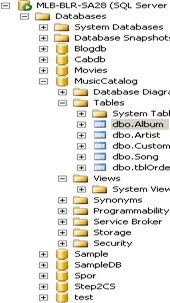
Step 2:
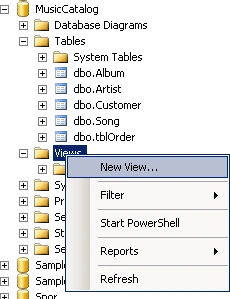
Now right-click on the "views" folder and click "new view".
Step 3:
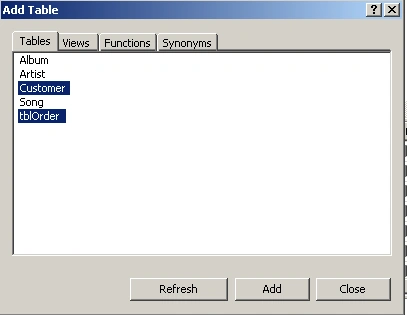
After that you will see a new "Add table" window. In the "Tables" tab please select your required table; for mine I selected "Customer" and "tblorders". After that click the "Add" button.
Step 4:
After that you will see the tables with a relation diagram just like the following figure:
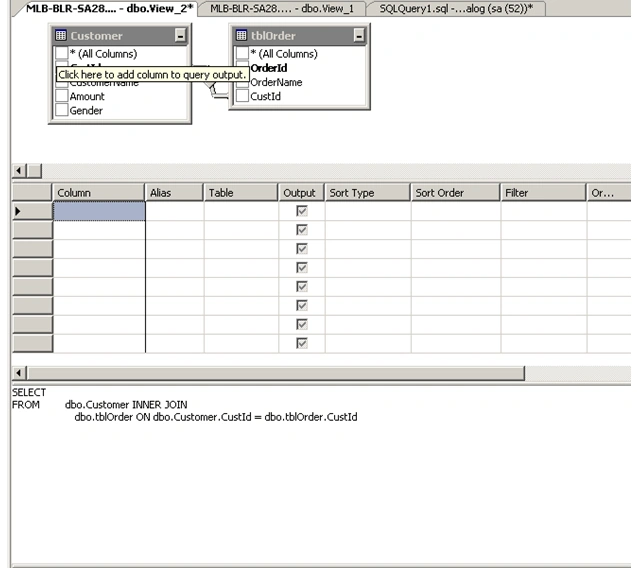
Now look here; we got the default query between 2 tables. Now we will configure the "column" the "alias" giving "Sort Type", "Filter" etc.
Now when you change the settings the query will automatically change.
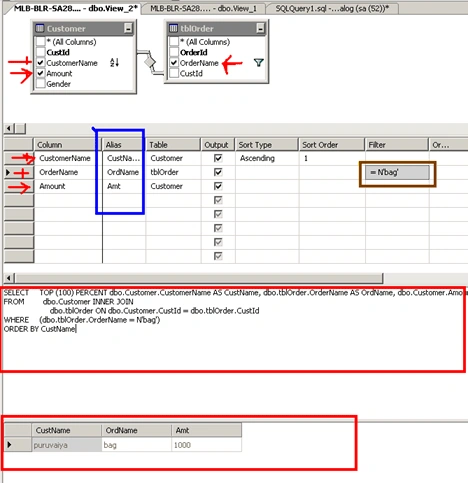
See the upper figure. While checking the column name in the customer tables the column name will be shown (red arrows). After that give the Alias Name (marked with blue). Then after that give the Filter Name "Bag" on the "OrderName" part (marked with a brown square).
Now see the automatic query generated for everything. Marked with a red square.
Now when you run the application you will see the result.
Conclusion: In SQL Server when generating a view it is usefull to write the complex query in a stored procedure while there is a situation to fetch the data.
broderick merrittPosted Jul 5, 2012, 4:58 PM
I've been searching the web for a few hours now, and experimenting with the views I've created for my DB. However I still cant figure an answer to my problem/question. When creating a filter with the views, how can I create multiple filters for one column? IE column = type 5 different types i want to filter a view so it only shows 3 types and need to cancel out the other types