

This article describes how you can create page transition animations in a Windows Phone 7 application. Page transition animations can be created either using XAML code or code-behind code. In this article we will see the use of both the options. First we will start with writing XAML code and at the end we will see how to animate page transitions using code-behind code.
First we have to add a reference to the Microsoft.Phone.Controls.Toolkit.dll file to our project.
This file is found in the following location:
C:\Program Files\Microsoft SDKs\Windows Phone\v7.0\Toolkit\Feb11\Bin
Introduction
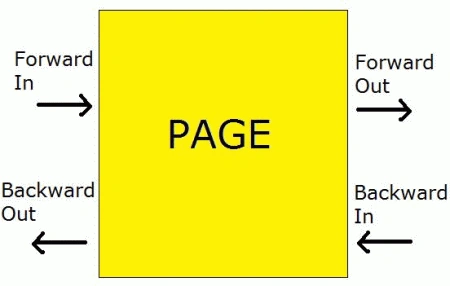
By using Page transition animations, we can customize the way pages are displayed when we enter/exit a page from its previous/next page. A Forward In transition occurs on a page when we move into a page from its previous page. A Forward Out transition occurs when we move out of a page to its next page. A Backward In transition occurs when we move into a page from its next page. A Backward Out transition occurs when we move out of a page to its previous page. We can visualize page transitions using the following figure.
There are 5 typea of transitions as follows:
- RollTransition
- RotateTransition
- SlideTransition
- SwivelTransition
- TurnstileTransition
All transitions except RollTransition have a Mode property which specifies the type of transition you want.
Example Code
First create a new Windows Phone 7 project in Microsoft Visual Studio 2010 Express for Windows Phone. Visual Studio adds a default page called MainPage to the project.
Add a button and customize the page to give it the following appearance.
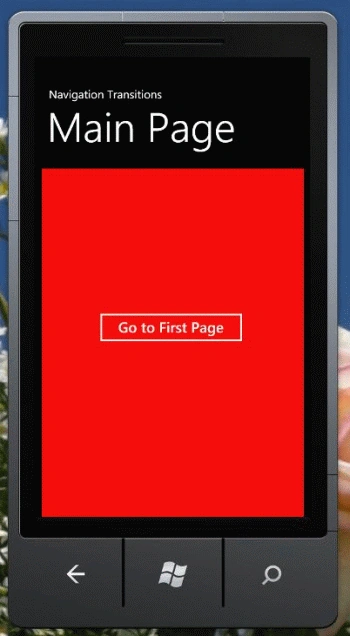
Add two pages, Page1 and Page2 as follows: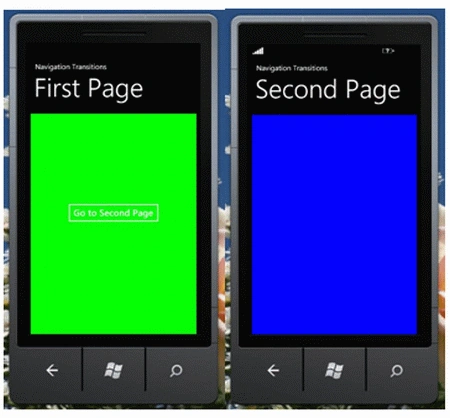
Write the following code on the click event of the button on the MainPage to navigate to the FirstPage:
private void button1_Click(object sender, RoutedEventArgs e)
{
NavigationService.Navigate(new Uri("/Page1.xaml", UriKind.Relative));
}
Write the following code on the click event of the button on the FirstPage to navigate to the SecondPage:
private void button1_Click(object sender, RoutedEventArgs e)
{
NavigationService.Navigate(new Uri("/Page2.xaml", UriKind.Relative));
}
We will provide our custom animation on the FirstPage.
Add the toolkit namespace as an attribute of the <phone:PhoneApplicationPage> root element in the FirstPage:
xmlns:toolkit="clr-namespace:Microsoft.Phone.Controls;assembly=Microsoft.Phone.Controls.Toolkit"
The following is the XAML code of the FirstPage to animate transition to and from the FirstPage:
<toolkit:TransitionService.NavigationInTransition>
<toolkit:NavigationInTransition>
<toolkit:NavigationInTransition.Backward>
<toolkit:TurnstileTransition Mode="BackwardIn"/>
</toolkit:NavigationInTransition.Backward>
<toolkit:NavigationInTransition.Forward>
<toolkit:TurnstileTransition Mode="ForwardIn"/>
</toolkit:NavigationInTransition.Forward>
</toolkit:NavigationInTransition>
</toolkit:TransitionService.NavigationInTransition>
<toolkit:TransitionService.NavigationOutTransition>
<toolkit:NavigationOutTransition>
<toolkit:NavigationOutTransition.Backward>
<toolkit:TurnstileTransition Mode="BackwardOut"/>
</toolkit:NavigationOutTransition.Backward>
<toolkit:NavigationOutTransition.Forward>
<toolkit:TurnstileTransition Mode="ForwardOut"/>
</toolkit:NavigationOutTransition.Forward>
</toolkit:NavigationOutTransition>
</toolkit:TransitionService.NavigationOutTransition>
The above code provides the TurnstileTransition for the In and Out transitions on the FirstPage. The Mode attribute of the <toolkit:TurnstileTransition> element specifies the transition type to be applied.
The complete XAML code of the FirstPage is as follows:
<phone:PhoneApplicationPage
x:Class="WindowsPhoneNavigationTransitions.Page1"
xmlns="http://schemas.microsoft.com/winfx/2006/xaml/presentation"
xmlns:x="http://schemas.microsoft.com/winfx/2006/xaml"
xmlns:phone="clr-namespace:Microsoft.Phone.Controls;assembly=Microsoft.Phone"
xmlns:shell="clr-namespace:Microsoft.Phone.Shell;assembly=Microsoft.Phone"
xmlns:d="http://schemas.microsoft.com/expression/blend/2008"
xmlns:mc="http://schemas.openxmlformats.org/markup-compatibility/2006"
xmlns:toolkit="clr-namespace:Microsoft.Phone.Controls;assembly=Microsoft.Phone.Controls.Toolkit"
FontFamily="{StaticResource PhoneFontFamilyNormal}"
FontSize="{StaticResource PhoneFontSizeNormal}"
Foreground="{StaticResource PhoneForegroundBrush}"
SupportedOrientations="Portrait" Orientation="Portrait"
mc:Ignorable="d" d:DesignHeight="768" d:DesignWidth="480"
shell:SystemTray.IsVisible="True">
Join the conversation! Your thoughts help the community grow.