

Introduction
This article shows how to save document files like PDF and Word files into a database using the FileUpload control of ASP.NET.
To help explain this article, I will use the following procedure:
- Create a table in a database to store the document files and some other relevant data by which I can fetch the documents from the table.
- Create a website with a page that contains some control like "textbox", "FileUpload" and "Button" on the design part of that page (.aspx).
- Write the code in the ".cs" file of that page to save the document files in the database at the "button click" event.
The following is the details of the preceding procedure.
Step 1
Create a table named "Documents" that will store:
- Identity column for Serial number
- Name of the file
- Display File name that you want to show
- Extension of file
- Content Type of file
- File in binary format
- Size of file
- Date of file insertion
- create table Documents
- (
- SNo int identity,
- Name_File varchar(100),
- DisplayName varchar(50),
- Extension varchar(10),
- ContentType varchar(200),
- FileData varbinary(max),
- FileSize bigint,
- UploadDate datetime
- )
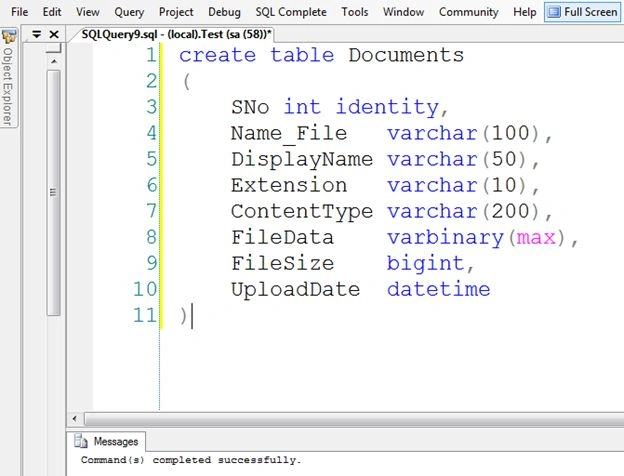
Step 2
i) Create a new empty website named "FilesToBinary".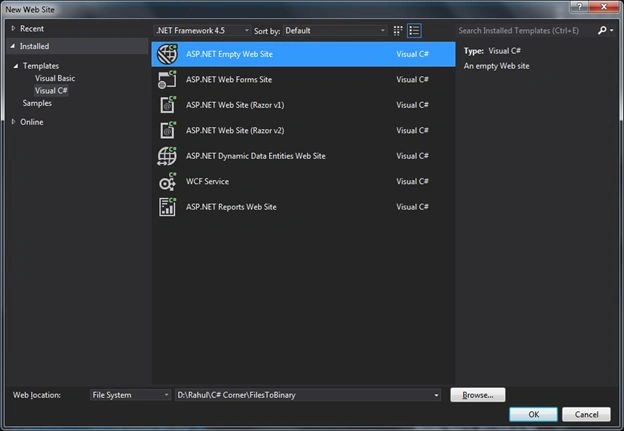
ii) Add a new page named "Conversion.aspx".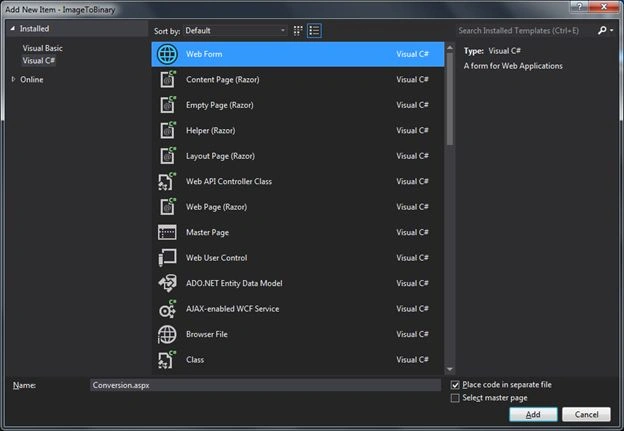
Step 3
Add 3 the following controls to the page:
- TextBox (to display the name of the file)
- FileUpload (for selecting the file)
- Button with Onclick event (for submitting the image)
Display Name
- <asp:TextBox ID="txtfilename" runat="server">
- </asp:TextBox>
- <br />
- Select File
- <asp:FileUpload ID="FileUpload1" runat="server" />
- <br />
- <asp:Button ID="Button1" runat="server"
- Text="Convert" OnClick="Button1_Click" />
- protected void Button1_Click(object sender, EventArgs e)
- {
- if (!FileUpload1.HasFile)
- {
- Response.Write("No file Selected"); return;
- }
- else
- {
- string filename = Path.GetFileName(FileUpload1.PostedFile.FileName);
- string extension = Path.GetExtension(filename);
- string contentType = FileUpload1.PostedFile.ContentType;
- HttpPostedFile file = FileUpload1.PostedFile;
- byte[] document = new byte[file.ContentLength];
- file.InputStream.Read(document, 0, file.ContentLength);
- //Validations
- if ((extension == ".pdf") || (extension == ".doc") || (extension == ".docx") || (extension == ".xls"))//extension
- {
- if (file.ContentLength <= 31457280)//size
- {
- //Insert the Data in the Table
- using (SqlConnection connection = new SqlConnection())
- {
- connection.ConnectionString = ConfigurationManager.ConnectionStrings["constr"].ToString();
- connection.Open();
- SqlCommand cmd = new SqlCommand();
- cmd.Connection = connection;
- string commandText = @"insert into Documents(Name_File,DisplayName,Extension,ContentType,FileData,FileSize,UploadDate) values(@Name_File,@DisplayName,@Extension,@ContentType,@FileData,@FileSize,getdate())";
- cmd.CommandText = commandText;
- cmd.CommandType = CommandType.Text;
- cmd.Parameters.Add("@Name_File", SqlDbType.VarChar);
- cmd.Parameters["@Name_File"].Value = filename;
- cmd.Parameters.Add("@DisplayName", SqlDbType.VarChar);
- cmd.Parameters["@DisplayName"].Value = txtfilename.Text.Trim();
- cmd.Parameters.Add("@Extension", SqlDbType.VarChar);
- cmd.Parameters["@Extension"].Value = extension;
- cmd.Parameters.Add("@ContentType", SqlDbType.VarChar);
- cmd.Parameters["@ContentType"].Value = contentType;
- cmd.Parameters.Add("@FileData", SqlDbType.VarBinary);
- cmd.Parameters["@FileData"].Value = document;
- cmd.Parameters.Add("@FileSize", SqlDbType.BigInt);
- cmd.Parameters["@FileSize"].Value = document.Length;
- cmd.ExecuteNonQuery();
- cmd.Dispose();
- connection.Close();
- Response.Write("Data has been Added");
- }
- }
- else
- { Response.Write("Inavlid File size"); return; }
- }
- else
- {
- Response.Write("Inavlid File"); return;
- }
- }
- }
Note: You can also add some other validations like:
- Check the length of file on client side.
- Check the MIME type of the file on server side.
Run the page; it will be like:
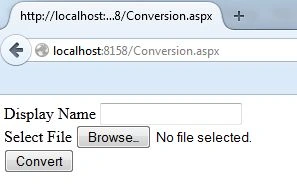
Now I will upload 3 files of various types like Word, PDF and Excel files one by one using the following procedure:
- Fill in the Display name and click on the browse button to select the file.
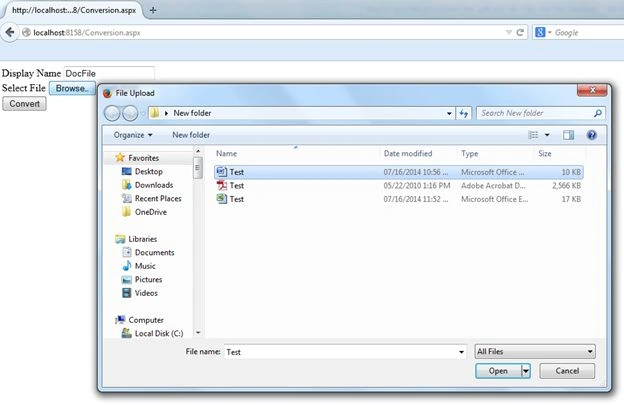
- After selecting the file.
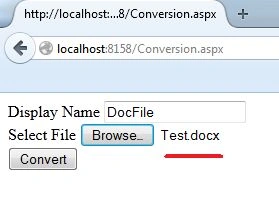
- Click on the convert button to save the file.
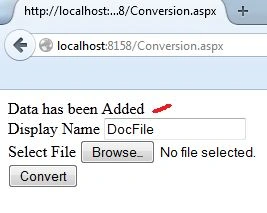
Then do the same procedure for PDF and Excel files.
Result
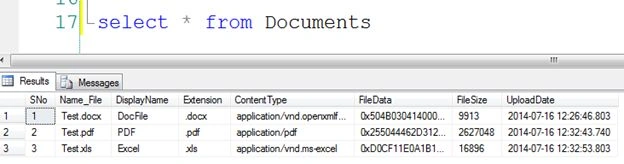
Now you can see all the files were saved in the database in binary format.
Anel HodzicPosted Jan 10, 2016, 9:13 AM
Is it a good advice to use binary data to store files into database ? Should we use blobs ?
Upendra Pratap ShahiPosted Jun 25, 2015, 1:30 AM
good..
Saber ShaikhPosted Jan 8, 2015, 1:04 AM
nice
hothorasman panjaitanPosted Nov 26, 2014, 10:04 PM
Rahul Bansal: how to display the files on other pages example: I want to see details on page details_view
Rahul BansalPosted Nov 18, 2014, 3:57 AM
@hothorasman panjaitan - For fetching the data, check it here- http://www.c-sharpcorner.com/UploadFile/a20beb/how-to-get-the-pdf-word-and-excel-files-from-the-database/
hothorasman panjaitanPosted Nov 18, 2014, 1:27 AM
how to display it to the gridview, and when clicked will display the file
hothorasman panjaitanPosted Nov 18, 2014, 1:25 AM
hi Rahul Bansal
Rahul BansalPosted Aug 23, 2014, 3:09 AM
Thanks Thor....you just need to add a column in to the table for userid and save the the userid of user who is logged in. Now when user do the login, just create a session at that time where and add the userid in to session variable. This will be value which will you save in to your new column...you can also refer my article to get the files from database named "How to Get the PDF, Word and Excel Files From the Database".
THor BasbergPosted Aug 22, 2014, 9:16 PM
Great explanation Rahul Bansal! May I ask how I could extend your example to get the ID of a logged in user and select only those files (rows) in the database that have the userid in the filename? The SQL query would add contains or like clause but I don't know how to get the logged in username from the page. I am a newbie at .NET but have a little more experience with SQL. Thank you! Even if you don't have time to answer I still appreciate the article.
Rahul BansalPosted Aug 22, 2014, 8:48 PM
JUST add data insertion code into a web method in to web service with sone parameters and call that method in this code simple
tasbiha sajjadPosted Aug 22, 2014, 11:31 AM
how can we do this using webservices in asp.net
Dharmesh KumarPosted Aug 6, 2014, 5:10 AM
hi Rahul, I need certain consultations. my email address is [email protected]
Del WoodcockPosted Jul 17, 2014, 10:40 AM
Great article!
Khan Abrar AhmedPosted Jul 17, 2014, 1:44 AM
Very Good Explained, Thanks sir to sharing the knowledge
Saineshwar BageriPosted Jul 17, 2014, 12:54 AM
Nice article sir
Prerana TiwariPosted Jul 16, 2014, 11:43 PM
Well explained.