

Whether it is useful or not I don't know but as I had a requirement in my project to load data which I saved as a blob I am writing this article.
Data in my-sql:

Final output that we get:
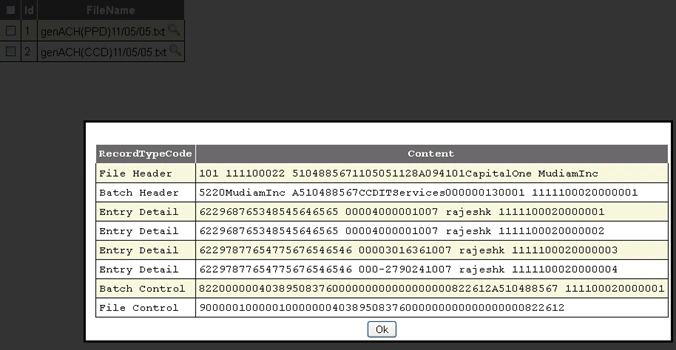
As my file has certain conditions as shown in the image I loaded according to that, if anyone wants to modify it then he can do that as needed.
Creating the required table (I used my-sql):
CREATE TABLE `tblachmaster` (
`Id` int(11) NOT NULL AUTO_INCREMENT,
`FedTaxId` varchar(9) DEFAULT NULL,
`File_Name` varchar(128) DEFAULT NULL,
`File_Data` longblob,
`Date_Time` timestamp NULL DEFAULT CURRENT_TIMESTAMP,
PRIMARY KEY (`Id`)
) ENGINE=InnoDB AUTO_INCREMENT=3 DEFAULT CHARSET=latin1$$
Code that used to load the data
protected void GridView1_RowCommand(object sender, GridViewCommandEventArgs e)
{
int id = 0;
string strLine = string.Empty;
string[] lines = null;
if (e.CommandName == "Image")
{
GridViewRow row = (GridViewRow)((Control)e.CommandSource).Parent.Parent;
Label l = (Label)GridView1.Rows[row.RowIndex].Cells[1].FindControl("Label1");
id = Convert.ToInt16(l.Text);
string selectSQL = "Select File_Data from tblachmaster WHERE Id IN (" + id + ")";
MySqlCommand cmd1 = new MySqlCommand(selectSQL);
cmd1.Parameters.Add("@_id", SqlDbType.Int).Value = id;
DataTable dt1 = GetData1(cmd1);
if (dt1 != null)
{
for (int i = 0; i < dt1.Rows.Count; i++)
{
Byte[] bytes = (Byte[])dt1.Rows[i]["File_Data"];
string text = Encoding.UTF8.GetString(bytes);
lines = Regex.Split(text, "\r\n");
strLine = convertArrayToString(lines);
}
}
DataTable table = new DataTable();
table.Columns.Add("RecordTypeCode", typeof(string));
table.Columns.Add("Content", typeof(string));
foreach (string strcontent in lines)
{
if (strcontent != string.Empty)
table.Rows.Add(rectype[(strcontent.Substring(0, 1))], strcontent);
}
dynamicGridView.DataSource = table;
dynamicGridView.DataBind();
popup.Show();
}
}
Join the conversation! Your thoughts help the community grow.