
Introduction
API Methods
- getCurrentPosition
The getCurrentPosition method is used for a one time query on the location.
- watchPosition
The watchPosition method is used when location updates are also needed. When you want to stop the continued updates for the position, you need to call the clear watch method, using the same watchID value. This is very useful
when you want to track changes such as direction mapping applications.
Both methods are asynchronous. The methods specify a mandatory successCallback argument and can optionally specify an errorCallback function and options for the location query. The various options that can be customized for the location query are:
enableHighAccuracy (precise location but may cause slower response and higher
power usage), timeout (default of zero which indicates no timeout) and
maximumAge (expiration for cached location).
In case there was an error, the error callback is invoked if it was specified in the getCurrentPosition/watchPosition method call. Typical error situations
are if the user has denied permission to access the location information, or the
position is unavailable, timeouts, etc.
If the location was successfully retrieved, the success callback method is
invoked. Once you get the location, you can utilize it in your application.
The result location information is returned in a Position object. The Position object has properties which can include expanded location information. Latitude,
longitude, altitude, accuracy, altitude accuracy, heading, speed, and timestamp.
The Latitude, longitude and accuracy properties are populated whereas the
remaining properties may be populated if supported or may be null.
In this code sample, we will run a very basic script to get the user's location and display the latitude and longitude in a text box. When the "Get my
Location" button is clicked, we check if the geolocation API is supported and if it is supported, a call is made to the getCurrentPosition method of the navigator object. The success callback method (displayResult) displays the latitude and longitude retrieved for the user or in case an error occurred, the error callback gets executed and the error message is displayed to the user.
Sample in Action: Here
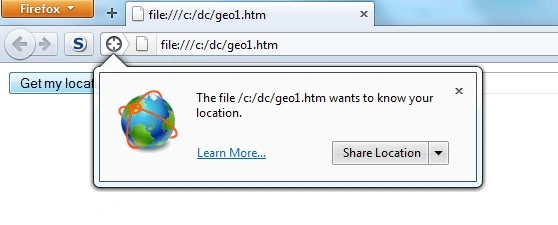
are some screenshots of the application running in Mozilla Firefox 6.0.2

Code Sample
Figure: browser prompt for user's permission
Figure: Success - got the location!

Figure: Error
- <!DOCTYPE HTML>
- <html>
- <body>
- <script language="javascript">
- function getUserLoc() {
- if (navigator.geolocation) {
- navigator.geolocation.getCurrentPosition(
- displayResult,
- displayError);
- }
- else {
- setMessage("Geolocation is not supported by this browser");
- }
- }
- function displayResult(position) {
- setMessage("Latitude: " + position.coords.latitude + ", Longitude: " + position.coords.longitude);
- }
- function setMessage(msg) {
- document.forms[0].myLoc.value = msg;
- }
- function displayError(error) {
- var errors = { 1: 'Permission denied', 2: 'Position unavailable', 3: 'Request timeout' };
- setMessage("Error occured: " + errors[error.code]);
- }
- </script>
- <form>
- <input type="button" onClick="getUserLoc( );" value="Get my location"/>
- <input type="label" name="myLoc" size="200"/>
- </form>
- </body>
- </html>
Rahat YasirPosted Dec 2, 2014, 9:52 AM
i have tried this and it doesn't show exact location............
Sanjay KumarPosted Sep 11, 2013, 3:26 AM
How can be Find Current Location and which ip ?
Sam HobbsPosted Sep 18, 2011, 2:10 AM
Since the "Geolocation API is not a part of the HTML5 standard", why is this article called "HTML5 Geolocation"?