

Introduction
Hi friends. This is another of my articles on notifications in Android.
First, we must understand what notifications are in Android. A notification is a message in Android to show the update on the top of the title bar and notification slide.
To make a Permanent Notification we must use the following few steps.
First, make the Notification ID. This is very useful for showing the notification, using this id we can easily remove the notification programmatically.
- Context context;
- final int NOTIFICATION_ID = 1;
- context = NonRemovableNotification.this;
- //here NonRemovableNotification is an Activity
- // create notification builder object
- Notification.Builder builder = new Notification.Builder(context);
- builder.setContentText("there is a demo message").setContentTitle(
- context.getString(R.string.app_name));
- builder.setSmallIcon(R.drawable.ic_launcher);
- // make the intent object
- Intent secondActivityIntent = new Intent(NonRemovableNotification.this,
- SecondaryActivity.class);
- // pending intent
- PendingIntent pendingIntent = PendingIntent.getActivity(context, 0,
- secondActivityIntent, 0);
- builder.setContentIntent(pendingIntent);
- builder.setAutoCancel(false);
- Notification notification = builder.build();
- notification.flags |= Notification.FLAG_NO_CLEAR;
- NotificationManager manager = (NotificationManager) context
- .getSystemService(Context.NOTIFICATION_SERVICE);
- manager.notify(NOTIFICATION_ID, notification);
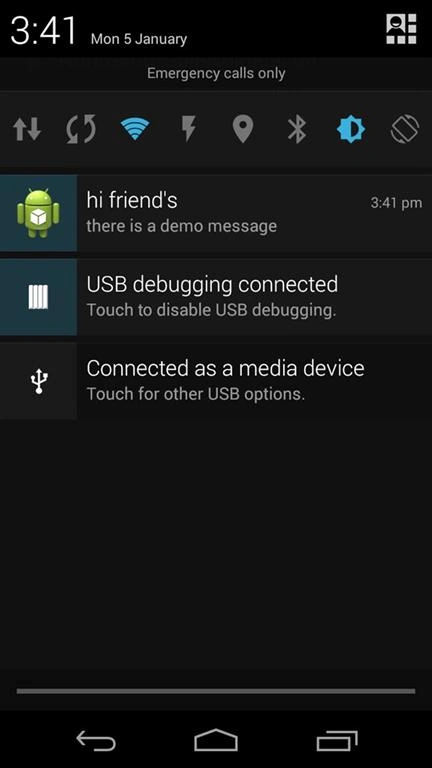
- package com.example.nonremovablenotification;
- import android.app.Activity;
- import android.app.Notification;
- import android.app.NotificationManager;
- import android.app.PendingIntent;
- import android.content.Context;
- import android.content.Intent;
- import android.os.Bundle;
- public class NonRemovableNotification extends Activity {
- Context context;
- final int NOTIFICATION_ID = 1;
- @Override
- protected void onCreate(Bundle savedInstanceState) {
- super.onCreate(savedInstanceState);
- context = NonRemovableNotification.this;
- // create notification builder object
- Notification.Builder builder = new Notification.Builder(context);
- builder.setContentText("there is a demo message").setContentTitle(
- context.getString(R.string.app_name));
- builder.setSmallIcon(R.drawable.ic_launcher);
- // make the intent object
- Intent secondActivityIntent = new Intent(NonRemovableNotification.this,
- SecondaryActivity.class);
- // pending intent
- PendingIntent pendingIntent = PendingIntent.getActivity(context, 0,
- secondActivityIntent, 0);
- builder.setContentIntent(pendingIntent);
- builder.setAutoCancel(false);
- Notification notification = builder.build();
- // this is the main thing to do to make a non removable notification
- notification.flags |= Notification.FLAG_NO_CLEAR;
- NotificationManager manager = (NotificationManager) context
- .getSystemService(Context.NOTIFICATION_SERVICE);
- manager.notify(NOTIFICATION_ID, notification);
- }
- }
Join the conversation! Your thoughts help the community grow.