

What is GUID (Globally Unique Identifier)
- GUID is a unique identifier, you can use this for identifying the particular component.
- GUIDs are usually stored as 128-bit values, and are commonly displayed as 32 hexadecimal digits with groups separated by hyphens, such as {DA1FFC57-62EE-4019-9BAE-D5670339CD1C}.
- GUIDs generated from random numbers that normally contains 6 fixed bits (these indicate that the GUID is random) and 122 random bits; the total number of unique such GUIDs is 2122 (approximately 5.3×1036).
Steps to generate GUID
Here are the steps to generate the new GUID.
Step 1: Open Visual Studio in your machine:

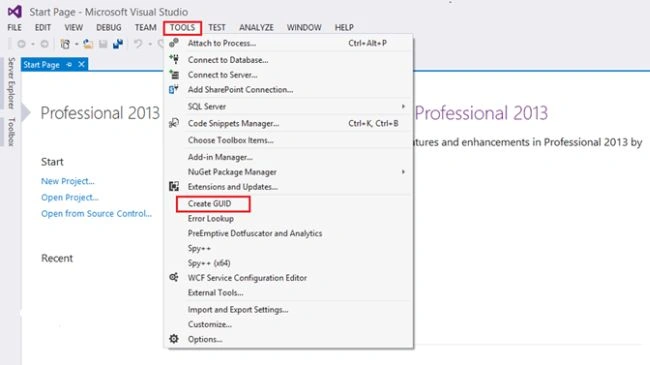
Step 2: Click on the TOOLS from Menu as in the following screenshot:

Step 3: On the TOOLS panel choose Create GUID for generating new GUID.
Step 4: Once you click Create GUID you will get the pop up as in the following screenshot:
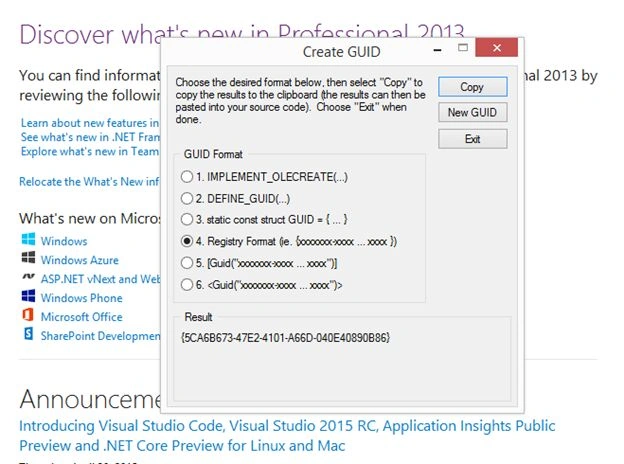
Step 5: By clicking Copy on the pop up you can copy the GUID. If you want to generate one more, then click on the New GUID button as in the following screenshot:

Finally New GUID will be generated successfully.
Summary
In this article we have explored how to create new GUID using Visual Studio.
Happy Learning!
Kaviya BalasubramanianPosted Sep 7, 2015, 7:23 AM
Thank you all :)
Santhakumar MunuswamyPosted Sep 5, 2015, 4:19 AM
Thanks for nice share
Sumit JoshiPosted Sep 4, 2015, 12:25 PM
Thanks for sharing.
Kaviya BalasubramanianPosted Sep 4, 2015, 1:07 AM
Thanks all :)
Kaviya BalasubramanianPosted Sep 4, 2015, 1:07 AM
While u create the custom site columns in SharePoint , u need a unique GUID for those columns at the time you can use this... When ever u need Unique GUID u can create using the above steps.
Rajeesh MenothPosted Sep 4, 2015, 12:37 AM
Nice Share..
Rajeev RanjanPosted Sep 4, 2015, 12:36 AM
what is the uses of this GUID??
Akash MalhotraPosted Sep 3, 2015, 3:11 PM
Nice article
Mohammed IbrahimPosted Sep 3, 2015, 11:37 AM
nice information..
Pankaj Kumar ChoudharyPosted Sep 3, 2015, 8:07 AM
nice Explain.......
Kaviya BalasubramanianPosted Sep 3, 2015, 8:04 AM
Thank you all :)
Nilesh JadavPosted Sep 3, 2015, 7:29 AM
Nice one sir ! Good Article
RakeshPosted Sep 3, 2015, 5:11 AM
Good one
Sibeesh VenuPosted Sep 3, 2015, 4:54 AM
Nice
Karthikeyan KPosted Sep 3, 2015, 3:42 AM
Good one...Thanks for sharing