

Creating a Silverlight application to consume a WCF service.
Task 1: In the same solution created in the Exercise 1, add a new Silverlight application and name it 'SILV4_JSON_Client'. (Note: You must create a separate web site for the Silverlight application.)
Task 2: Open the 'MailPage.xaml' and write the following XAML: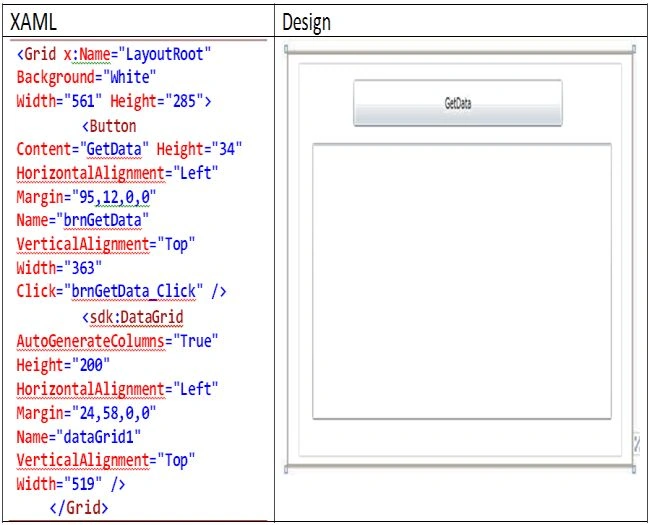
(Note: <sdk:DataGrid> may be different in your code. So instead of copying and pasting, drag-and-drop the DataGrid from your toolbox.)
Task 3: Since we will be making a call to the WCF JSON service, we need to consume the JSON response in the stream. This stream needs to be deserialized into the object. To do this, add the following references in the Silverlight project:
SystemRuntime.Serialization and System.ServiceModel.Web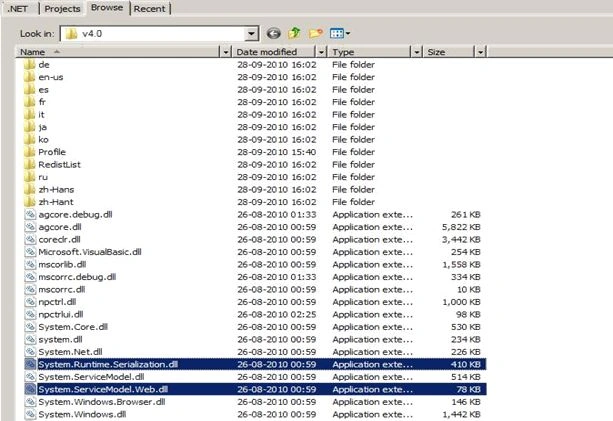
Task 4: In the Silverlight project add the following class:
public class Employee
{
public int EmpNo { get; set; } public string EmpName { get; set; } public string DeptName { get; set; } public int Salary { get; set; }
}
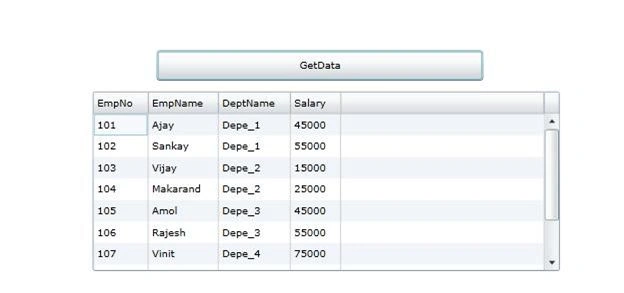
This class will be used to consume the JSON deserialized response.
Task 5: Add the following references in the using block:
using System.IO;
using System.Runtime.Serialization;
using System.Runtime.Serialization.Json;
Task 6: Open MainPage.Xaml.cs and write the following code in the "Get Data" click as below:
private void brnGetData_Click(object sender, RoutedEventArgs e)
{
Amit TiwariPosted May 31, 2016, 7:57 AM
Thanks all of you
pawan vashishthaPosted Jan 6, 2016, 2:14 AM
nice
Gowtham RajamanickamPosted May 20, 2015, 1:02 AM
good