
Introduction:
In this article, I am creating two web
services and using (consuming) them in a web application. We can consume more
than one web service into one web application. The method for consuming more web
services is same as consuming simple web service in web application. Here, first
web service returns a string and second web service returns records from
student_detail table.
At first we create a web service. Create an ASP.NET Web
Service application and replace the
code with the following code.
using
System;
using
System.Collections.Generic;
using
System.Linq;
using
System.Web;
using
System.Web.Services;
namespace
SERVICE1
{
///
<summary>
/// Summary
description for Service1 ///
</summary>
[WebService(Namespace =
"http://EXAMPLE1.ORG",Name="SIMPLE
EXAMPLE")]
[WebServiceBinding(ConformsTo =
WsiProfiles.BasicProfile1_1)]
[System.ComponentModel.ToolboxItem(false)]
// To allow this Web Service to be called from
script, using ASP.NET AJAX, uncomment the following line.
// [System.Web.Script.Services.ScriptService]
public class
Service1 : System.Web.Services.WebService
{
[WebMethod]
public string
SHOW(string NAME)
{
return
"Hello, "+NAME+" !";
}
}
}
Run the application. Now create another web service. Repeat the same procedure
for creating a web service and replace the default code with the following code.
using
System;
using
System.Collections.Generic;
using
System.Linq;
using System.Web;
using
System.Web.Services;
using
System.Data.SqlClient;
using
System.Data;
namespace
SERVICE2
{
///
<summary>
/// Summary
description for Service1
///
</summary>
[WebService(Namespace =
"http://EXAMPLE2",Name="COMPLEX
EXAMPLE")]
[WebServiceBinding(ConformsTo =
WsiProfiles.BasicProfile1_1)]
[System.ComponentModel.ToolboxItem(false)]
// To allow this Web Service to be called from
script, using ASP.NET AJAX, uncomment the following line.
// [System.Web.Script.Services.ScriptService]
public class
Service1 : System.Web.Services.WebService
{
[WebMethod]
public
DataSet DATA(int ID)
{
SqlDataAdapter DA =
new SqlDataAdapter("SELECT
* FROM STUDENT_DETAIL WHERE STUDENT_DETAIL.ID=ID ",
"Data
Source=SERVER_NAME;Initial
Catalog=STUDENT;Integrated Security=True");
DataSet DS =
new DataSet();
DA.Fill(DS);
return DS;
}
}
}
Run the application. Now, we create
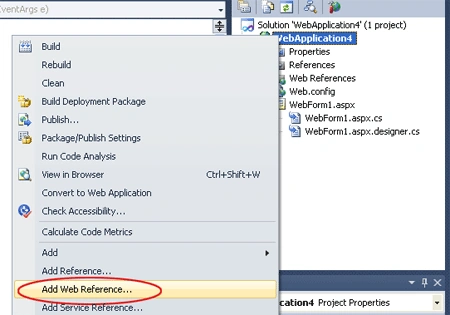
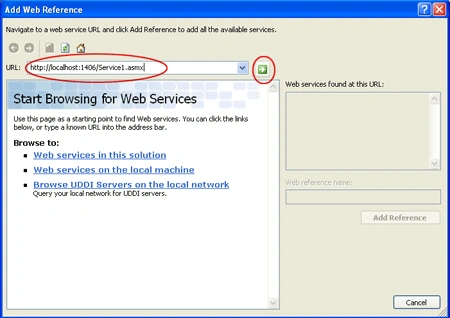
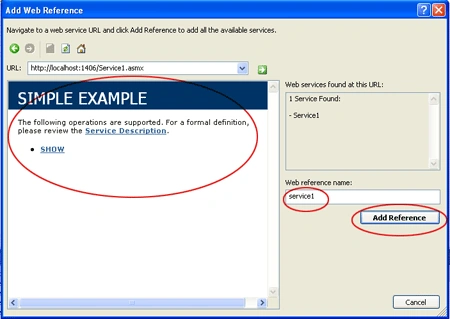
a web application. Take a ASP.NET Web Application. To add service reference, go
to Solution Explorer -> right click at your web project.
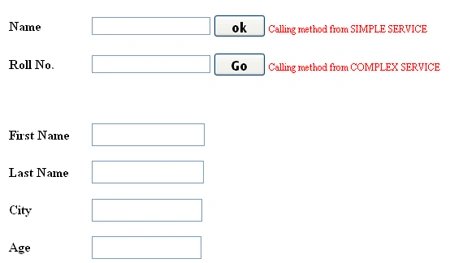

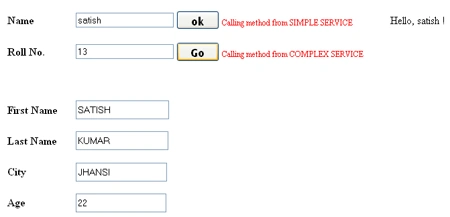
Join the conversation! Your thoughts help the community grow.