

In Language Integrated Query (LINQ) we use Select and SelectMany methods for projecting data present in a collection. As the name suggests we use projection methods to project the data in the same way as we use a Select clause in a SQL database to fetch specific columns of a table. Based on the type of collection we either use a Select or to flatten the list we use SelectMany.
I will try to explain both these methods with examples.
Part 1: Select
OverLoad 1: Enumerable.Select<TSource, TResult> Method (IEnumerable<TSource>, Func<TSource, TResult>)
This is the first overload of the Select method. Don't be confused or scared by looking at the method definition since Lambda expressions makes it much easier then how it actually is and how it looks :) Here is the definition of this method:
public static IEnumerable<TResult> Select<TSource, TResult>(
this IEnumerable<TSource> source,
Func<TSource, TResult> selector
)
If we see the method closely, the first parameter is just denoting that this method can be implemented on any object that implements an IEnumerable interface (If this point is not clear please check my article on Extension methods). The second parameter is a Func delegate that expects an input of type "T" (TSource) or the type on which we are invoking this method and similarly TResult denotes the result it will be returning of type "T" again. For more information about a Func delegate, do read Sachin's article here.
I know many us have the following reaction when initially reading all this stuff:
But, trust me; once we get a good command on lambda expressions, the syntax of a Func delegate won't scare us. :-)
So, I will start with examples since that will be help us understand these extension methods easily. Please note I will not display the syntax of each overloaded version, because that is easily accessible on the MSDN.
Example 1: Suppose I have an array of integers like this:
int[] numbers = { 2, 55, 67, 82, 99, 13 };
What I want is to divide each number present in this array by 2 and return the resulting integer array, here is the code for this:
int[] result = numbers.Select(x => x / 2).ToArray();
Yes, that's it! We are using the LINQ projection method Select here. First check what Visual Studio intellisense is showing:

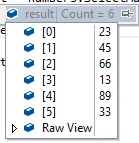
Now, it will be more clear that since we are applying this method on an array of type int, the Func input parameter will be automatically inferred as int. Here x will be each integer element present in the integer array. So we consider this as we are looping through the int array using a Lambda expression and applying a division by 2 on each number. We will get the following output:
1,27,33,41,49,6
Example 2: Suppose we have a list of strings as follows:
List<string> fruits = new List<string> { "Apple", "Banana","Mango", "Grapes", "Lemon" };
Now, I want to display each fruit (string) in upper case. We will use the LINQ Select method again and this time the "x" will be of string type, because we are applying this method on a List of strings. Since x is a string (each fruit present in the List), we can use all the built-in functions that can be applied to a variable of type string. Here is the query:
List<string> fruitsStartingWithL = fruits.Select(x => x.ToUpper()).ToList();
We will get the following output:
APPLE, BANANA, MANGO, GRAPES, LEMON
OverLoad 2: Enumerable.Select<TSource, TResult> Method (IEnumerable<TSource>, Func<TSource, Int32, TResult>)
Again, don't be confused looking at the Func, see that we are just passing a second parameter of type int that is nothing but the index of the element present in the source.
Example 3: Suppose we have the same integer array that we have used in Example 1, now what we want to do is to create an integer array that will be the product of the number at its index in the array, in other words 2 * 0, 27 * 1, 33 * 2 and so on. Here is the LINQ query to do the same:
int[] result = numbers.Select((x, i) => x * i).ToArray();
Here, x denotes the number and i denotes its respective index. We will get the following output:
0, 55, 134, 246, 396, 65
Example 4: We can manipulate the index the way we want, if example 3 doesn't seem to be a practical example then just check my article: Sum-Up Values at same Index that is a classic example where index manipulation is very important.
Part 2: SelectMany
OverLoad 1: Enumerable.SelectMany<TSource, TResult> Method (IEnumerable<TSource>, Func<TSource, IEnumerable<TResult>>)
First of all SelectMany is used to project each element of a sequence to an IEnumerable<T> and flatten the resulting sequence into one sequence. If this statement is not clear then don't worry, it will become more clear with examples. The main purpose of SelectMany is to flatten any given collection and generate a single collection.
Example 5: Suppose we have a List of strings that holds some products like this:
List<List<string>> products = new List<List<string>>
{
    new List<string> { "Apple", "Banana", "Grapes" },
    new List<string> { "Coke", "Milk", "Fanta" },
    new List<string> { "Mobile", "TV", "Tablet" }
 };
Now, what we want to do is to extract a single List<String> that will hold all the products. We will use SelectMany to flatten the list of lists into one list. Notice the intellisense here:

Please note that since we are applying the SelectMany method on products that are of type List<List<String>>, Func is expecting a List<String> and that makes sense because here our "x" will be "List<String>". Now SelectMany projects each element to an IEnumerable<string> and then flattens it, in other words combines that list to a single list. Here is the LINQ query for it:
List<string> allProducts = products.SelectMany(x => x).ToList();
//Or if we want we can project the inner list too, both are same
List<string> allProductsByProjection = products.SelectMany(x => x.Select(z => z)).ToList();
We will get the following output:
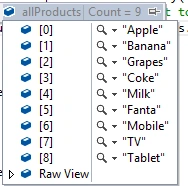
Example 6: Again its tough to guess a scenario for where we actually use it, but in reality we may encounter many problems where this method will be really handy. You can check the use of SelectMany in the same article that I have pointed to in example 4.

Ankur MistryPosted Nov 29, 2015, 6:35 AM
nice share
Manish Kumar ChoudharyPosted Jan 4, 2015, 10:57 PM
Nice explanation..