

Introduction
- You need to upload the content to the server first. This will take time when the data is more. When it takes more than 2 minutes, no one will wait for it. They will just cancel the process and close your application. So your reputation is diminished.
- Once the contents are uploaded, the server will initiate the process of downloading. Again this may take time.
The Process
- Export From HTML Table Using jQuery.
- Export Hierarchical (Multi-Level) HTML Table With Styles Using jQuery.
- Working With JQX Grid With Filtering And Sorting And Searching.
- Advanced JQX Grid With All Functionality.
- Assigning Data Source Batch By Batch in JQWidgets JQX Grid.
The following is the code for the compression:
- var LZW = {
- compress: function (uncompressed) {
- "use strict";
- // Build the dictionary.
- var i,
- dictionary = {},
- c,
- wc,
- w = "",
- result = [],
- dictSize = 256;
- for (i = 0; i < 256; i += 1) {
- dictionary[String.fromCharCode(i)] = i;
- }
- for (i = 0; i < uncompressed.length; i += 1) {
- c = uncompressed.charAt(i);
- wwc = w + c;
- //Do not use dictionary[wc] because javascript arrays
- //will return values for array['pop'], array['push'] etc
- // if (dictionary[wc]) {
- if (dictionary.hasOwnProperty(wc)) {
- w = wc;
- } else {
- result.push(dictionary[w]);
- // Add wc to the dictionary.
- dictionary[wc] = dictSize++;
- w = String(c);
- }
- }
- if (w !== "") {
- result.push(dictionary[w]);
- }
- return result;
- }
- }
The preceding code does the compression, now we need to check the implementation. Am I right?
- $("#excelExport").click(function () {
- var exportInfo = LZW.compress($("#jqxgrid").jqxGrid('exportdata', 'xls'));
- });
You can get the grid data as follows.
- $("#jqxgrid").jqxGrid('exportdata', 'xls');
To learn more about exporting in JQX Grid, please see here: Advanced JQX Grid With All Functionality.
You can always decompress the data as follows.
- decompressedVariable = LZW.decompress(exportInfo);
The following is the code for the decompression:
- decompress: function (compressed) {
- "use strict";
- // Build the dictionary.
- var i,
- dictionary = [],
- w,
- result,
- k,
- entry = "",
- dictSize = 256;
- for (i = 0; i < 256; i += 1) {
- dictionary[i] = String.fromCharCode(i);
- }
- w = String.fromCharCode(compressed[0]);
- result = w;
- for (i = 1; i < compressed.length; i += 1) {
- k = compressed[i];
- if (dictionary[k]) {
- entry = dictionary[k];
- } else {
- if (k === dictSize) {
- entry = w + w.charAt(0);
- } else {
- return null;
- }
- }
- result += entry;
- // Add w+entry[0] to the dictionary.
- dictionary[dictSize++] = w + entry.charAt(0);
- w = entry;
- }
- return result;
- }
Exporting Using BLOB
To work on it, you need to attach the script:
- <script src="FileSaver.min.js"></script>
This script does the saving of the Excel file. So it is important that we include it though.
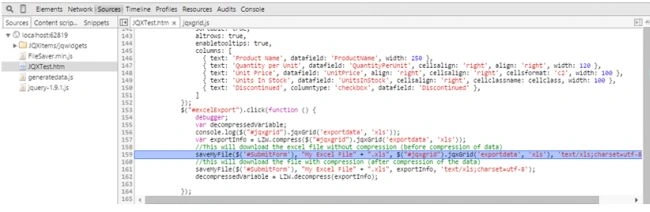
The following code explains the implementation.
- //This will download the excel file without compression (before compression of data)
- saveMyFile($('#SubmitForm'), "My Excel File" + ".xls", $("#jqxgrid").jqxGrid('exportdata', 'xls'), 'text/xls;charset=utf-8');
- //this will download the file with compression (after compression of the data)
- saveMyFile($('#SubmitForm'), "My Excel File" + ".xls", exportInfo, 'text/xls;charset=utf-8');
You can see that the parameters of the function saveMyFile,
- Reference form.
- File name.
- The string to be exported. In our case, it is our XML string.
- The mime type, for example: 'text/xls;charset=utf-8'.
The export function
- function saveMyFile(ref, fname, text, mime) {
- var blob = new Blob([text], { type: mime });
- saveAs(blob, fname);
- return false;
- }
- Without compression
- With compression
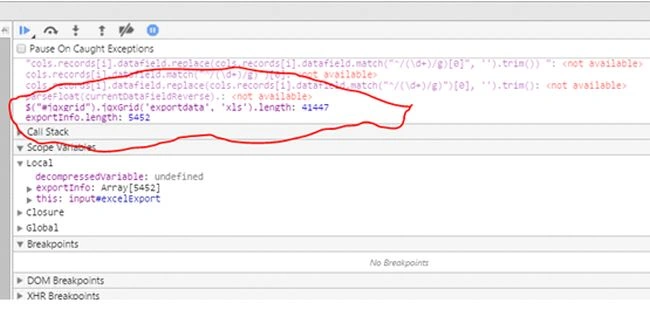
Let us see the size difference now.
 Here, My Excel File.xls is without compression and My Excel File(1).xls is with compression. I hope you see the difference. :)
Now it is time for the complete HTML.
Here, My Excel File.xls is without compression and My Excel File(1).xls is with compression. I hope you see the difference. :)
Now it is time for the complete HTML.
- <!DOCTYPE html>
- <html lang="en">
- <head>
- <title id='Description'>This example illustrates how to customize the filtering conditions available in the columns popup menu.
- </title>
- <script src="jquery-1.9.1.js"></script>
- <script type="text/javascript" src="JQXItems/jqwidgets/jqxcore.js"></script>
- <script type="text/javascript" src="JQXItems/jqwidgets/jqxdata.js"></script>
- <script type="text/javascript" src="JQXItems/jqwidgets/jqxbuttons.js"></script>
- <script type="text/javascript" src="JQXItems/jqwidgets/jqxscrollbar.js"></script>
- <script type="text/javascript" src="JQXItems/jqwidgets/jqxlistbox.js"></script>
- <script type="text/javascript" src="JQXItems/jqwidgets/jqxdropdownlist.js"></script>
- <script type="text/javascript" src="JQXItems/jqwidgets/jqxgrid.js"></script>
- <script type="text/javascript" src="JQXItems/jqwidgets/jqxgrid.filter.js"></script>
- <script type="text/javascript" src="JQXItems/jqwidgets/jqxgrid.sort.js"></script>
- <script type="text/javascript" src="JQXItems/jqwidgets/jqxgrid.selection.js"></script>
- <script type="text/javascript" src="JQXItems/jqwidgets/jqxgrid.pager.js"></script>
- <script type="text/javascript" src="JQXItems/jqwidgets/jqxgrid.columnsresize.js"></script>
- <script type="text/javascript" src="JQXItems/jqwidgets/jqxgrid.columnsreorder.js"></script>
- <script type="text/javascript" src="JQXItems/jqwidgets/jqxgrid.export.js"></script>
- <script type="text/javascript" src="JQXItems/jqwidgets/jqxdata.export.js"></script>
- <script type="text/javascript" src="JQXItems/jqwidgets/jqxdatatable.js"></script>
- <script src="JQXItems/jqwidgets/jqxcheckbox.js"></script>
- <script src="JQXItems/jqwidgets/jqxmenu.js"></script>
- <link href="JQXItems/jqwidgets/styles/jqx.base.css" rel="stylesheet" />
- <script src="generatedata.js"></script>
- <script src="FileSaver.min.js"></script>
- <script type="text/javascript">
- $(document).ready(function () {
- var LZW = {
- compress: function (uncompressed) {
- "use strict";
- // Build the dictionary.
- var i,
- dictionary = {},
- c,
- wc,
- w = "",
- result = [],
- dictSize = 256;
- for (i = 0; i < 256; i += 1) {
- dictionary[String.fromCharCode(i)] = i;
- }
- for (i = 0; i < uncompressed.length; i += 1) {
- c = uncompressed.charAt(i);
- wc = w + c;
- //Do not use dictionary[wc] because javascript arrays
- //will return values for array['pop'], array['push'] etc
- // if (dictionary[wc]) {
- if (dictionary.hasOwnProperty(wc)) {
- w = wc;
- } else {
- result.push(dictionary[w]);
- // Add wc to the dictionary.
- dictionary[wc] = dictSize++;
- w = String(c);
- }
- }
- if (w !== "") {
- result.push(dictionary[w]);
- }
- return result;
- },
- decompress: function (compressed) {
- "use strict";
- // Build the dictionary.
- var i,
- dictionary = [],
- w,
- result,
- k,
- entry = "",
- dictSize = 256;
- for (i = 0; i < 256; i += 1) {
- dictionary[i] = String.fromCharCode(i);
- }
- w = String.fromCharCode(compressed[0]);
- result = w;
- for (i = 1; i < compressed.length; i += 1) {
- k = compressed[i];
- if (dictionary[k]) {
- entry = dictionary[k];
- } else {
- if (k === dictSize) {
- entry = w + w.charAt(0);
- } else {
- return null;
- }
- }
- result += entry;
- // Add w+entry[0] to the dictionary.
- dictionary[dictSize++] = w + entry.charAt(0);
- w = entry;
- }
- return result;
- }
- }
- var url = "products.xml";
- // prepare the data
- var source =
- {
- datatype: "xml",
- datafields: [
- { name: 'ProductName', type: 'string' },
- { name: 'QuantityPerUnit', type: 'int' },
- { name: 'UnitPrice', type: 'float' },
- { name: 'UnitsInStock', type: 'float' },
- { name: 'Discontinued', type: 'bool' }
- ],
- root: "Products",
- record: "Product",
- id: 'ProductID',
- url: url
- };
- var cellclass = function (row, columnfield, value) {
- if (value < 20) {
- return 'red';
- }
- else if (value >= 20 && value < 50) {
- return 'yellow';
- }
- else return 'green';
- }
- var dataAdapter = new $.jqx.dataAdapter(source, {
- downloadComplete: function (data, status, xhr) { },
- loadComplete: function (data) { },
- loadError: function (xhr, status, error) { }
- });
- // initialize jqxGrid
- $("#jqxgrid").jqxGrid(
- {
- width: 850,
- source: dataAdapter,
- pageable: true,
- autoheight: true,
- sortable: true,
- altrows: true,
- enabletooltips: true,
- columns: [
- { text: 'Product Name', datafield: 'ProductName', width: 250 },
- { text: 'Quantity per Unit', datafield: 'QuantityPerUnit', cellsalign: 'right', align: 'right', width: 120 },
- { text: 'Unit Price', datafield: 'UnitPrice', align: 'right', cellsalign: 'right', cellsformat: 'c2', width: 100 },
- { text: 'Units In Stock', datafield: 'UnitsInStock', cellsalign: 'right', cellclassname: cellclass, width: 100 },
- { text: 'Discontinued', columntype: 'checkbox', datafield: 'Discontinued' },
- ]
- });
- $("#excelExport").click(function () {
- debugger;
- var decompressedVariable;
- console.log($("#jqxgrid").jqxGrid('exportdata', 'xls'));
- var exportInfo = LZW.compress($("#jqxgrid").jqxGrid('exportdata', 'xls'));
- //This will download the excel file without compression (before compression of data)
- saveMyFile($('#SubmitForm'), "My Excel File" + ".xls", $("#jqxgrid").jqxGrid('exportdata', 'xls'), 'text/xls;charset=utf-8');
- //this will download the file with compression (after compression of the data)
- saveMyFile($('#SubmitForm'), "My Excel File" + ".xls", exportInfo, 'text/xls;charset=utf-8');
- decompressedVariable = LZW.decompress(exportInfo);
- });
- function saveMyFile(ref, fname, text, mime) {
- var blob = new Blob([text], { type: mime });
- saveAs(blob, fname);
- return false;
- }
- });
- </script>
- </head>
- <body class='default'>
- <input type="button" value="Export to Excel" id='excelExport' />
- <style>
- .green {
- color: black\9;
- background-color: #b6ff00\9;
- }
- .yellow {
- color: black\9;
- background-color: yellow\9;
- }
- .red {
- color: black\9;
- background-color: #e83636\9;
- }
- .green:not(.jqx-grid-cell-hover):not(.jqx-grid-cell-selected), .jqx-widget .green:not(.jqx-grid-cell-hover):not(.jqx-grid-cell-selected) {
- color: black;
- background-color: #b6ff00;
- }
- .yellow:not(.jqx-grid-cell-hover):not(.jqx-grid-cell-selected), .jqx-widget .yellow:not(.jqx-grid-cell-hover):not(.jqx-grid-cell-selected) {
- color: black;
- background-color: yellow;
- }
- .red:not(.jqx-grid-cell-hover):not(.jqx-grid-cell-selected), .jqx-widget .red:not(.jqx-grid-cell-hover):not(.jqx-grid-cell-selected) {
- color: black;
- background-color: #e83636;
- }
- </style>
- <div id='jqxWidget' style="font-size: 13px; font-family: Verdana; float: left;">
- <div id="jqxgrid">
- </div>
- </div>
- </body>
- </html>
Join the conversation! Your thoughts help the community grow.