

Introduction
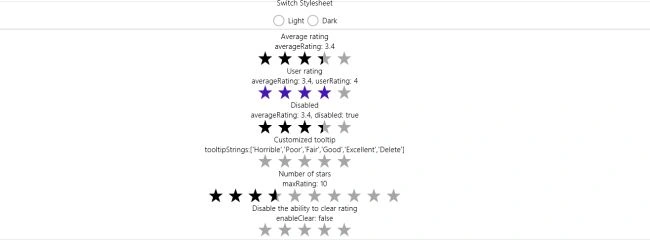
Today we are going to learn how to create Windows Store Apps for Page Rating using JavaScript. The Rating control shows the average rating of an item until the user provides his or her own rating.
The user can clear his or her previous rating by dragging to the left of the control using a mouse, touch or pressing the "0" key or left arrow key. If your page doesn't want to allow that, you could disable it. I assume you can create a simple Windows Store App using JavaScript; for more help visit Simple Windows Store Apps using JavaScript.
To start the creation of the apps, add two JavaScript pages by right-clicking on the js folder in the Solution Explorer and select Add > new item > JavaScript Page and then give an appropriate name. In the same way, add one HTML pages to your project.
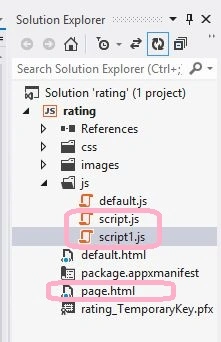
Write the following code in default.aspx:
<!DOCTYPE html>
<html>
<head>
<meta charset="utf-8" />
<title>Rating</title>
<link rel="stylesheet" href="//Microsoft.WinJS.1.0/css/ui-light.css" />
<script src="//Microsoft.WinJS.1.0/js/base.js"></script>
<script src="//Microsoft.WinJS.1.0/js/ui.js"></script>
<link rel="stylesheet" href="/css/default.css" />
<script src="/js/script1.js"></script>
<script src="/js/default.js"></script>
</head>
<body role="application">
<center> <div id="rootGrid">
<div id="content">
<h1 id="featureLabel"></h1>
<div id="contentHost"></div>
</div>
</div>
</center>
</body>
</html>
Write the following code in default.js:
(function () {
"use strict";
var sampleTitle = "Rating";
var pages = [
{ url: "page.html", title: "Basics" }
];
function activated(eventObject) {
if (eventObject.detail.kind === Windows.ApplicationModel.Activation.ActivationKind.launch) {
eventObject.setPromise(WinJS.UI.processAll().then(function () {
var url = WinJS.Application.sessionState.lastUrl || pages[0].url;
return WinJS.Navigation.navigate(url);
}));
}
}
WinJS.Navigation.addEventListener("navigated", function (evt) {
var url = evt.detail.location;
var host = document.getElementById("contentHost");
host.winControl && host.winControl.unload && host.winControl.unload();
WinJS.Utilities.empty(host);
WinJS.UI.Pages.render(url, host).then(function () {
WinJS.Application.sessionState.lastUrl = url;
});
});
WinJS.Namespace.define("SdkSample", {
sampleTitle: sampleTitle,
pages: pages
});
WinJS.Application.addEventListener("activated", activated, false);
WinJS.Application.start();
})();
function switchStyleDark() {
document.styleSheets[0].disabled = true;
document.styleSheets[3].disabled = false;
WinJS.Utilities.removeClass(document.body, "ui-light");
WinJS.Utilities.addClass(document.body, "ui-dark");
}
function switchStyleLight() {
document.styleSheets[0].disabled = false;
document.styleSheets[3].disabled = true;
WinJS.Utilities.removeClass(document.body, "ui-dark");
WinJS.Utilities.addClass(document.body, "ui-light");
}
Write the following code in page.html:
<!DOCTYPE html>
<html>
<head>
<title></title>
<link rel="stylesheet" href="//Microsoft.WinJS.1.0/css/ui-dark.css " disabled="true" />
<link rel="stylesheet" href="/css/basics.css" />
<link rel="stylesheet" href="/css/formLayout.css">
<script src="/js/script.js"></script>
</head>
<body>
<div data-win-control="SdkSample.pageInput">
<fieldset class="controlGroup">
<legend class="controlGroupName">Switch Stylesheet</legend>
<label class="radioLabel horizontalLabelLayout">
<input type="radio" name="radiogroup1" id="lightStyle" title="Use this Control to switch between the light and dark styles to see how the controls look." onclick="switchStyleLight();" />Light
</label>
<label class="radioLabel horizontalLabelLayout">
<input type="radio" name="radioGroup1" id="darkStyle" title="Use this control to switch between the light and dark styles to see how the controls look." onclick="switchStyleDark();" />Dark
</label>
</fieldset>
</div>
<div data-win-control="SdkSample.pageOutput">
<fieldset id="Fieldset3" class="formSection">
<div class="twoColumnGridContainer-ControlList">
<div style="-ms-grid-row: 1; -ms-grid-column: 1;">
Average rating
<div class="detail">
Join the conversation! Your thoughts help the community grow.