

Introduction
In this article I describe how to create a file using Windows Store apps. In this article I have create a sample.dat file .I assume that you can create simple Windows 8 apps if you face any problem than you can visit for creating this apps you create a simple Windows 8 style app using JavaScript and than add a folder named html by right-clicking on the solution name and than another folder named app-util. In app-util you add the following pages:
Three html pages:
- header.html
- footer.html
- select.html
A JavaScript page:
util.js
A CSS file:
util.css
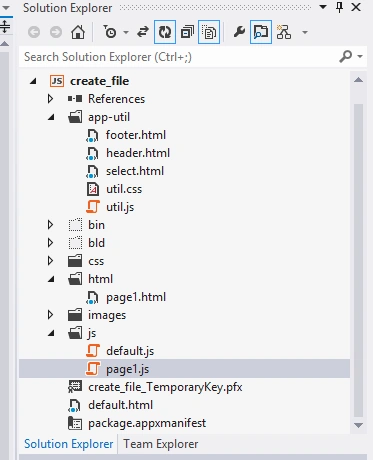
In your header.html you write the following code:
<!DOCTYPE html>
<html>
<head>
<title></title>
</head>
<body>
<span>Windows app sample</span>
</body>
</html>
In your footer.html you write the following code:
<!DOCTYPE html>
<html>
<head>
<title></title>
</head>
<body>
<div id="company" class="company"><span>Copyright © Middha Corporation. All rights reserved.</span></div>
</body>
</html>
In your select.html you write the following code:
<!DOCTYPE html>
<html>
<head>
<title></title>
</head>
<body>
<div class="options">
<h3 id="listLabel">Select page:</h3>
<select id="scenarioSelect" aria-labelledby="listLabel">
</select>
</div>
</body>
</html>
In your util.js you write the following code:
(function () {
var lastError = "";
var lastStatus = "";
var ScenarioInput = WinJS.Class.define(
function (element, options) {
element.winControl = this;
this.element = element;
new WinJS.Utilities.QueryCollection(element)
.setAttribute("role", "main")
.setAttribute("aria-labelledby", "inputLabel");
element.id = "input";
this.addInputLabel(element);
this.addDetailsElement(element);
this.addScenariosPicker(element);
}, {
addInputLabel: function (element) {
var label = document.createElement("h2");
label.textContent = "Input";
label.id = "inputLabel";
element.parentNode.insertBefore(label, element);
},
addScenariosPicker: function (parentElement) {
var scenarios = document.createElement("div");
scenarios.id = "pages";
var control = new ScenarioSelect(scenarios);
parentElement.insertBefore(scenarios, parentElement.childNodes[0]);
},
addDetailsElement: function (sourceElement) {
var detailsDiv = this._createDetailsDiv();
while (sourceElement.childNodes.length > 0) {
detailsDiv.appendChild(sourceElement.removeChild(sourceElement.childNodes[0]));
}
sourceElement.appendChild(detailsDiv);
},
_createDetailsDiv: function () {
var detailsDiv = document.createElement("div");
new WinJS.Utilities.QueryCollection(detailsDiv)
.addClass("details")
.setAttribute("role", "region")
.setAttribute("aria-labelledby", "descLabel")
.setAttribute("aria-live", "assertive");
var label = document.createElement("h3");
label.textContent = "Description";
label.id = "descLabel";
detailsDiv.appendChild(label);
return detailsDiv;
},
}
);
var ScenarioOutput = WinJS.Class.define(
function (element, options) {
element.winControl = this;
this.element = element;
new WinJS.Utilities.QueryCollection(element)
.setAttribute("role", "region")
.setAttribute("aria-labelledby", "outputLabel")
.setAttribute("aria-live", "assertive");
element.id = "output";
this._addOutputLabel(element);
this._addStatusOutput(element);
}, {
_addOutputLabel: function (element) {
var label = document.createElement("h2");
label.id = "outputLabel";
label.textContent = "Output";
element.parentNode.insertBefore(label, element);
},
_addStatusOutput: function (element) {
var statusDiv = document.createElement("div");
statusDiv.id = "statusMessage";
element.insertBefore(statusDiv, element.childNodes[0]);
}
}
);
var ScenarioSelect = WinJS.UI.Pages.define("/app-util/select.html", {
ready: function (element, options) {
var that = this;
var selectElement = WinJS.Utilities.query("#scenarioSelect", element);
this._selectElement = selectElement[0];
SdkSample.scenarios.forEach(function (s, index) {
that._addScenario(index, s);
});
selectElement.listen("change", function (evt) {
var select = evt.target;
if (select.selectedIndex >= 0) {
var newUrl = select.options[select.selectedIndex].value;
WinJS.Navigation.navigate(newUrl).then(function () {
setImmediate(function () {
document.getElementById("scenarioSelect").setActive();
});
});
}
});
selectElement[0].size = (SdkSample.scenarios.length > 5 ? 5 : SdkSample.scenarios.length);
if (SdkSample.scenarios.length === 1) {
// Avoid showing down arrow when there is only one scenario
selectElement[0].setAttribute("multiple", "multiple");
}
},
_addScenario: function (index, info) {
var option = document.createElement("option");
if (info.url === currentScenarioUrl) {
option.selected = "selected";
}
option.text = (index + 1) + ") " + info.title;
option.value = info.url;
this._selectElement.appendChild(option);
}
});
function activated(e) {
WinJS.Utilities.query("#featureLabel")[0].textContent = SdkSample.sampleTitle;
}
WinJS.Application.addEventListener("activated", activated, false);
// Export public methods & controls
WinJS.Namespace.define("SdkSample", {
ScenarioInput: ScenarioInput,
ScenarioOutput: ScenarioOutput
});
// SDK Sample Test helper
document.TestSdkSample = {
getLastError: function () {
return lastError;
},
getLastStatus: function () {
return lastStatus;
},
selectScenario: function (scenarioID) {
scenarioID = scenarioID >> 0;
var select = document.getElementById("scenarioSelect");
var newUrl = select.options[scenarioID - 1].value;
WinJS.Navigation.navigate(newUrl).then(function () {
setImmediate(function () {
document.getElementById("scenarioSelect").setActive();
});
});
}
};
})();
In your html folder add a new HTML page named page1.html and use the following code in it:
<!DOCTYPE html>
<html>
<head>
<title></title>
<script src="/js/page1.js"></script>
</head>
<body>
<div data-win-control="SdkSample.ScenarioInput">
<p>Creates a'sample.dat'file</p>
<button id="createFile">Create </button>
<br /><br />
</div>
<div data-win-control="SdkSample.ScenarioOutput">
<div id="output"></div>
</div>
</body>
</html>
In your default.html you write the following code:
<!DOCTYPE html>
<html>
<head>
<meta charset="utf-8" />
<title>SDK Sample</title>
<link href="//Microsoft.WinJS.1.0/css/ui-dark.css" rel="stylesheet" />
<script src="//Microsoft.WinJS.1.0/js/base.js"></script>
<script src="//Microsoft.WinJS.1.0/js/ui.js"></script>
<link rel="stylesheet" href="/app-util/util.css" />
<link href="/css/default.css" rel="stylesheet" />
<script src="/app-util/util.js"></script>
<script src="/js/default.js"></script>
</head>
<body role="application">
<div id="rootGrid">
<div id="header" role="contentinfo" data-win-control="WinJS.UI.HtmlControl" data-win-options="{uri: '/app-util/header.html'}"></div>
<div id="content">
<h1 id="featureLabel"></h1>
<div id="contentHost"></div>
</div>
<div id="footer" data-win-control="WinJS.UI.HtmlControl" data-win-options="{uri: '/app-util/footer.html'}"></div>
</div>
</body>
</html>
In your default.js you write the following code:
(function () {
"use strict";
var sampleTitle = "File access JS sample";
var sampleFile = null;
var mruToken = null;
var falToken = null;
var scenarios = [
{ url: "/html/page1.html", title: "Creating a file" }
];
function activated(eventObject) {
if (eventObject.detail.kind === Windows.ApplicationModel.Activation.ActivationKind.launch) {
eventObject.setPromise(WinJS.UI.processAll().then(function () {
var url = WinJS.Application.sessionState.lastUrl || scenarios[0].url;
return WinJS.Navigation.navigate(url);
}));
}
}
WinJS.Namespace.define("SdkSample", {
sampleTitle: sampleTitle,
scenarios: scenarios,
sampleFile: sampleFile,
mruToken: mruToken,
falToken: falToken
});
WinJS.Application.addEventListener("activated", activated, false);
WinJS.Application.start();
})();
Add aonther JavaScript file named page1.js and the following code:
(function () {
"use strict";
var page = WinJS.UI.Pages.define("/html/page1.html", {
ready: function (element, options) {
document.getElementById("createFile").addEventListener("click", createFile, false);
}
});
function createFile() {
Windows.Storage.KnownFolders.documentsLibrary.createFileAsync("sample.dat", Windows.Storage.CreationCollisionOption.replaceExisting).done(
function (file) {
SdkSample.sampleFile = file;
var outputDiv = document.getElementById("output");
outputDiv.innerHTML = "The file '" + SdkSample.sampleFile.name + "' was created.";
},
function (error) {
WinJS.log && WinJS.log(error, "sample", "error");
});
}
})();
Run your app; your output will look like the following: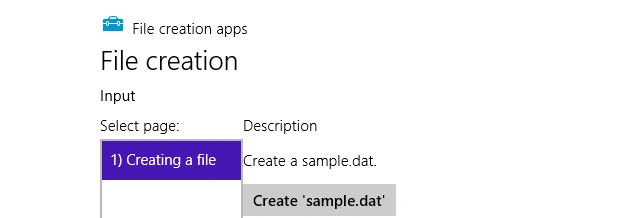
Gowtham RajamanickamPosted Apr 19, 2016, 6:48 AM
good article