

Introduction
In my previous article Determine Whether a User Name is Available Using jQuery and Ajax determines whether or not a user exists in the table. In this article we are learning whether or not a username exists. If the user exists in the table then some other name is suggested like Gmail. We can check whether the user exists in the table using the front end (C# Language) or the back end. I always prefer the back end(database).
In my previous article Determine Whether a User Name is Available Using jQuery and Ajax determines whether or not a user exists in the table. In this article we are learning whether or not a username exists. If the user exists in the table then some other name is suggested like Gmail. We can check whether the user exists in the table using the front end (C# Language) or the back end. I always prefer the back end(database).
First of all we need a table for holding the customer login data.
- Select * from mytable
- id EmailID
- 1 [email protected]
- 2 [email protected]
In the previous article in create a query in the .cs file, this type of query creates a SQL Injection and SQL Injection is very bad for developers. So in this article we create a procedure for connecting with the database. The procedure has one parameter @EmailID varchar(max).
- if exists(select id from mytable where emailid=@EmailId) //Check Email id already exists or not in the mytable.
- create proc Proc_CheckUserAndSuggestEmail
- (
- @EmailId varchar(max) // input Parameter
- )
- as
- begin
- if exists(select id from mytable where emailid=@EmailId)
- begin
- select Email from fun_suggest(@EmailID) //if already exists call this function with parameter
- end
- end
- SELECT @cslice= LEFT(@dataone,(CHARINDEX('@',@dataone)) - 1) --This line break the emailid like this type. suppose I enter the [email protected]. Return the Left('[email protected]',(charindex('@','[email protected]'))-1) "test" only.
- ALTER function [dbo].[fun_suggest]
- (@dataone varchar(max))
- returns @temptable table(Email varchar(max))
- as
- begin
- declare @cslice varchar(max)
- declare @notsingle int=1 --set the value of Inner while loop
- declare @five int =5 --set the value of outer while loop
- declare @temp varchar(max) --hold the value of simple
- declare @charindexvalue int --check and hold the underscore(_) in the email id
- declare @boolvalue int=1 --check and hold the value of help makeing the query
- SELECT @cslice= LEFT(@dataone,(CHARINDEX('@',@dataone)) - 1)
- while(@five>0) --this while loop work five time only.
- begin
- select @charindexvalue=CHARINDEX('_',@dataone) --if '_' underscore is found in email id then return the number of
- where is place other wise return the zero(number).
- if(@charindexvalue=0) --if @charindexvalue is zero then have not _ in email id
- begin
- SELECT @temp=@cslice+'_' -- So I add _ every email id if have not email id.
- end
- else
- begin
- SELECT @temp=@cslice --if have already '_' in email id don't add another _.
- end
- select @five-=1 -- every time decrement one....
- while(@notsingle>0) --this loop run have no idea which times run.
- begin
- if(@boolvalue!=1)
- begin
- select @temp=left(@temp,charindex('@',@temp)-1) --get the word before the @.
- end
- set @temp+=(select myrand from Get_Rand) --Get_Rand view return the every time random number. view explain below.
- if (CHARINDEX('@',@temp)=0)
- begin
- select @temp+=RIGHT(@dataone,(len(@dataone)-CHARINDEX('@',@dataone)+1)) --concatenate @gmail.com
- end
- if not exists(select id from mytable where Emailid=@temp) --check automatic create email id exists or Not in the table
- begin
- if not exists( select email from @temptable where Email=@temp) --check automatic create email is exists or not in the @temptable
- begin
- select @notsingle-=1;
- end
- end
- set @boolvalue=0
- end
- set @notsingle=1
- set @boolvalue=1
- insert into @temptable values(@temp) --insert the email id in @temptable
- SELECT @temp=''
- SELECT @temp=@cslice+'_'
- end
- return
- end
This view always returns a number in the range 1 to 9.
- CREATE VIEW [dbo].[Get_RAND]
- AS
- SELECT CAST(CAST(RAND(CHECKSUM(NEWID())) * 9 AS int) + 1 AS varchar) AS MyRAND
- type: "POST" //aspx page have two state one is Get and another is Post state.
- url: "Register.aspx/CheckUserName", // page URL is Register.aspx and function name is checkUserName
msg.d.split(","); return the array of data. var temp to hold the array of data. If we want to get the data one by one we need a Loop. I decided to make a loop for getting the data one by one.
- var temp = msg.d.split(",");
- document.getElementById("msgbox").innerHTML = "";
- for (var i = 0; i < temp.length; i++) {
- document.getElementById("msgbox").innerHTML+= ("<br/>"+temp[i]+"<br/>");
The following is the complete function of JavaScript.
- function checkuser() {
- var uname = $("#<%=txtUserName.UniqueID%>");
- if (uname.val().length > 5) {
- $.ajax({
- type: "POST",
- url: "Register.aspx/CheckUserName", // In this example most important thing is Testing is Static Method name like this:--- public static string Testing(string testing) and also parameter name is match other wise no error expection fire and no result accourate.
- data: "{'args': '" + uname.val() + "'}",
- contentType: "application/json; charset=utf-8",
- dataType: "json",
- success: function (msg) { //if success then this funcation call other wise some error message fire. code behind method reaten a String type value this value hold is msg.
- if (msg.d == 'Available') {
- uname.removeClass("notavailablecss");
- uname.addClass("availablecss");
- document.getElementById("msgbox").innerHTML = "";
- msgbox.html('<img src="Images/a.png"> <font color="Green"> Available </font>');
- }
- else {
- uname.removeClass("availablecss");
- uname.addClass("notavailablecss");
- var temp = msg.d.split(",");
- document.getElementById("msgbox").innerHTML = "";
- for (var i = 0; i < temp.length; i++) {
- document.getElementById("msgbox").innerHTML+= ("<br/>"+temp[i]+"<br/>");
- }
- }
- }
- });
- }
- else {
- uname.addClass("notavailablecss");
- msgbox.html('<font color="#cc0000">User Name must be more than 5 characters</font>');
- }
- }
- /script>
- [System.Web.Services.WebMethod]
- public static string CheckUserName(string args)
- {
- DataTable dt = new DataTable();
- string returnValue = string.Empty;
- SqlConnection sqlConn = new SqlConnection(@"Data Source=-----;Initial Catalog=----;Integrated Security=True");
- try
- {
- SqlCommand sqlCmd = new SqlCommand("Proc_CheckUserAndSuggestEmail", sqlConn);
- sqlCmd.CommandType = CommandType.StoredProcedure;
- sqlCmd.Parameters.AddWithValue("@EmailId", args);
- sqlConn.Open();
- SqlDataReader rd= sqlCmd.ExecuteReader();
- dt.Load(rd);
- if (dt.Rows.Count == 0)
- {
- returnValue = "Available";
- }
- else
- {
- for (int i = 0; i < dt.Rows.Count; i++)
- {
- returnValue +=","+ dt.Rows[i]["email"].ToString();
- }
- }
-
- }
- catch
- {
- //Handle Error
- }
- finally
- {
- sqlConn.Close();
- }
- return returnValue;
- }
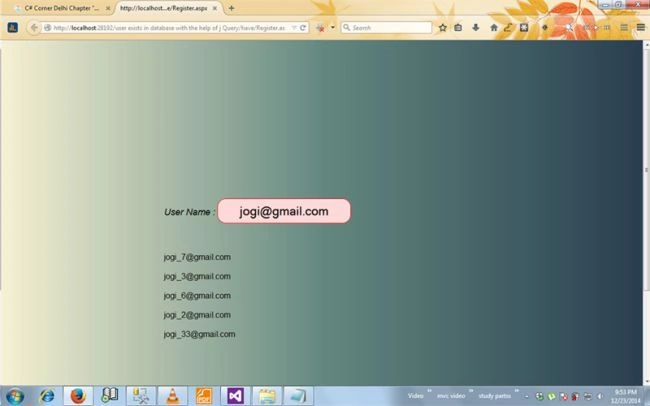
To check whether or not the email id exists in the table I enter the id already in the table and get the suggestion of another five email ids.
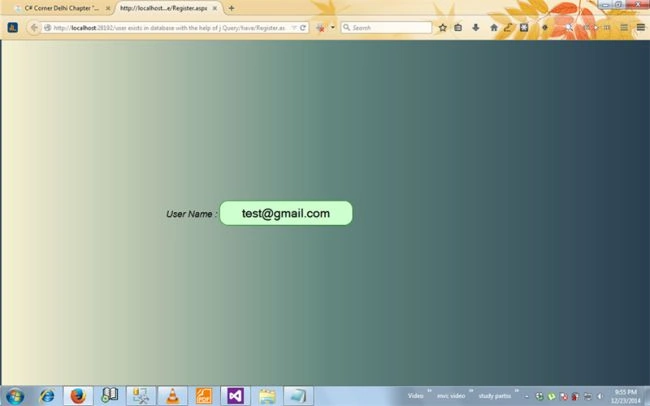
Then enter again another email id. This email id does not exist in the table.
Final word
If you have any query then drop a comment in the comment box. You can download this project with the database query.
Joginder BangerPosted Dec 29, 2014, 3:06 AM
Manish Kumar Choudhary,KP Singh Chundawat,N Vinodh Thanks every one for your kind word.
Vinodh NarayananPosted Dec 29, 2014, 2:52 AM
nice
Manish Kumar ChoudharyPosted Dec 27, 2014, 11:54 AM
Nice one Joginder Banger sir...
K P Singh ChundawatPosted Dec 27, 2014, 6:31 AM
Nice article ........