

This article shows how to access a SQL Server database with the Entity Framework Code First Approach and later we will also look at how to do a update data operation.
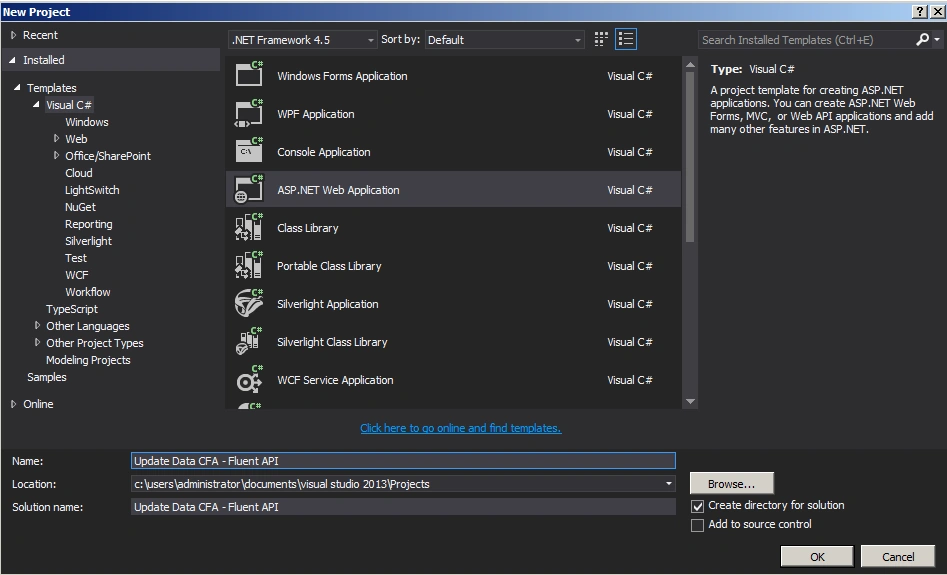
Create an ASP.Net web application as in the following.
Employee.cs
- using System;
- using System.Collections.Generic;
- using System.Linq;
- using System.Web;
- namespace Update_Data_CFA___Fluent_API
- {
- public class Employee
- {
- public Employee()
- {
- }
- public int Id { get; set; }
- public string FirstName { get; set; }
- public string LastName { get; set; }
- public int Age { get; set; }
- }
- }
Employeecontext.cs
- using System;
- using System.Collections.Generic;
- using System.Data.Entity;
- using System.Linq;
- using System.Web;
- namespace Update_Data_CFA___Fluent_API
- {
- public class EmployeeContext: DbContext
- {
- public EmployeeContext()
- : base("EmployeeConn")
- {
- Database.SetInitializer<EmployeeContext>(new CreateDatabaseIfNotExists<EmployeeContext>());
- }
- protected override void OnModelCreating(DbModelBuilder modelBuilder)
- {
- //Set primary key to Employee table
- modelBuilder.Entity<Employee>().HasKey(m => m.Id).Property(m => m.Id).IsRequired();
- //First Name is required and Max Length is 50
- modelBuilder.Entity<Employee>().Property(p => p.FirstName).IsRequired().HasMaxLength(50);
- //Last Name is required and Max Length is 50
- modelBuilder.Entity<Employee>().Property(p => p.LastName).IsRequired().HasMaxLength(50);
- //Age is required
- modelBuilder.Entity<Employee>().Property(p => p.Age).IsRequired();
- }
- public DbSet<Employee> Employees { get; set; }
- }
- }
Web.config
- <connectionStrings>
- <add name="EmployeeConn"
- connectionString="Data Source=WIN-B4KJ8JI75VF;Initial Catalog=EmployeeDB;Integrated Security=true"
- providerName="System.Data.SqlClient"/>
- </connectionStrings>
- <%@ Page Language="C#" AutoEventWireup="true" CodeBehind="WebForm1.aspx.cs" Inherits="Update_Data_CFA___Fluent_API.WebForm1" %>
- <!DOCTYPE html>
- <html xmlns="http://www.w3.org/1999/xhtml">
- <head runat="server">
- <title></title>
- </head>
- <body>
- <form id="form1" runat="server">
- <div>
- <table>
- <tr>
- <td>
- <asp:Label ID="Label1" runat="server" Text="Update Data CFA - Fluent API" Font-Bold="true"></asp:Label>
- </td>
- </tr>
- </table>
- <br />
- <br />
- <table>
- <tr>
- <td>
- <asp:Label ID="Label6" runat="server" Text="Please Enter Id: " ForeColor="Brown"
- Font-Bold="true" Font-Italic="true"></asp:Label>
- </td>
- <td>
- <asp:TextBox ID="TextBox4" runat="server"></asp:TextBox>
- </td>
- </tr>
- <tr>
- <td>
- <asp:Label ID="Label2" runat="server" Text="Please Enter FirstName: " ForeColor="Brown"
- Font-Bold="true" Font-Italic="true"></asp:Label>
- </td>
- <td>
- <asp:TextBox ID="TextBox1" runat="server"></asp:TextBox>
- </td>
- </tr>
- <tr>
- <td>
- <asp:Label ID="Label3" runat="server" Text="Please Enter LastName: " ForeColor="Brown"
- Font-Bold="true" Font-Italic="true"></asp:Label>
- </td>
- <td>
- <asp:TextBox ID="TextBox2" runat="server"></asp:TextBox>
- </td>
- </tr>
- <tr>
- <td>
- <asp:Label ID="Label4" runat="server" Text="Please Enter Age: " ForeColor="Brown"
- Font-Bold="true" Font-Italic="true"></asp:Label>
- </td>
- <td>
- <asp:TextBox ID="TextBox3" runat="server"></asp:TextBox>
- </td>
- </tr>
- <tr>
- <td colspan="2">
- <asp:Button ID="Button1" runat="server" Text="Update Data"
- BackColor="Orange" Font-Bold="true" OnClick="Button1_Click" />
- <br />
- <br />
- </td>
- </tr>
- </table>
- <br />
- <br />
- <table>
- <tr>
- <td colspan="3">
- <asp:Label ID="Label5" runat="server" ForeColor="Red" Font-Bold="true"></asp:Label>
- </td>
- </tr>
- </table>
- </div>
- </form>
- </body>
- </html>
Webform1.aspx.cs
- using System;
- using System.Collections.Generic;
- using System.Linq;
- using System.Web;
- using System.Web.UI;
- using System.Web.UI.WebControls;
- namespace Update_Data_CFA___Fluent_API
- {
- public partial class WebForm1 : System.Web.UI.Page
- {
- protected void Page_Load(object sender, EventArgs e)
- {
- }
- protected void Button1_Click(object sender, EventArgs e)
- {
- EmployeeContext empContext = new EmployeeContext();
- var empId = int.Parse(TextBox4.Text);
- var emp = empContext.Employees.Where(a => a.Id.Equals(empId)).SingleOrDefault();
- emp.FirstName = TextBox1.Text;
- emp.LastName = TextBox2.Text;
- emp.Age = int.Parse(TextBox3.Text);
- empContext.SaveChanges();
- }
- }
- }
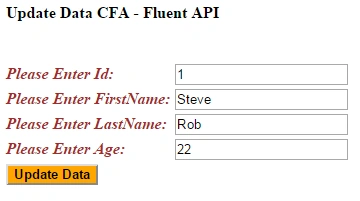
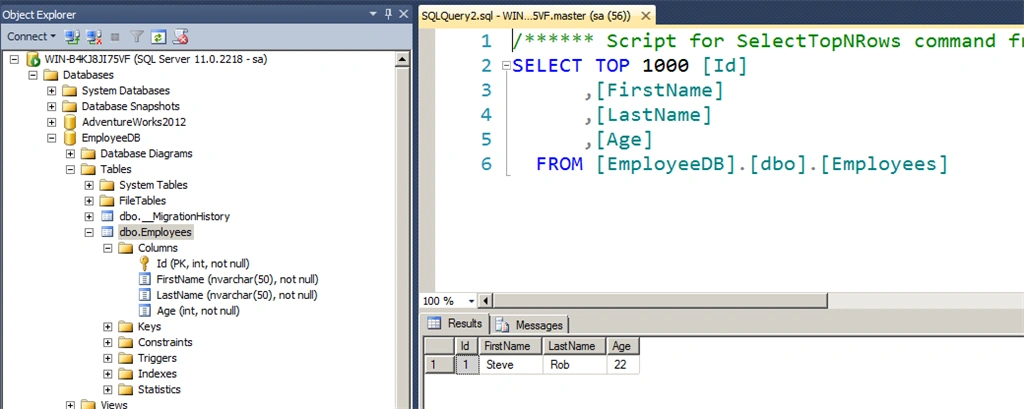
The output of the application looks as in the following.
Summary: In this operation we saw how to access a SQL Server database with the Entity Framework Code First Approach and how to do a update data operation. Happy coding.
In this operation we will see how to access a SQL Server database with the Entity Framework Code First Approach and later we will also look at how to do a delete data operation.
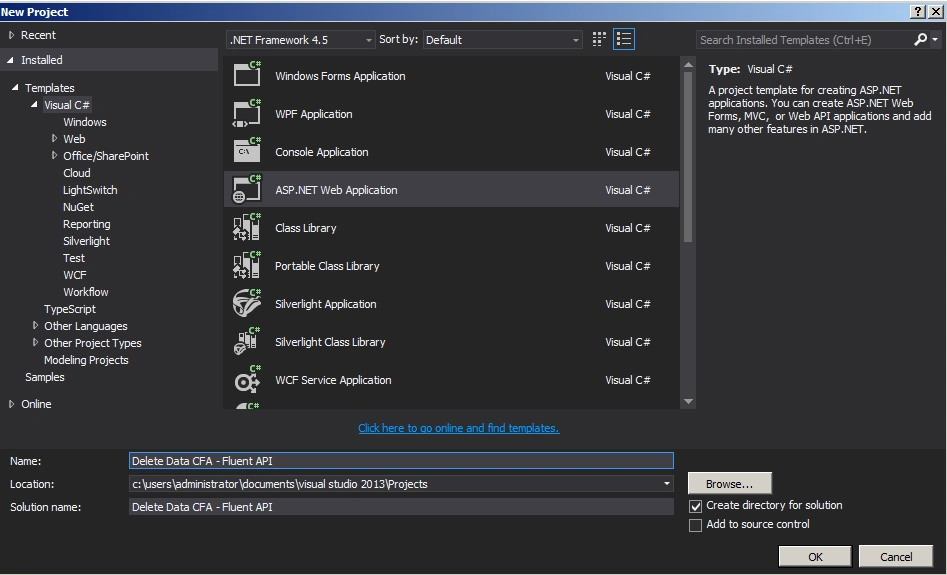
Create an ASP.Net web application as in the following.
Employee.cs
- using System;
- using System.Collections.Generic;
- using System.Linq;
- using System.Web;
- namespace Delete_Data_CFA___Fluent_API
- {
- public class Employee
- {
- public Employee()
- {
- }
- public int Id { get; set; }
- public string FirstName { get; set; }
- public string LastName { get; set; }
- public int Age { get; set; }
- }
- }
Employeecontext.cs
- using System;
- using System.Collections.Generic;
- using System.Data.Entity;
- using System.Linq;
- using System.Web;
- namespace Delete_Data_CFA___Fluent_API
- {
- public class EmployeeContext: DbContext
- {
- public EmployeeContext()
- : base("EmployeeConn")
- {
- Database.SetInitializer<EmployeeContext>(new CreateDatabaseIfNotExists<EmployeeContext>());
- }
- protected override void OnModelCreating(DbModelBuilder modelBuilder)
- {
- //Set primary key to Employee table
- modelBuilder.Entity<Employee>().HasKey(m => m.Id).Property(m => m.Id).IsRequired();
- //First Name is required and Max Length is 50
- modelBuilder.Entity<Employee>().Property(p => p.FirstName).IsRequired().HasMaxLength(50);
- //Last Name is required and Max Length is 50
- modelBuilder.Entity<Employee>().Property(p => p.LastName).IsRequired().HasMaxLength(50);
- //Age is required
- modelBuilder.Entity<Employee>().Property(p => p.Age).IsRequired();
- }
- public DbSet<Employee> Employees { get; set; }
- }
- }
Web.config
- <connectionStrings>
- <add name="EmployeeConn"
- connectionString="Data Source=WIN-B4KJ8JI75VF;Initial Catalog=EmployeeDB;Integrated Security=true"
- providerName="System.Data.SqlClient"/>
- </connectionStrings>
Webform1.asp
- <%@ Page Language="C#" AutoEventWireup="true" CodeBehind="WebForm1.aspx.cs" Inherits="Delete_Data_CFA___Fluent_API.WebForm1" %>
- <!DOCTYPE html>
- <html xmlns="http://www.w3.org/1999/xhtml">
- <head runat="server">
- <title></title>
- </head>
- <body>
- <form id="form1" runat="server">
- <div>
- <table>
- <tr>
- <td>
- <asp:Label ID="Label1" runat="server" Text="Delete Data CFA - Fluent API" Font-Bold="true"></asp:Label>
- </td>
- </tr>
- </table>
- <br />
- <br />
- <table>
- <tr>
- <td>
- <asp:Label ID="Label6" runat="server" Text="Please Enter Id: " ForeColor="Brown"
- Font-Bold="true" Font-Italic="true"></asp:Label>
- </td>
- <td>
- <asp:TextBox ID="TextBox1" runat="server"></asp:TextBox>
- </td>
- </tr>
- <tr>
- <td colspan="2">
- <asp:Button ID="Button1" runat="server" Text="Delete Data"
- BackColor="Orange" Font-Bold="true" OnClick="Button1_Click" />
- <br />
- <br />
- </td>
- </tr>
- </table>
- <br />
- <br />
- <table>
- <tr>
- <td colspan="3">
- <asp:Label ID="Label5" runat="server" ForeColor="Red" Font-Bold="true"></asp:Label>
- </td>
- </tr>
- </table>
- </div>
- </form>
- </body>
- </html>
Webform1.aspx.cs
- using System;
- using System.Collections.Generic;
- using System.Linq;
- using System.Web;
- using System.Web.UI;
- using System.Web.UI.WebControls;
- namespace Delete_Data_CFA___Fluent_API
- {
- public partial class WebForm1 : System.Web.UI.Page
- {
- protected void Page_Load(object sender, EventArgs e)
- {
- }
- protected void Button1_Click(object sender, EventArgs e)
- {
- EmployeeContext empContext = new EmployeeContext();
- var empID = int.Parse(TextBox1.Text);
- var emp = empContext.Employees.Where(a => a.Id.Equals(empID)).SingleOrDefault();
- empContext.Employees.Remove(emp);
- empContext.SaveChanges();
- }
- }
- }
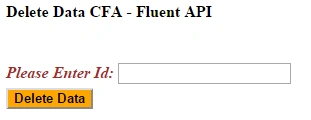
The output of the application looks as in the following.
Summary: In this operation we saw how to access a SQL Server database with the Entity Framework Code First Approach and how to do a delete data operation. Happy coding!
praveen semwalPosted Feb 7, 2018, 5:57 AM
How do we delete data from entity which is ICollection of any other entity
Sonu ChaudharyPosted May 26, 2016, 10:46 AM
Good one...
Bhuvanesh MohankumarPosted May 6, 2016, 4:02 PM
Good one...
Dominique CejaPosted May 20, 2015, 9:12 AM
Great article
Khargesh RajputPosted May 20, 2015, 12:39 AM
nice article
Vivek TripathiPosted May 19, 2015, 10:59 PM
Nice article, very clear
Vijay PrativadiPosted May 19, 2015, 10:05 PM
Thank You Sir!
Mahesh ChandPosted May 19, 2015, 6:51 PM
Nice Vijay!